
19.3论坛的代码实现
19.3 论坛的代码实现
下面来分析论坛的代码是如何实现的。
19.3.1 数据库连接相关文件
文件mysql.inc位于附书源代码中,主要用于自编连接数据库、服务器以及执行SQL语句的函数库,具体代码如下。
  <?php
  class mysql{
      //连接服务器、数据库以及执行SQL语句的类库
      public $database;
      public $server_username;
      public $server_userpassword;
      function mysql()
    	{  //构造函数初始化所要连接的数据库
         $this->server_username="root";
         $this->server_userpassword="";
         }//end mysql()
  	function link($database)
    	{  //连接服务器和数据库
         //设置所有连接的数据库
          if ($database==""){
              $this->database="bbs_data";
              }else{
              $this->database=$database;
              }
          //连接服务器和数据库
           if(@$id=mysql_connect("localhost",$this->server_username,$this->server_userpassword)){
            if(!mysql_select_db($this->database,$id)){
  		       echo "数据库连接错误!!!";
                 exit;
                 }
   	       }else{
                 echo "服务器正在维护中,请稍后重试!!!";
                 exit;
        	   }
  	}//end link($database)
  	function excu($query)
      {     //执行SQL语句
           if($result=mysql_query($query)){
  		      return $result;
           }else{
                echo "sql语句执行错误!!!请重试!!!";
         	     exit;
          	}
      } //end  excu($query)
  } //end class mysql
  ?>
文件myfunction.inc位于附书源代码中,主要用于自编函数库,具体代码如下。
<?php
class myfunction{
/////////////////字符转换:向数据库中插入或更新时用//////////////////////////
function str_to($str)
{
$str=str_replace(" "," ",$str); //把空格替换html的字符串空格
$str=str_replace("<","<",$str); //把html的输出标志正常输出
$str=str_replace(">",">",$str); //把html的输出标志正常输出
$str=nl2br($str); //把回车替换成html中的br
return $str;
}
/////////////////////由子版块的id返回该子版块的主题数///////////////////////
function son_module_idtonote_num($son_module_id){
$aa=new mysql;
$aa->link("");
$query="select * from note_info where module_id="".$son_module_id."" and up_id="0"";
$rst=$aa->excu($query);
return mysql_num_rows($rst);
}
////////////////////////////////////////////////////////////////////////////
/////////////////////由子版块的id返回该子版块的帖子数///////////////////////
function son_module_idtonote_num2($son_module_id){
//由子版块的id返回该子版块的主题数
$aa=new mysql;
$aa->link("");
$query="select * from note_info where module_id="".$son_module_id."" and up_id="0"";
$rst=$aa->excu($query);
$num=mysql_num_rows($rst);
while ($note=mysql_fetch_array($rst,MYSQL_ASSOC)){
$query="select * from note_info where up_id="".$note["id"]."" and module_id="0"";
$rst=$aa->excu($query);
$num+=mysql_num_rows($rst);
}
return $num;
}
/////////////////////由子版块的id输出该子版块的最新帖子/////////////////////
function son_module_idtolast_note($son_module_id){
//由子版块的id输出该子版块的最新帖子
$aa=new mysql;
$aa->link("");
$query="select * from note_info where module_id="".$son_module_id."" order by time desc
limit 0,1";
$rst=$aa->excu($query);
$note=mysql_fetch_array($rst,MYSQL_ASSOC);
$query2="select * from note_info where id="".$note["up_id"].""";
$rst2=$aa->excu($query);
$note2=mysql_fetch_array($rst2,MYSQL_ASSOC);
echo $note2["title"];
echo "<br>";
echo $note["time"]." ".$note["user_name"];
}
/////////////////////由子版块的id输出该子版块的版主///////////////////////
function son_module_idtouser_name($son_module_id){
//由子版块的id输出该子版块的版主
$aa=new mysql;
$aa->link("");
$query="select * from son_module_info where id="".$son_module_id.""";
$rst=$aa->excu($query);
$module=mysql_fetch_array($rst,MYSQL_ASSOC);
if ($module["user_name"]==""){
return "版主暂缺";
}else{
return $module["user_name"];
}
}
////////////////输出所有版块的下拉列表(子版块有参数)////////////////////
function son_module_list($son_module_id){
//输出所有版块的下拉列表(子版块有参数)
$aa=new mysql;
$aa->link("");
$query="select * from father_module_info order by id";
$rst=$aa->excu($query);
echo "<select name=module_id>";
while($father_module=mysql_fetch_array($rst,MYSQL_ASSOC)){
echo "<option value=>".$father_module["module_name"]."</option>";
$query="select * from son_module_info where father_module_id="".$father_module["id"].""
order by id ";
$rst2=$aa->excu($query);
while($son_module=mysql_fetch_array($rst2,MYSQL_ASSOC)){
echo"<option
value=".$son_module["id"]."> ".$son_module["module_name"]."</option>";
}
}
echo "</select>";
}
/////////////////////输出父版块的下拉列表////////////////////////////////////
function father_module_list($father_module_id){
//输出父版块的下拉列表
$aa=new mysql;
$aa->link("");
echo "<select name=father_module_id>";
if ($father_module_id==""){
echo "<option selected>请选择...</option>";
}else{
$query="select * from father_module_info where id="$father_module_id"";
$rst=$aa->excu($query);
$father_module=mysql_fetch_array($rst,MYSQL_ASSOC);
echo"<option
value=".$father_module["id"].">".$father_module["module_name"]."</option>";
}
$query="select * from father_module_info order by show_order";
$rst=$aa->excu($query);
while($father_module=mysql_fetch_array($rst,MYSQL_ASSOC)){
echo "<option value=".$father_module["id"].">".$father_module["module_name"]."</option>";
}
echo "</select>";
}
/////////////////////由帖子的id返回该帖子被浏览的次数///////////////////////
function note_idtotimes($note_id){
$aa=new mysql;
$aa->link("");
$query="select * from note_info where id="".$note_id.""";
$rst=$aa->excu($query);
$note=mysql_fetch_array($rst,MYSQL_ASSOC);
return $note["times"];
}
/////////////////////由帖子的id返回该帖子的标题///////////////////////
function note_idtotitle($note_id){
$aa=new mysql;
$aa->link("");
$query="select * from note_info where id="$note_id"";
$rst=$aa->excu($query);
$note=mysql_fetch_array($rst,MYSQL_ASSOC);
return $note["title"];
}
/////////////////////由帖子的id返回帖子的回复数//////////////////////
function note_idtonote_num($note_id){
$aa=new mysql;
$aa->link("");
$query="select * from note_info where up_id="".$note_id.""";
$rst=$aa->excu($query);
$num=mysql_num_rows($rst);
return $num+1;
}
///////////////////由帖子的id输出帖子的最后回复时间////////////////////
function note_idtolast_time($note_id){
$aa=new mysql;
$aa->link("");
$query="select * from note_info where up_id="$note_id" order by time desc limit 0,1";
$rst=$aa->excu($query);
$note=mysql_fetch_array($rst,MYSQL_ASSOC);
echo $note["time"];
}
/////////////////////由帖子的id输出帖子的最后回复人//////////////////////
function note_idtolast_user_name($note_id){
$aa=new mysql;
$aa->link("");
$query="select * from note_info where up_id="$note_id" order by time desc limit 0,1";
$rst=$aa->excu($query);
$note=mysql_fetch_array($rst,MYSQL_ASSOC);
echo $note["user_name"];
}
/////////////////////由子版块的id返回其父版块的名称///////////////////////
function son_module_idtofather_name($son_module_id){
$aa=new mysql;
$aa->link("");
$query="select * from son_module_info where id="$son_module_id"";
$rst=$aa->excu($query);
$module=mysql_fetch_array($rst,MYSQL_ASSOC);
$query2="select * from father_module_info where id="$module[father_module_id]"";
$rst2=$aa->excu($query2);
$module2=mysql_fetch_array($rst2,MYSQL_ASSOC);
return $module2["module_name"];
}
/////////////////////由子版块的id返回本版块的名称///////////////////////
function son_module_idtomodule_name($son_module_id){
$aa=new mysql;
$aa->link("");
$query="select * from son_module_info where id="".$son_module_id.""";
$rst=$aa->excu($query);
$module=mysql_fetch_array($rst,MYSQL_ASSOC);
return $module["module_name"];
}
/////////////////////所有帖子的总数///////////////////////
function note_total_num(){
$aa=new mysql;
$aa->link("");
$query="select * from note_info";
$rst=$aa->excu($query);
return mysql_num_rows($rst);
}
/////////////////////所有会员的总数///////////////////////
function user_total_num(){
$aa=new mysql;
$aa->link("");
$query="select * from user_info";
$rst=$aa->excu($query);
return mysql_num_rows($rst);
}
/////////////////////所有会员的总数///////////////////////
function last_username(){
$aa=new mysql;
$aa->link("");
$query="select * from user_info order by id desc limit 0,1";
$rst=$aa->excu($query);
$user=mysql_fetch_array($rst,MYSQL_ASSOC);
return $user["user_name"];
}
/////////////分页函数////////////////////
function page($query,$page_id,$add,$num_per_page){
// include "mysql.inc";
////////使用方法为:
/////// $myf=new myfunction;
/////// $query="";
/////// $myf->page($query,$page_id,$add,$num_per_page);
/////// $bb=$aa->excu($query);
$bb=new mysql;
global $query; //声明全局变量
$bb->link("");
$page_id=@$_GET["page_id"]; //接收page_id
if ($page_id==""){
$page_id=1;
}
$rst=$bb->excu($query);
$num=mysql_num_rows($rst);
if ($num==0){
echo "没有查到相关记录或没有相关回复!<br>";
}
$page_num=ceil($num/$num_per_page);
for ($i=1;$i<=$page_num;$i++){
echo " [<a href=?".$add."page_id=".$i.">".$i."</a>]";
}
$page_up=$page_id-1;
$page_down=$page_id+1;
if ($page_id==1){
echo "<a href=?".$add."page_id=".$page_down.">下一页</a> 第".$page_id."页,共
".$page_num."页";
}
else if ($page_id>=$page_num-1){
echo "<a href=?".$add."page_id=".$page_up.">上一页</a> 第".$page_id."页,共
".$page_num."页";
}
else{
echo "<a href=?".$add."page_id=".$page_up.">上一页</a> <a
href=?".$add."page_id=".$page_down.">下一页</a> 第".$page_id."页,
共".$page_num."页";
}
$page_jump=$num_per_page*($page_id-1);
$query=$query." limit $page_jump,$num_per_page";
}
}//end myfunction
?>
19.3.2 论坛主页面
论坛主页面的相关文件如下。
文件head.php位于随书光盘的ch19\inc\下,为论坛的头文件,代码如下。
<?php
@session_start();
?>
<style type="text/css">
<!--
@font-face {
font-family: "Hanyihei";
src: url("inc/hanyihei.ttf") format("truetype");
font-style: normal; }
@font-face {
font-family: "Minijanxixingkai";
src: url("inc/minijanxixingkai.ttf") format("truetype");
font-style: normal; }
.STYLE1 {
font-family: "Hanyihei";
font-size: 36px;
color:#024f6c;
}
.STYLE2 {
font-family: "Hanyihei";
}
-->
</style>
<table width="98%" border="0" align="center" cellpadding="0" cellspacing="1">
<tr>
<td height="60" bgcolor="f0b604"><span class="STYLE1"> 迅捷BBS系统</span></td>
</tr>
<tr>
<td height="2"></td>
</tr>
</table>
文件foot.php位于附书源代码中,为论坛的版权文件,具体代码如下。
  <table width="98%" border="0" align="center" cellpadding="0" cellspacing="0">
    <tr>
      <td height="10"></td>
    </tr>
    <tr>
      <td height="10" bgcolor="#5F8AC5"></td>
    </tr>
    <tr>
      <td height="40" align="center" valign="middle" bgcolor="#f0b604">建议使用浏览器IE 6.0以上 分辨
  率1024*768以上<br>
        版权所有:<a href="http://www.quickbbs.net" target="_blank">迅捷BBS</a> </td>
    </tr>
  </table>
文件total_info.php位于附书源代码中,为论坛的总信息文件,具体代码如下。
<?php
//@session_start();
//用户登录并注册SESSION
if(isset($_POST["tijiao"])){
$tijiao=$_POST["tijiao"];
}
if (@$tijiao=="提交"){
$user_name=@$_POST["user_name"];
$user_pw=@$_POST["user_pw"];
$check_query="select * from user_info where user_name="".$user_name.""";
$check_rst=$aa->excu($check_query);
$user=mysql_fetch_array($check_rst);
if ($user_pw==$user["user_pw"]){
$_SESSION["user_name"]=$user["user_name"];
$today=date("Y-m-d H:i:s");
$query="update user_info set time2="".$today.""
where user_name="".$_SESSION["user_name"].""";
$aa->excu($query);
}
}
if (@$tijiao=="安全退出"){
$_SESSION["user_name"]="";
}
?>
<table width="98%" border="0" align="center" cellpadding="0" cellspacing="1">
<tr><form id="form1" name="form1" method="post" action="#">
<td width="80%" height="25" align="left" valign="middle" bgcolor="5F8AC5">
<?php
if (@$_SESSION["user_name"]!=""){
echo "<font color=ffffff>欢迎您:".$_SESSION["user_name"]."</font>";
echo "
<input type="submit" name="tijiao" value="安全退出">";
}else{
?>
用户名:
<input type="text" name="user_name" size="8" />
密码:<input type="text" name="user_pw" size="8" />
<input type="submit" name="tijiao" value="提交" />
<a href="register.php"><font color="#FFFFFF">我要注册</font></a>
<?php
}
?>
</td>
</form>
<td width="20%" align="right" valign="middle" bgcolor="5F8AC5">
<?php
$today=date("Y-m-d H:i:s");
echo $today;
?>
</td>
</tr>
<tr>
<td height="25" colspan="2" align="right" valign="middle">帖子总数:<?php
echo $bb->note_total_num();?> 会员总数:<?php
echo $bb->user_total_num();?> 欢迎新会员:
<?php echo $bb->last_username();?> </td>
</tr>
<tr>
<td height="13" colspan="2" align="right" valign="middle"> </td>
</tr>
</table>
文件index.php位于附书源代码中,是用户访问的主页,具体代码如下。
<html>
<head>
<meta http-equiv="Content-Type" content="text/html; charset=utf-8" />
<title>===迅捷BBS系统===</title>
<link href="inc/style.css" rel="stylesheet" type="text/css" />
</head>
<body>
<?php
@session_start();
include "inc/mysql.inc";
include "inc/myfunction.inc";
include "inc/head.php";
$aa=new mysql;
$bb=new myfunction;
$aa->link("");
include "inc/total_info.php";
?>
<table class="indextemp" width="98%" border="0" align="center" cellpadding="0"
cellspacing="1" bgcolor="#FFFFFF">
<tr>
<td width="50%" height="25" align="center" valign="middle" bgcolor="5F8AC5">
<span class="STYLE2">讨论区</span></td>
<td width="10%" align="center" valign="middle" bgcolor="5F8AC5"><span class="STYLE2">
主 题</span></td>
<td width="10%" align="center" valign="middle" bgcolor="5F8AC5"><span class="STYLE2">
帖 子</span></td>
<td width="20%" align="center" valign="middle" bgcolor="5F8AC5"><span class="STYLE2">
最新帖子</span></td>
<td width="10%" align="center" valign="middle" bgcolor="5F8AC5"><span class="STYLE2">
版 主</span></td>
</tr>
<tr>
<td colspan="5">
<?php
$query="select * from father_module_info order by id";
$result=$aa->excu($query);
while($father_module=mysql_fetch_array($result)){
?>
<table width="100%" border="0" cellspacing="0" cellpadding="0">
<tr>
<td height="25" colspan="6" bgcolor="98B2CC">
<img src="pic_sys/li-1.gif" width="16" height="15">
<?php echo $father_module["module_name"]?></td>
</tr>
<?php
$query2="select * from son_module_info where father_module_id="".$father_module["id"].""
order by id";
$result2=$aa->excu($query2);
while($son_module=mysql_fetch_array($result2)){
?>
<tr>
<td width="5%" height="40" align="center" valign="middle"><img src="pic_sys/li-2.gif"
width="32" height="32"></td>
<td width="45%" align="left" valign="middle">
<?php
echo "<b><a href=module_list.php?module_id=".$son_module["id"].">
<font color=0000ff>".$son_module["module_name"]."</font></a></b><br>";
echo $son_module["module_cont"];
?> </td>
<td width="10%" align="center" valign="middle"><?php
echo $bb->son_module_idtonote_num($son_module["id"]);?></td>
<td width="10%" align="center" valign="middle"><?php
echo $bb->son_module_idtonote_num2($son_module["id"]);?></td>
<td width="20%" align="left" valign="middle"><?php
echo $bb->son_module_idtolast_note($son_module["id"]);?></td>
<td width="10%" align="center" valign="middle"><?php
echo $bb->son_module_idtouser_name($son_module["id"]);?></td>
</tr>
<?php }?>
</table>
<?php } ?>
</td>
</tr>
</table>
<?php
include "inc/foot.php";
?>
</body>
</html>
主页运行后效果如图19-2所示。
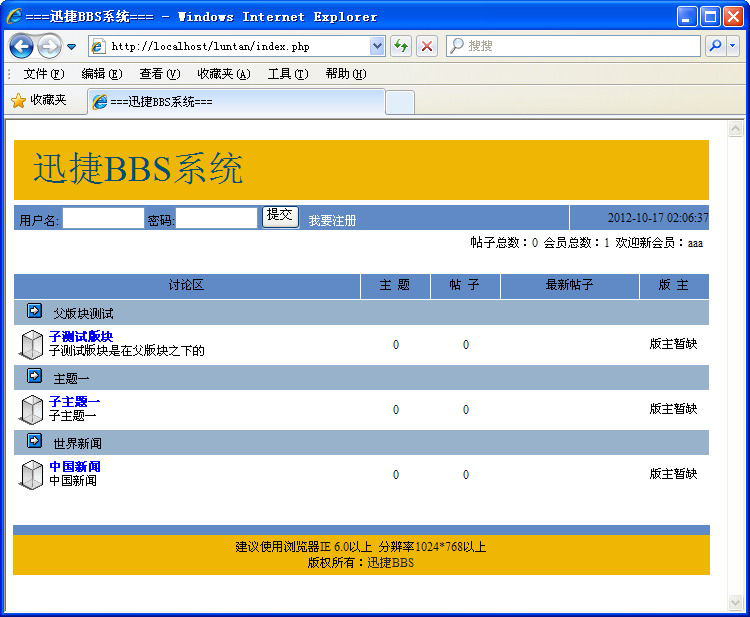
图19-2 论坛主页面
19.3.3 新用户注册页面
文件register.php位于附书源代码中,是新用户注册页面,具体代码如下。
<html>
<head>
<meta http-equiv="Content-Type" content="text/html; charset=utf-8" />
<title>===迅捷BBS系统===</title>
<link href="inc/style.css" rel="stylesheet" type="text/css" />
</head>
<body>
<?php
include "inc/mysql.inc";
include "inc/myfunction.inc";
include "inc/head.php";
$aa=new mysql;
$bb=new myfunction;
$aa->link("");
include "inc/total_info.php";
?>
<table width="98%" border="0" align="center" cellpadding="0" cellspacing="0">
<tr>
<td width="73%" height="30"><a href="./">迅捷BBS系统</a>>>新用户注册</td>
<td width="27%" align="right" valign="middle"><a href="new_note.php"></a></td>
</tr>
</table>
<table width="98%" border="0" align="center" cellpadding="0" cellspacing="1"
bgcolor="#FFFFFF">
<tr>
<td height="25" align="center" valign="middle" bgcolor="5F8AC5">发 布 新 帖</td>
</tr>
<tr>
<td height="25" align="center" valign="middle">
<?php
//接收提交表单内容检验数据库中是否已经存在此用户名,不存在写入数据库
$tijiao=@$_POST["tijiao"];
if ($tijiao=="提交"){
$user_name=@$_POST["user_name"];
$query="select * from user_info where user_name="$user_name"";
$rst=$aa->excu($query);
if (mysql_num_rows($rst)!=0){
echo "===您注册的用户名已经存在,请选择其他的用户名重新注册!===";
}else{
$user_pw1=$_POST["user_pw1"];
$user_pw2=$_POST["user_pw2"];
if ($user_pw1!=$user_pw2){
echo "===您两次输入的密码不匹配,请重新输入!===";
}else{
$today=date("Y-m-d H:i:s");
$query="insert into user_info
(user_name,user_pw,time1) values("$user_name","$user_pw1","$today")";
if ($aa->excu($query)){
echo "===恭喜您,注册成功!请<a href=../>
返回主页</a>登录===";
$register_tag=1;
}
}
}
}
//显示注册表单
if (@$register_tag!=1){
?>
<form name="form1" method="post" action="#">
<table width="500" border="0" cellpadding="0" cellspacing="2">
<tr>
<td width="122" height="26" align="right" valign="middle" bgcolor="#CCCCCC">
用户名:</td>
<td width="372" height="26" align="left" valign="middle" bgcolor="#CCCCCC"><input
type="text" name="user_name"></td>
</tr>
<tr>
<td height="26" align="right" valign="middle" bgcolor="#CCCCCC">密码:</td>
<td height="26" align="left" valign="middle" bgcolor="#CCCCCC">
<input type="text" name="user_pw1"></td>
</tr>
<tr>
<td height="26" align="right" valign="middle" bgcolor="#CCCCCC">重复密码:</td>
<td height="26" align="left" valign="middle" bgcolor="#CCCCCC">
<input type="text" name="user_pw2"></td>
</tr>
<tr>
<td height="26" colspan="2" align="center" valign="middle" bgcolor="#CCCCCC">
<input type="submit" name="tijiao" value="提 交">
<input type="reset"
name="Submit2" value="重 置"></td>
</tr>
</table>
</form>
<?php
}
?>
</td>
</tr>
<tr>
<td height="1" bgcolor="#CCCCCC"></td>
</tr>
</table>
<?php
include "inc/foot.php";
?>
</body>
</html>
注册页面的运行效果如图19-3所示。输入用户名和密码后,单击【提交】按钮即可注册新用户。
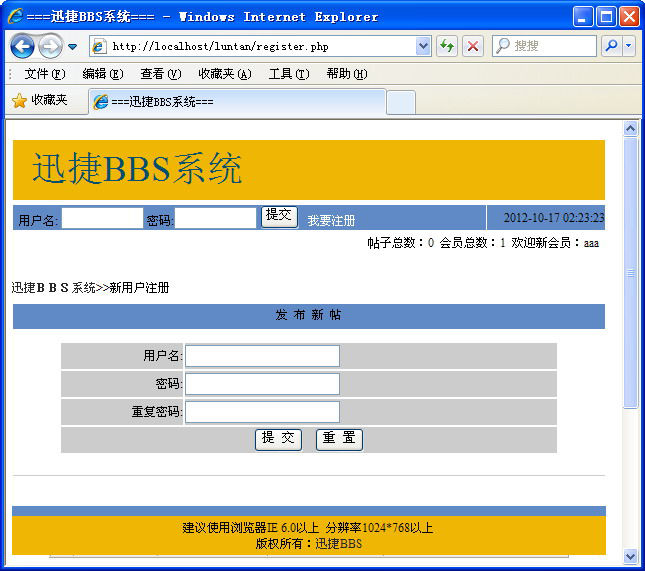
图19-3 新用户注册页面
注册完成后,即可在主页输入用户名和密码,单击【提交】按钮,登录论坛系统。登录后效果如图19-4所示。单击【安全退出】按钮,即可退出登录操作。
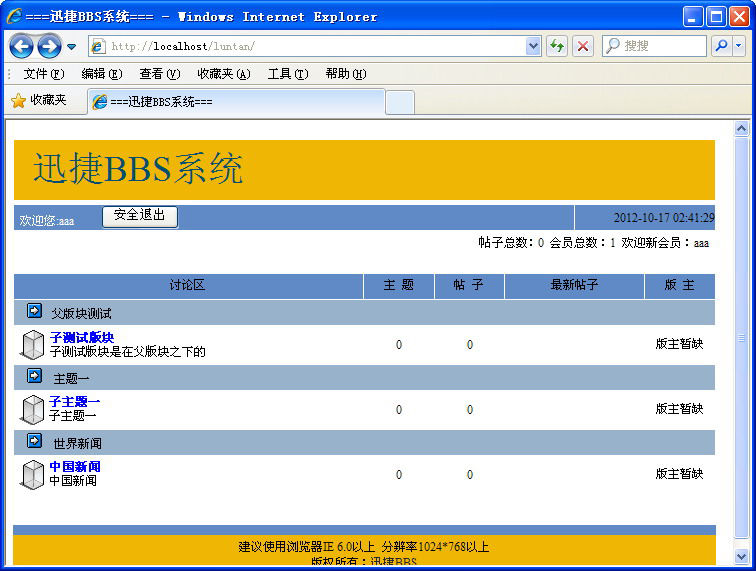
图19-4 用户成功登录页面
19.3.4 论坛帖子的相关页面
下面介绍论坛帖子的相关页面。
文件new_note.php位于随书光盘的ch19\下,是用于发布新帖的页面,具体代码如下。
<html>
<head>
<meta http-equiv="Content-Type" content="text/html; charset=utf-8" />
<title>===迅捷BBS系统===</title>
<link href="inc/style.css" rel="stylesheet" type="text/css" />
</head>
<body>
<?php
//@session_start();
include "inc/mysql.inc";
include "inc/myfunction.inc";
include "inc/head.php";
$aa=new mysql;
$bb=new myfunction;
$aa->link("");
include "inc/total_info.php";
?>
<table width="98%" border="0" align="center" cellpadding="0" cellspacing="0">
<tr>
<td width="73%" height="30"><a href="./">迅捷BBS系统</a>>>发新帖子</td>
<td width="27%" align="right" valign="middle"><a href="new_note.php">
<img src="pic_sys/post.gif" width="82" height="20"></a></td>
</tr>
</table>
<table width="98%" border="0" align="center" cellpadding="0" cellspacing="1" bgcolor="#FFFFFF">
<tr>
<td height="25" align="center" valign="middle" bgcolor="5F8AC5">发 布 新 帖</td>
</tr>
<tr>
<td height="25" align="center" valign="middle">
<?php
if (@$_SESSION["user_name"]==""){
echo "===请先登录!==";
}else{
//接收提交表单内容写入数据库
$tijiao=@$_POST["tijiao"];
if ($tijiao=="提交"){
$module_id=@$_POST["module_id"];
$title=@$_POST["title"];
$cont=@$_POST["cont"];
$cont=$bb->str_to($cont);
$today=date("Y-m-d H:i:s");
if ($module_id!="" and $title!="" and $cont!=""){
$query="insert into note_info
(module_id,title,cont,time,user_name)
values("$module_id","$title","$cont","$today","".$_SESSION["user_name"]."")";
if ($aa->excu($query)){
echo "===新帖发布成功,请继续!===";
}
}else{
echo "===请选择子模块,而且标题和内容均不能为空!===";
}
}
?>
<form name="form1" method="post" action="new_note.php">
<table width="500" border="0" cellpadding="0" cellspacing="2">
<tr>
<td width="122" height="26" align="right" valign="middle" bgcolor="#CCCCCC">隶属版块:</td>
<td width="372" height="26" align="left" valign="middle" bgcolor="#CCCCCC">
<?php
$bb->son_module_list("");
?>
</td>
</tr>
<tr>
<td height="26" align="right" valign="middle" bgcolor="#CCCCCC">标题:</td>
<td height="26" align="left" valign="middle" bgcolor="#CCCCCC">
<input type="text" name="title"></td>
</tr>
<tr>
<td height="26" align="right" valign="middle" bgcolor="#CCCCCC">内容:</td>
<td height="26" align="left" valign="middle" bgcolor="#CCCCCC">
<textarea name="cont" cols="50" rows="8"></textarea></td>
</tr>
<tr>
<td height="26" align="right" valign="middle" bgcolor="#CCCCCC">发帖人:</td>
<td height="26" align="left" valign="middle" bgcolor="#CCCCCC">
<?php echo $_SESSION["user_name"];?></td>
</tr>
<tr>
<td height="26" align="right" valign="middle" bgcolor="#CCCCCC">时间:</td>
<td height="26" align="left" valign="middle" bgcolor="#CCCCCC">系统将自动记录!</td>
</tr>
<tr>
<td height="26" colspan="2" align="center" valign="middle" bgcolor="#CCCCCC">
<input type="submit" name="tijiao" value="提 交">
<input type="reset" name="submit2" value="重 置"></td>
</tr>
</table>
</form>
<?php
}
?>
</td>
</tr>
<tr>
<td height="1" bgcolor="#CCCCCC"></td>
</tr>
</table>
<?php
include "inc/foot.php";
?>
</body>
</html>
发布新帖的页面效果如图19-5所示。
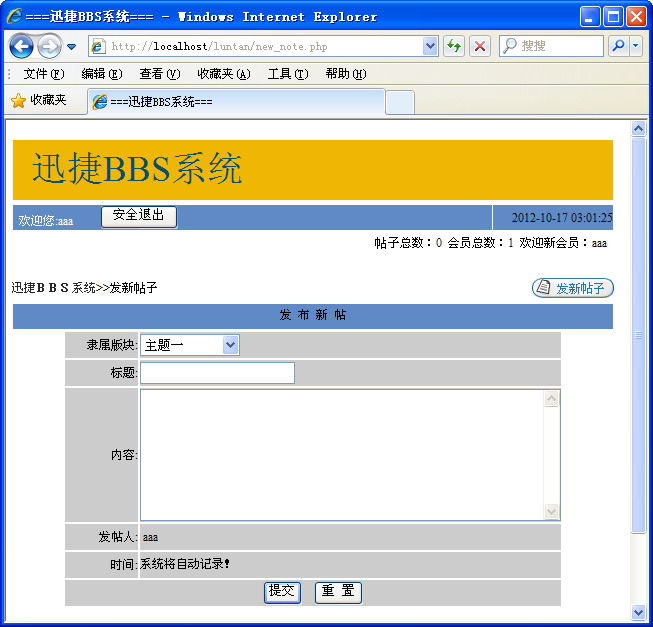
图19-5 发新帖页面
文件note_show.php位于随书光盘的ch19\下,是显示帖子和相关回复的页面,具体代码如下。
<html>
<head>
<meta http-equiv="Content-Type" content="text/html; charset=gb2312" />
<title>===迅捷BBS系统===</title>
<link href="inc/style.css" rel="stylesheet" type="text/css" />
</head>
<body>
<?php
include "inc/mysql.inc";
include "inc/myfunction.inc";
include "inc/head.php";
$aa=new mysql;
$bb=new myfunction;
$aa->link("");
include "inc/total_info.php";
$module_id=$_GET[module_id];
$note_id=$_GET[note_id];
?>
<table width="98%" border="0" align="center" cellpadding="0" cellspacing="0">
<tr>
<td width="73%" height="30"><a href="./">迅捷BBS系统</a>>>
<?php
echo "<a href=module_list.php?module_id=".$module_id.">";
echo $bb->son_module_idtofather_name($module_id);
echo "</a>>>";
echo $bb->son_module_idtomodule_name($module_id);
//删除回复
$del_id=$_GET[del_id];
if ($del_id!=""){
if ($bb->son_module_idtouser_name($module_id)==$_SESSION[user_name]){
$del_query="delete from note_info where id="$del_id"";
$aa->excu($del_query);
echo "<br>===删除回复成功!===";
}
}
//添加回复
$tijiao=$_POST[tijiao];
if ($tijiao=="提 交"){
$title=$_POST[title];
$cont=$_POST[cont];
$cont=$bb->str_to($cont);
$today=date("Y-m-d H:i:s");
if ($_SESSION[user_name]==""){
$user_name="游客";
}else{
$user_name=$_SESSION[user_name];
}
$query="insert into note_info(up_id,title,cont,time,user_name)
values("$note_id","$title","$cont","$today","$user_name")";
$aa->excu($query);
}
?></td>
<td width="16%" align="right" valign="middle"><a href="#huifu">
img src="pic_sys/reply.gif" width="82" height="20"></a></td>
<td width="11%" align="right" valign="middle"><a href="new_note.php">
<img src="pic_sys/post.gif" width="82" height="20"></a></td>
</tr>
</table>
<?php
$query="select * from note_info where up_id="$note_id" order by time";
$add="module_id=".$module_id."¬e_id=".$note_id."&";
?>
<table width="98%" border="0" align="center" cellpadding="0" cellspacing="0">
<tr>
<td height="30" align="left" valign="middle"><?php $bb->page($query,$page_id,$add,20)?>
</td>
</tr>
</table>
<?php
$query2="select * from note_info where id="$note_id"";
$result2=$aa->excu($query2);
$note2=mysql_fetch_array($result2);
?>
<table width="98%" border="0" align="center" cellpadding="0" cellspacing="1" bgcolor="#FFFFFF">
<tr>
<td width="71%" height="25" align="left" valign="middle" bgcolor="5F8AC5">标题:
<?php
echo $note2[title]?></td>
<td width="29%" align="center" valign="middle" bgcolor="5F8AC5">发帖时间:
<?php echo $note2[time]?></td>
</tr>
<tr>
<td height="1" colspan="2" bgcolor="#CCCCCC"></td>
</tr>
</table>
<table width="98%" border="0" align="center" cellpadding="0" cellspacing="0">
<tr>
<td width="16%" height="15" align="center" valign="top"><img src="pic_sys/head2.jpg"
width="85" height="90"><br><?php echo $note2[user_name]?></td>
<td align="left" valign="middle"><?php echo $note2[cont]?></td>
</tr>
<tr>
<td height="8" colspan="2" align="center" valign="top" bgcolor="#5F8AC5"></td>
</tr>
</table>
<?php
$rst=$aa->excu($query);
if (mysql_num_rows($rst)!=0){
?>
<table width="98%" border="0" align="center" cellpadding="0" cellspacing="0">
<?php
while ($note=mysql_fetch_array($rst)){
?>
<tr>
<td width="16%" height="120" rowspan="3" align="center" valign="top">
<?php
if ($note[user_name]=="游客"){
?>
<img src="pic_sys/head1.png" width="100" height="100">
<br>
游客
<?php
}else{
?>
<img src="pic_sys/head2.jpg" width="85" height="90"><br>
<?php
echo $note[user_name];
}
?>
</td>
<td width="54%" height="26" align="left" valign="middle"><?php echo $note[title]?></td>
<td width="18%" height="26" align="center" valign="middle"><?php echo $note[time]?></td>
<td width="12%" height="26" align="center" valign="middle">
<?php
if ($bb->son_module_idtouser_name($module_id)==$_SESSION[user_name] || $_SESSION
[manage_tag]==1){
echo "<a href=?
module_id=".$module_id."¬e_id=".$note_id."&page_id=".$page_id."&del_id=".$note[id].">
删除回复</a>";
}
?> </td>
</tr>
<tr>
<td height="1" colspan="3" align="left" valign="top" bgcolor="#CCCCCC"></td>
</tr>
<tr>
<td height="70" colspan="3" align="left" valign="top"><?php echo $note[cont]?></td>
</tr>
<tr>
<td height="2" colspan="4" align="center" valign="top" bgcolor="#CCCCCC"></td>
</tr>
<?php }?>
</table>
<?php
}
?>
<table width="98%" border="0" align="center" cellpadding="0" cellspacing="0">
<tr>
<td height="30" align="right" valign="bottom"><?php
$query="select * from note_info where up_id="$note_id" order by time desc";
$bb->page($query,$page_id,$add,20);
?></td>
</tr>
</table>
<form name="form1" method="post" action="#">
<table width="500" border="0" align="center" cellpadding="0" cellspacing="2">
<tr>
<td height="26" colspan="2" align="center" valign="middle" bgcolor="#CCCCCC">
<a name="huifu">回 复 此 帖</a></td>
</tr>
<tr>
<td width="122" height="26" align="right" valign="middle" bgcolor="#CCCCCC">标题:</td>
<td width="372" height="26" align="left" valign="middle" bgcolor="#CCCCCC">
<?php
$reply_title="回复:".$bb->note_idtotitle($note_id);
echo $reply_title;
?>
<input type="hidden" name="title" value="<?php echo $reply_title?>">
</td>
</tr>
<tr>
<td height="26" align="right" valign="middle" bgcolor="#CCCCCC">内容:</td>
<td height="26" align="left" valign="middle" bgcolor="#CCCCCC">
<textarea name="cont" cols="50" rows="8"></textarea></td>
</tr>
<tr>
<td height="26" align="right" valign="middle" bgcolor="#CCCCCC">发贴人:</td>
<td height="26" align="left" valign="middle" bgcolor="#CCCCCC">
<?php
if ($_SESSION[user_name]==""){
echo "游客";
}else{
echo $_SESSION[user_name];
}
?></td>
</tr>
<tr>
<td height="26" align="right" valign="middle" bgcolor="#CCCCCC">时间:</td>
<td height="26" align="left" valign="middle" bgcolor="#CCCCCC">系统将自动记录!</td>
</tr>
<tr>
<td height="26" colspan="2" align="center" valign="middle" bgcolor="#CCCCCC">
<input type="submit" name="tijiao" value="提 交">
<input type="reset" name="Submit2" value="重 置"></td>
</tr>
</table>
</form>
<?php
include "inc/foot.php";
?>
</body>
</html>
回复帖子页面效果如图19-6所示。
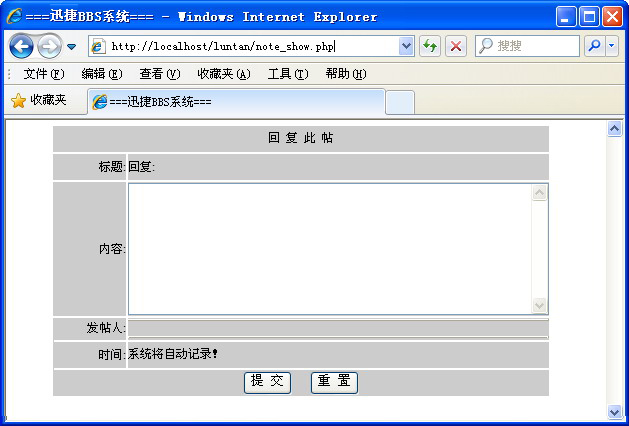
图19-6 回复帖子页面
文件module_list.php位于随书光盘的ch19\下,是显示子模块下帖子列表的页面,具体代码如下。
<html>
<head>
<meta http-equiv="Content-Type" content="text/html; charset=utf-8" />
<title>===迅捷BBS系统===</title>
<link href="inc/style.css" rel="stylesheet" type="text/css" />
</head>
<body>
<?php
@session_start();
include "inc/mysql.inc";
include "inc/myfunction.inc";
include "inc/head.php";
$aa=new mysql;
$bb=new myfunction;
$aa->link("");
include "inc/total_info.php";
$module_id=@$_GET["module_id"];
$del_id=@$_GET["del_id"];
if ($bb->son_module_idtouser_name($module_id)==@$_SESSION["user_name"]){
$query="delete from note_info where id="".$del_id.""";
$aa->excu($query);
}
$query="select * from note_info where module_id="".$module_id."" order by time desc";
$add="module_id=".$module_id."&";
?>
<table width="98%" border="0" align="center" cellpadding="0" cellspacing="0">
<tr>
<td width="73%" height="30"><a href="./">迅捷BBS系统</a>>>
<?php
echo "<a href=module_list.php?module_id=".$module_id.">";
echo $bb->son_module_idtofather_name($module_id);
echo "</a>>>";
echo $bb->son_module_idtomodule_name($module_id);
?></td>
<td width="27%" align="right" valign="middle"><a href="new_note.php">
<img src="pic_sys/post.gif" width="82" height="20"></a></td>
</tr>
</table>
<table width="98%" border="0" align="center" cellpadding="0" cellspacing="0">
<tr>
<td height="30" align="left" valign="middle"><?php $bb->page($query,@$page_id,$add,20)?></td>
</tr>
</table>
<table width="98%" border="0" align="center" cellpadding="0" cellspacing="1" bgcolor="#FFFFFF">
<tr>
<td width="3%" height="25" align="center" valign="middle" bgcolor="5F8AC5"> </td>
<td width="5%" align="center" valign="middle" bgcolor="5F8AC5">人气</td>
<td width="50%" align="center" valign="middle" bgcolor="5F8AC5">标 题</td>
<td width="9%" align="center" valign="middle" bgcolor="5F8AC5">发起人</td>
<td width="5%" align="center" valign="middle" bgcolor="5F8AC5">帖子数</td>
<td width="16%" align="center" valign="middle" bgcolor="5F8AC5">最后发表时间</td>
<td width="12%" align="center" valign="middle" bgcolor="5F8AC5">最后发表人</td>
</tr>
<?php
$result=$aa->excu($query);
while($note=mysql_fetch_array($result)){
?>
<tr>
<td height="25" align="center" valign="middle"><img src="pic_sys/li-3.gif"
width="14" height="11"></td>
<td height="25" align="center" valign="middle"><?php echo $bb->note_idtotimes($note["id"]);?></td>
<td height="25" align="left" valign="middle"><?php
echo "<a href=note_show.php?module_id=".$module_id."¬e_id=".$note["id"].">".$note["title"]."</a>";
if ($bb->son_module_idtouser_name($module_id)==$_SESSION["user_name"]
|| $_SESSION["manage_tag"]==1){
echo "
<a href=module_list.php?module_id=".$module_id."&page_id=".$page_id."&del_id=".$note["id"].">
删除此帖</a>";
}
?></td>
<td height="25" align="center" valign="middle"><?php echo $note["user_name"];?></td>
<td height="25" align="center" valign="middle">
<?php echo $bb->note_idtonote_num($note["id"]);?></td>
<td height="25" align="center" valign="middle">
<?php echo $bb->note_idtolast_time($note["id"]);?></td>
<td height="25" align="center" valign="middle">
<?php echo $bb->note_idtolast_user_name($note["id"]);?></td>
</tr>
<tr>
<td height="1" colspan="7" bgcolor="#CCCCCC"></td>
</tr>
<?php
}
?>
</table>
<table width="98%" border="0" align="center" cellpadding="0" cellspacing="0">
<tr>
<td height="30" align="right" valign="bottom">
<?php
$query="select * from note_info where module_id="".$module_id."" order by time desc";
$bb->page($query,@$page_id,$add,20)
?></td>
</tr>
</table>
<?php
include "inc/foot.php";
?>
</body>
</html>
显示帖子的页面效果如图19-7所示。
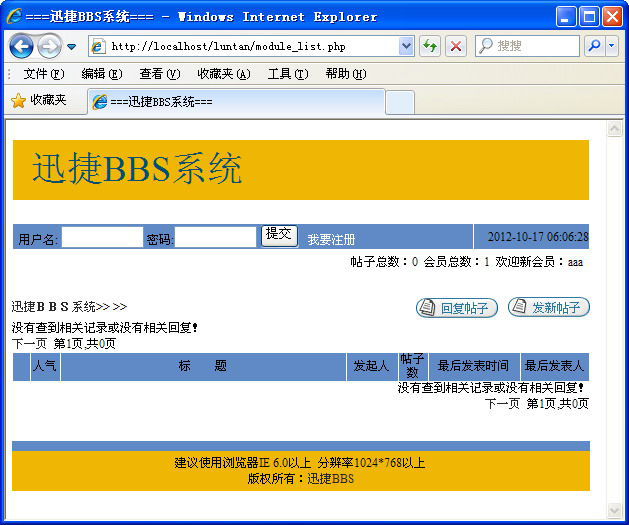
图19-7 显示帖子列表页面
19.3.5 后台管理系统的相关页面
下面介绍后台管理系统的相关页面。
文件login.php位于随书光盘的ch19\manage\下,是管理用户的登录页面,具体代码如下。
<?php
include "../inc/mysql.inc";
include "../inc/myfunction.inc";
$aa=new mysql;
$bb=new myfunction;
$aa->link("");
$_SESSION["manage_name"]="";
$_SESSION["manage_tag"]="";
?>
<head>
<style>
<!--
td { font-size: 10pt }
-->
</style>
<title>:::管理员登录==迅捷BBS系统:::</title>
</head>
<body onLoad="tijiao.username.value="";tijiao.username.focus();">
<p align="center"> </p>
<br>
</font></p>
<div align="center">
<center>
<form method=POST name="tijiao" action="auth.php">
<table border="1" cellpadding="0" cellspacing="0" bordercolor="#111111" width="240"
height="126" bordercolorlight="#FFFFFF" bordercolordark="#FFFFFF" style="border-collapse: collapse">
<tr>
<td width="238" colspan="2" height="25" bgcolor="#A8A3AD">
<p align="center"><b><font color="#FFFFFF">迅捷BBS后台管理系统</font></b></td>
</tr>
<tr>
<td width="64" height="26" bgcolor="#E3E1E6">
<p align="center">账 号:</td>
<td height="26" bgcolor="#E3E1E6" width="173">
<input type="text" name="username" size="20" style="color: #A8A3AD; border-style: solid;
border-width: 1; padding-left: 4; padding-right: 4; padding-top: 1; padding-bottom: 1"></td>
</tr>
<tr>
<td width="64" height="26" bgcolor="#E3E1E6">
<p align="center">口 令:</td>
<td height="26" bgcolor="#E3E1E6" width="173">
<input type="password" name="password" size="20" style="color: #A8A3AD; border-style: solid;
border-width: 1; padding-left: 4; padding-right: 4; padding-top: 1; padding-bottom: 1"></td>
</tr>
<tr>
<td width="238" height="29" bgcolor="#E3E1E6" colspan="2">
<p align="center"><input type="submit" value="登 陆" name="login">
<input type="reset" value="取 消" name="cancel"></td>
</tr>
<tr>
<td width="238" colspan="2" height="20" bgcolor="#A8A3AD"> </td>
</tr>
</table>
</form>
</center>
</div>
</body>
管理用户的登录页面效果如图19-8所示。
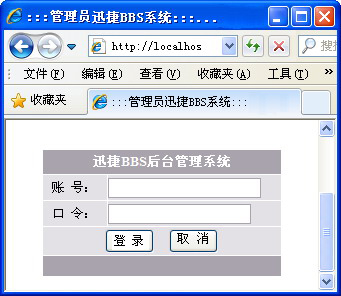
图19-8 管理用户的登录页面
文件session.inc位于随书光盘的ch19\manage\下,是检验Session是否存在的页面,具体代码如下。
  <?php
  @session_start();
  //if ($_SESSION["manage_name"]=="" and $_SESSION["manage_tag"]!=1){
  //    header("location:./login.php");
  //    }
  ?>
文件index_top.php位于随书光盘的ch19\manage\下,是后台管理主页面的上部页面,具体代码如下。
<HTML>
<HEAD><TITLE>顶部管理导航菜单</TITLE>
<META http-equiv=Content-Type content="text/html; charset=gb2312">
<STYLE type=text/css>A:link {
COLOR: #ffffff; TEXT-DECORATION: none
}
A:hover {
COLOR: #ffffff
}
A:visited {
COLOR: #f0f0f0; TEXT-DECORATION: none
}
.spa {
FONT-SIZE: 9pt; FILTER: Glow(Color=#0F42A6, Strength=2) dropshadow(Color=#0F42A6, OffX=2,
OffY=1,); COLOR: #8aade9; FONT-FAMILY: "宋体"
}
IMG {
FILTER: Alpha(opacity:100); chroma: #FFFFFF)
}
</STYLE>
<SCRIPT language=JavaScript type=text/JavaScript>
function preloadImg(src) {
var img=new Image();
img.src=src
}
preloadImg("image/admin_top_open.gif");
var displayBar=true;
function switchBar(obj) {
if (displayBar) {
parent.frame.cols="0,*";
displayBar=false;
obj.src="image/admin_top_open.gif";
obj.title="打开左边管理导航菜单";
} else {
parent.frame.cols="200,*";
displayBar=true;
obj.src="image/admin_top_close.gif";
obj.title="关闭左边管理导航菜单";
}
}
</SCRIPT>
<META content="MSHTML 6.00.2900.2963" name=GENERATOR></HEAD>
<BODY leftMargin=0 background=image/admin_top_bg.gif
topMargin=0>
<TABLE cellSpacing=0 cellPadding=0 width="100%" border=0>
<TBODY>
<TR vAlign=center>
<TD width=60><IMG title=关闭左边管理导航菜单 style="CURSOR: hand"
onclick=switchBar(this)
src="image/admin_top_close.gif"></TD>
<TD width=92><A href="login.php" target="_parent" ><IMG
src="image/top_an_1.gif" border=0></A></TD>
<TD width=92><A href="#"></A></TD>
<TD width=104><A href="#"></A></TD>
<TD width=92><A href="#"></A></TD>
<TD width=92><A href="#"></A></TD>
<TD class=spa align=right>ET PHP SOUND CODE DEVELOP
</TD>
</TR>
</TBODY>
</TABLE>
</BODY>
</HTML>
文件index_left.php位于随书光盘的ch19\manage\下,是后台管理主页面的左侧页面,具体代码如下。
<?php
include "session.inc";
?>
<HTML>
<HEAD><TITLE>管理导航菜单</TITLE>
<META http-equiv=Content-Type content="text/html; charset=gb2312">
<SCRIPT src="menu.js"></SCRIPT>
<LINK href="left.css" type=text/css rel=stylesheet>
</HEAD>
<BODY leftMargin=0 topMargin=0 marginwidth="0" marginheight="0">
<TABLE cellSpacing=0 cellPadding=0 width=180 align=center border=0>
<TBODY>
<TR>
<TD vAlign=top height=44><IMG src="image/title.gif"></TD></TR></TBODY></TABLE>
<TABLE cellSpacing=0 cellPadding=0 width=180 align=center>
<TBODY>
<TR>
<TD class=menu_title id=menuTitle0
onmouseover="this.className="menu_title2";"
onmouseout="this.className="menu_title";"
background=image/title_bg_quit.gif
height=26> <A href="Admin_Main.php" target="_top"><B><SPAN class=glow>
管理首页</SPAN></B></A><SPAN class=glow> |
</SPAN><A href="login.php" target="_top"><B><SPAN class=glow>退出
</SPAN></B></A> </TD></TR>
<TR>
<TD id=submenu0 background=image/title_bg_admin.gif height=97>
<DIV style="WIDTH: 180px">
<TABLE cellSpacing=0 cellPadding=0 width=130 align=center>
<TBODY>
<TR>
<TD height=16>您的用户名:<?php echo @$_SESSION["manage_name"];?></TD></TR>
<TR>
<TD height=16>您的身份:<?php echo @$_SESSION["manage_name"];?></TD></TR>
<TR>
<TD height=16>IP:<?php echo $_SERVER["REMOTE_ADDR"];?></TD>
</TR>
<TR>
<TD height=16> </TD>
</TR>
</TBODY></TABLE></DIV>
<DIV style="WIDTH: 167px">
<TABLE cellSpacing=0 cellPadding=0 width=130 align=center>
<TBODY>
<TR>
<TD height=20></TD></TR></TBODY></TABLE></DIV></TD></TR></TBODY></TABLE>
<TABLE cellSpacing=0 cellPadding=0 width=167 align=center>
<TBODY>
<TR>
<TD class=menu_title id=menuTitle1
onmouseover="this.className="menu_title2"" style="CURSOR: hand"
onclick="new Element.toggle("submenu1")"
onmouseout="this.className="menu_title""
background=image/Admin_left_1.gif height=28 ;><SPAN class=glow>论坛版块管理</SPAN></TD>
</TR>
<TR>
<TD id=submenu1 style="DISPLAY: none" align=right>
<DIV class=sec_menu style="WIDTH: 165px">
<TABLE cellSpacing=0 cellPadding=0 width=132 align=center>
<TBODY>
<TR>
<TD height=20><A href="father_module_add.php" target=main>父版块添加</A></TD>
</TR>
<TR>
<TD height=20><A href="father_module_list.php" target=main>父版块管理</A></TD>
</TR>
<TR>
<TD height=20><A href="son_module_add.php" target=main>子版块添加</A></TD>
</TR>
<TR>
<TD height=20><A href="son_module_list.php" target=main>子版块管理</A></TD>
</TR>
</TABLE>
</DIV>
<DIV style="WIDTH: 158px">
<TABLE cellSpacing=0 cellPadding=0 width=130 align=center>
<TBODY>
<TR>
<TD height=4></TD></TR></TBODY></TABLE></DIV></TD></TR></TBODY></TABLE>
<TABLE cellSpacing=0 cellPadding=0 width=167 align=center>
<TBODY>
<TR>
<TD class=menu_title id=menuTitle2
onmouseover="this.className="menu_title2"" style="CURSOR: hand"
onclick="new Element.toggle("submenu2")"
onmouseout="this.className="menu_title""
background=image/Admin_left_11.gif height=28 ;><SPAN class=glow>论坛用户管理</SPAN></TD>
</TR>
<TR>
<TD id=submenu2 style="DISPLAY: none" align=right>
<DIV class=sec_menu style="WIDTH: 165px">
<TABLE cellSpacing=0 cellPadding=0 width=132 align=center>
<TBODY>
<TR>
<TD height=20><A href="user_list.php" target=main>所有用户</A></TD>
</TR>
<TR>
<TD height=20><A href="user_js.php" target=main>用户检索</A></TD>
</TR>
</TBODY></TABLE>
</DIV>
<DIV style="WIDTH: 158px">
<TABLE cellSpacing=0 cellPadding=0 width=130 align=center>
<TBODY>
<TR>
<TD height=4></TD></TR></TBODY></TABLE></DIV></TD></TR></TBODY></TABLE>
<TABLE cellSpacing=0 cellPadding=0 width=167 align=center>
<TBODY>
<TR>
<TD class=menu_title id=menuTitle3
onmouseover="this.className="menu_title2"" style="CURSOR: hand"
onclick="new Element.toggle("submenu3")"
onmouseout="this.className="menu_title""
background=image/Admin_left_3.gif height=28 ;><SPAN class=glow>安全管理</SPAN></TD>
</TR>
<TR>
<TD id=submenu3 style="DISPLAY: none" align=right>
<DIV class=sec_menu style="WIDTH: 165px">
<TABLE cellSpacing=0 cellPadding=0 width=132 align=center>
<TBODY>
<TR>
<TD height=20><A href="user_pw_change.php" target=main>密码更改</A></TD>
</TR>
<TR>
<TD height=20><A href="../" target=_blank>帖子管理</A></TD>
</TR>
</TBODY></TABLE>
</DIV>
<DIV style="WIDTH: 158px">
<TABLE cellSpacing=0 cellPadding=0 width=130 align=center>
<TBODY>
<TR>
<TD height=4></TD></TR></TBODY></TABLE></DIV></TD></TR></TBODY></TABLE>
<TABLE cellSpacing=0 cellPadding=0 width=167 align=center>
<TBODY>
<TR>
<TD class=menu_title id=menuTitle208
onmouseover="this.className="menu_title2";"
onmouseout="this.className="menu_title";"
background=image/Admin_left_04.gif
height=28><SPAN>系统信息</SPAN> </TD></TR>
<TR>
<TD align=right>
<DIV class=sec_menu style="WIDTH: 165px">
<TABLE cellSpacing=0 cellPadding=0 width=130 align=center>
<TBODY>
<TR>
<TD height=20><br>版本号:verson 1.0<BR>版权所有: <A href= "http://www.quickbbs.net/" target=_blank>迅捷BBS</A>
<BR>设计制作: <A href="http://www.etpt.net/" target=_blank>迅捷BBS</A>
<BR>技术支持: <A href="http://bbs.etpt.net/" target=_blank>迅捷BBS</A>
<BR><BR></TD></TR></TBODY></TABLE></DIV></TD></TR>
</TBODY></TABLE>
</BODY>
</HTML>
文件index_right.php位于附书源代码中,是后台管理主页面的右侧页面,具体代码如下。
<?php
include "fun_head.php";
head("管理首页");
?>
<TABLE cellSpacing=0 cellPadding=0 width="100%" border=0>
<TBODY>
<TR>
<TD width=20 rowSpan=2> </TD>
<TD class=topbg align=middle width=100>论坛版块管理</TD>
<TD width=300> </TD>
<TD width=40 rowSpan=2> </TD>
<TD class=topbg align=middle width=100>论坛用户管理</TD>
<TD width=300> </TD>
<TD width=21 rowSpan=2> </TD></TR>
<TR class=topbg2>
<TD colSpan=2 height=1></TD>
<TD colSpan=2></TD></TR></TBODY></TABLE>
<TABLE cellSpacing=0 cellPadding=0 width="100%" border=0>
<TBODY>
<TR>
<TD width=20> </TD>
<TD width=400><br>
本管理模块共分四个子模块:父模块添加、父模块管理、子模块添加、子模块管理。
其中父模块添加和子模块添加可以实现本论坛的父模块和子模块的添加;
父模块的管理和子模块的管理可以实现本论坛父模块和子模块的删除、编辑等功能。<BR>
</TD>
<TD width=40> </TD>
<TD
width=400><br>
本管理模块共分两个子模块:所有用户和用户检索。
其中所有用户按用户注册的先后顺序分页依次列出。
用户检索是由管理员输入要查询的论坛注册用户的用户名,系统通过数据库查询出该用户的
相关信息,并列出,而且管理员也可以在查询注册用户后直接删除该用户。<br>
<br></TD>
<TD width=21> </TD></TR></TBODY></TABLE>
<TABLE height=10 cellSpacing=0 cellPadding=0 width="100%" border=0>
<TBODY>
<TR>
<TD></TD></TR></TBODY></TABLE>
<TABLE cellSpacing=0 cellPadding=0 width="100%" border=0>
<TBODY>
<TR>
<TD width=20 rowSpan=2> </TD>
<TD class=topbg align=middle width=100>安全管理</TD>
<TD width=300> </TD>
<TD width=40 rowSpan=2> </TD>
<TD class=topbg align=middle width=100>系统信息</TD>
<TD width=300> </TD>
<TD width=21 rowSpan=2> </TD></TR>
<TR class=topbg2>
<TD colSpan=2 height=1></TD>
<TD colSpan=2></TD></TR></TBODY></TABLE>
<TABLE cellSpacing=0 cellPadding=0 width="100%" border=0>
<TBODY>
<TR>
<TD width=20> </TD>
<TD
width=400><br>
本管理模块共分两个子模块:密码更改和帖子管理。
其中密码更改提供了管理员更改密码的功能,但必须输入原密码和两次新密码;
帖子管理是直接进入论坛的主界面,但与普通注册用户所不同的是,
在论坛的每个发帖和回复后面都多了一个删除按钮,可以通过此按钮删除相关帖子或回复。</TD>
<TD width=40> </TD>
<TD
width=400 valign="top"><br />
本模块提供了本论坛的版本号、版权所有、设计制作以及技术支持等信息。</TD>
<TD width=21> </TD></TR></TBODY></TABLE>
<TABLE height=70 cellSpacing=0 cellPadding=0 width="100%" border=0>
<TBODY>
<TR>
<TD></TD></TR></TBODY></TABLE>
<TABLE height=10 cellSpacing=0 cellPadding=0 width="100%" border=0>
<TBODY>
<TR>
<TD></TD></TR></TBODY></TABLE>
<BR>
<?php
include "bottom.php";
?>
文件bootom.php位于附书源代码中,是后台管理主页面的版权页面,具体代码如下。
<TABLE class=border cellSpacing=1 cellPadding=2 width="100%" align=center border=0> <TBODY> <TR align=middle> <TD class=topbg height=25><SPAN class=Glow>Copyright 2012 © <a href="http://www.quickbbs.net" target="_blank"><font color="#FFFFFF">迅捷BBS</font></a> All Rights Reserved.</SPAN> </TD></TR> </TBODY> </TABLE>
文件index.php位于附书源代码中,是后台管理的主页面,具体代码如下。
  <?php
  include "session.inc";
  ?>
  <HTML>
  <HEAD>
  <TITLE>===迅捷BBS系统-后台管理===</TITLE>
  <META http-equiv=Content-Type content="text/html; charset=gb2312">
  </HEAD>
  <FRAMESET id=frame border=false frameSpacing=0 rows=* frameBorder=0 cols=200,* scrolling="yes">
      <FRAME name=left marginWidth=0 marginHeight=0 src="index_left.php" scrolling=yes>
      <FRAMESET border=false frameSpacing=0 rows=53,* frameBorder=0 cols=* scrolling="yes">
           <FRAME name=top src="index_top.php" scrolling=no>
           <FRAME name=main src="index_right.php">
      </FRAMESET>
  </FRAMESET>
文件fun_head.php位于附书源代码中,是后台管理右侧页面中的头文件,具体代码如下。
  <?php
   function head($str){
  ?>
  <LINK href="Admin_Style.css" rel=stylesheet>
  <STYLE type=text/css>
  .STYLE4 {
  	COLOR: #000000
  }
  </STYLE>
  <BODY leftMargin=0 topMargin=0 marginheight="0" marginwidth="0">
  <TABLE cellSpacing=0 cellPadding=0 width="100%" border=0>
    <TBODY>
    <TR>
      <TD width=392 rowSpan=2><img height=126
        src="image/adminmain01.gif" width=392></TD>
      <TD vAlign=top background=image/adminmain0line2.gif
      height=114>
        <TABLE cellSpacing=0 cellPadding=0 width="100%" border=0>
          <TBODY>
          <TR>
            <TD height=20></TD></TR>
          <TR>
            <TD><SPAN class=STYLE4>频道管理中心</SPAN></TD></TR>
          <TR>
            <TD height=8><IMG height=1
              src="image/adminmain0line.gif" width=283></TD></TR>
          <TR>
            <TD><IMG src="image/img_u.gif"
              align=absMiddle>欢迎进入管理<FONT
          color=#ff0000></FONT></TD></TR>
          <TR>
            <TD><IMG src="image/img_u.gif" align=absMiddle>
            <?php
            echo "当前位置:<b><font color=#ffffff>".$str."</font></b>";
            ?></TD>
          </TR>
          </TBODY></TABLE></TD></TR>
    <TR>
      <TD vAlign=bottom background=image/adminmain03.gif
      height=9><IMG height=12 src="image/adminmain02.gif"
        width=23></TD></TR></TBODY></TABLE>
  	  <?php
  	   }
  ?>
文件father_module_add.php位于附书源代码中,是父模块添加页面,具体代码如下。
<?php
include "session.inc";
include "fun_head.php";
head("父版块添加");
include "../inc/mysql.inc";
include "../inc/myfunction.inc";
$aa=new mysql;
$bb=new myfunction;
$aa->link("");
$add_tag=@$_GET["add_tag"];
if ($add_tag==1){
$show_order=$_POST["show_order"];
$module_name=$_POST["module_name"];
if ($show_order=="" or $module_name==""){
echo "===对不起,您添加父版块不成功:
<font color=red>显示序号和父版块名称全不能为空</font>!===";
}else{
$query="insert into
father_module_info(module_name,show_order) values("$module_name","$show_order")";
$aa->excu($query);
echo "===恭喜您,添加父版块成功!===";
}
}
?>
<table width="100%" height="389" border="0" cellpadding="0" cellspacing="0" bgcolor="f0f0f0">
<tbody>
<tr>
<td width="20"> </td>
<td valign="top"><br />
<form action="?add_tag=1" method="post" name="form1" id="form1">
<table width="408" height="87" border="0" align="center" cellpadding="0"
cellspacing="1" bordercolor="#FFFFFF" bgcolor="449ae8">
<tr bgcolor="#dcccccc">
<td width="94" height="25" bgcolor="e0eef5"><div align="right">显示序号:</div></td>
<td width="306" bgcolor="e0eef5"><input type="text" size="6" name="show_order" />
请填写一整数,如:1。</td>
</tr>
<tr bgcolor="#dddddd">
<td height="25" bgcolor="#FFFFFF"><div align="right">父版块名称:</div></td>
<td bgcolor="#FFFFFF"><input type="text" size="20" name="module_name" /></td>
</tr>
<tr bgcolor="#dddddd">
<td height="33" colspan="2" bgcolor="e0eef5"><div align="center">
<input name="submit" type="submit" value="提交" />
<input name="reset" type="reset" value="重置" />
</div></td>
</tr>
</table>
</form>
<br />
<br /></td>
<td width="20"> </td>
</tr>
</tbody>
</table>
<?php
include "bottom.php";
?>
文件father_module_bj.php位于附书源代码中,是父模块编辑页面。具体代码如下。
<?php
include "session.inc";
include "fun_head.php";
head("父版块管理==>>编辑");
include "../inc/mysql.inc";
include "../inc/myfunction.inc";
$aa=new mysql;
$bb=new myfunction;
$aa->link("");
$module_id=$_GET["module_id"];
$update_tag=@$_GET["update_tag"];
if ($update_tag==1){
$show_order=$_POST["show_order"];
$module_name=$_POST["module_name"];
if ($show_order=="" or $module_name==""){
echo "===对不起,您编辑父版块不成功:<font color=red>
显示序号和父版块名称全不能为空</font>!===";
}else{
$query="update father_module_info set module_name="$module_name",show_order="$show_order
" where id="$module_id"";
$aa->excu($query);
echo "===恭喜您,编辑父版块成功!===";
}
}
$query="select * from father_module_info where id="$module_id"";
$rst=$aa->excu($query);
$module=mysql_fetch_array($rst,MYSQL_ASSOC);
?>
<table width="100%" height="389" border="0" cellpadding="0" cellspacing="0" bgcolor="f0f0f0">
<tbody>
<tr>
<td width="20"> </td>
<td valign="top"><br />
<form action="?update_tag=1&module_id=<?php echo $module_id?>"
method="post" name="form1" id="form1">
<table width="408" height="87" border="0" align="center" cellpadding="0"
cellspacing="1" bordercolor="#FFFFFF" bgcolor="449ae8">
<tr bgcolor="#dcccccc">
<td width="94" height="25" bgcolor="e0eef5"><div align="right">显示序号:</div></td>
<td width="306" bgcolor="e0eef5"><input type="text" size="6"
name="show_order" value="<?php echo $module["show_order"]?>" />
请填写一整数,如:1
。</td>
</tr>
<tr bgcolor="#dddddd">
<td height="25" bgcolor="#FFFFFF"><div align="right">父版块名称:</div></td>
<td bgcolor="#FFFFFF"><input type="text" size="20" name="module_name"
value="<?php echo $module["module_name"]?>" /></td>
</tr>
<tr bgcolor="#dddddd">
<td height="33" colspan="2" bgcolor="e0eef5"><div align="center">
<input name="submit" type="submit" value="提交" />
<input name="reset" type="reset" value="重置" />
</div></td>
</tr>
</table>
</form>
<br />
<br /></td>
<td width="20"> </td>
</tr>
</tbody>
</table>
<?php
include "bottom.php";
?>
文件father_module_list.php位于附书源代码中,是父模块添加显示页面,具体代码如下。
<?php
include "session.inc";
include "fun_head.php";
head("父版块管理");
include "../inc/mysql.inc";
include "../inc/myfunction.inc";
$aa=new mysql;
$bb=new myfunction;
$aa->link("");
///////////删除父版块////////////////////////////////
$del_tag=@$_GET["del_tag"];
if ($del_tag==1){
$module_id=$_GET["module_id"];
$query="delete from father_module_info where id="$module_id"";
$aa->excu($query);
echo "==恭喜您,删除父版块信息成功!==<br>";
}
///////////按显示顺序查询父版块信息表//////////////////////
$query="select * from father_module_info order by show_order";
$rst=$aa->excu($query);
?>
<table width="100%" height="390" border="0" cellpadding="0" cellspacing="0" bgcolor="f0f0f0">
<tbody>
<tr>
<td width="20"> </td>
<td valign="top"><br /><table width="80%" border="0" align="center" cellpadding="0" cellspacing="1" bgcolor="449ae8">
<tr bgcolor="#cccccc">
<td width="92" height="23" bgcolor="e0eef5"><div align="center">编号</div></td>
<td width="193" bgcolor="e0eef5"><div align="center">显示序号</div></td>
<td width="368" bgcolor="e0eef5"><div align="center">父版块名称</div></td>
<td colspan="2" bgcolor="e0eef5"><div align="center">操作</div></td>
</tr>
<?php
$m=0;
while($module=mysql_fetch_array($rst,MYSQL_ASSOC)){
$m++;
?>
<tr>
<td height="19" bgcolor="#FFFFFF"><div align="center"><?php echo $m;?></div></td>
<td bgcolor="#FFFFFF"><div align="center"><?php echo $module["show_order"]?></div></td>
<td bgcolor="#FFFFFF"><div align="center"><?php echo $module["module_name"]?></div></td>
<td width="134" align="center"
bgcolor="#FFFFFF"><a href="father_module_bj.php?module_id=
<?php echo $module["id"];?>">编辑</a></td>
<td width="142" align="center" bgcolor="#FFFFFF"><a href="?del_tag=1&module_id=
<?php echo $module["id"]?>">删除</a></td>
</tr>
<?php }?>
</table>
</td>
<td width="20"> </td>
</tr>
</tbody>
</table>
<?php
include "bottom.php";
?>
文件son_module_add.php位于附书源代码中,是子模块添加页面,具体代码如下。
<?php
include "session.inc";
include "fun_head.php";
head("子版块添加");
include "../inc/mysql.inc";
include "../inc/myfunction.inc";
$aa=new mysql;
$bb=new myfunction;
$aa->link("");
$add_tag=@$_GET["add_tag"];
if ($add_tag==1){
$father_module_id=$_POST["father_module_id"];
$module_name=$_POST["module_name"];
$module_cont=$_POST["module_cont"];
$user_name=$_POST["user_name"];
if ($father_module_id=="" or $module_name=="" or $module_cont==""){
echo "===对不起,您添加子版块不成功:<font color=red>隶属的父版块、
子版块的名称和简介全不能为空</font>!===";
}else{
$query="insert into son_module_info(father_module_id,
module_name,module_cont,user_name)
values("$father_module_id","$module_name","$module_cont","$user_name")";
$aa->excu($query);
echo "===恭喜您,添加子版块成功!===";
}
}
?>
<table width="100%" height="389" border="0" cellpadding="0" cellspacing="0" bgcolor="f0f0f0">
<tbody>
<tr>
<td width="20"> </td>
<td valign="top"><br />
<form action="?add_tag=1" method="post" name="form1" id="form1">
<table width="408" height="139" border="0" align="center" cellpadding="0"
cellspacing="1" bordercolor="#FFFFFF" bgcolor="449ae8">
<tr bgcolor="#dcccccc">
<td width="94" height="25" bgcolor="e0eef5"><div align="right">
隶属的父版块:</div></td>
<td width="306" bgcolor="e0eef5"><?php $bb->father_module_list("");?></td>
</tr>
<tr bgcolor="#dddddd">
<td height="25" bgcolor="#FFFFFF"><div align="right">子版块名称:</div></td>
<td bgcolor="#FFFFFF"><input type="text" size="20" name="module_name" /></td>
</tr>
<tr bgcolor="#dddddd">
<td height="25" align="right" valign="middle" bgcolor="#FFFFFF">简介:</td>
<td bgcolor="#FFFFFF"><textarea name="module_cont"
cols="42" rows="3"></textarea></td>
</tr>
<tr bgcolor="#dddddd">
<td height="25" align="right" valign="middle" bgcolor="#FFFFFF">版主用户名:</td>
<td bgcolor="#FFFFFF"><input type="text" size="20" name="user_name" />
可不填。</td>
</tr>
<tr bgcolor="#dddddd">
<td height="33" colspan="2" bgcolor="e0eef5"><div align="center">
<input name="submit" type="submit" value="提交" />
<input name="reset" type="reset" value="重置" />
</div></td>
</tr>
</table>
</form>
<br />
<br /></td>
<td width="20"> </td>
</tr>
</tbody>
</table>
<?php
include "bottom.php";
?>
文件sonr_module_bj.php位于附书源代码中,是子模块编辑页面,具体代码如下。
<?php
include "session.inc";
include "fun_head.php";
head("子版块管理>>编辑");
include "../inc/mysql.inc";
include "../inc/myfunction.inc";
$aa=new mysql;
$bb=new myfunction;
$aa->link("");
$module_id=$_GET["module_id"];
$update_tag=@$_GET["update_tag"];
if ($update_tag==1){
$father_module_id=$_POST["father_module_id"];
$module_name=$_POST["module_name"];
$module_cont=$_POST["module_cont"];
$user_name=$_POST["user_name"];
if ($father_module_id=="" or $module_name=="" or $module_cont==""){
echo "===对不起,您编辑子版块不成功:<font color=red>隶属的父版块、
子版块的名称和简介全不能为空</font>!===";
}else{
$query="update son_module_info
set father_module_id="$father_module_id",module_name="$module_name",module_cont
="$module_cont",user_name
="$user_name" where id="$module_id"";
$aa->excu($query);
echo "===恭喜您,编辑子版块成功!===";
}
}
$query="select * from son_module_info where id="$module_id"";
$rst=$aa->excu($query);
$module=mysql_fetch_array($rst,MYSQL_ASSOC);
?>
<table width="100%" height="389" border="0" cellpadding="0" cellspacing="0" bgcolor="f0f0f0">
<tbody>
<tr>
<td width="20"> </td>
<td valign="top"><br />
<form action="?update_tag=1&module_id=<?php echo $module_id?>"
method="post" name="form1" id="form1">
<table width="408" height="139" border="0" align="center" cellpadding="0"
cellspacing="1" bordercolor="#FFFFFF" bgcolor="449ae8">
<tr bgcolor="#dcccccc">
<td width="94" height="25" bgcolor="e0eef5"><div align="right">
隶属的父版块:</div></td>
<td width="306"
bgcolor="e0eef5"><?php $bb->father_module_list($module["father_module_id"]);?></td>
</tr>
<tr bgcolor="#dddddd">
<td height="25" bgcolor="#FFFFFF"><div align="right">子版块名称:</div></td>
<td bgcolor="#FFFFFF"><input type="text" size="20" name="module_name" value="
<?php echo $module["module_name"]?>" /></td>
</tr>
<tr bgcolor="#dddddd">
<td height="25" align="right" valign="middle" bgcolor="#FFFFFF">简介:</td>
<td bgcolor="#FFFFFF"><textarea name="module_cont" cols="42" rows="3">
<?php echo $module["module_cont"]?></textarea></td>
</tr>
<tr bgcolor="#dddddd">
<td height="25" align="right" valign="middle" bgcolor="#FFFFFF">版主用户名:</td>
<td bgcolor="#FFFFFF"><input type="text" size="20" name="user_name" value="
<?php echo $module["user_name"]?>" />
可不填。</td>
</tr>
<tr bgcolor="#dddddd">
<td height="33" colspan="2" bgcolor="e0eef5"><div align="center">
<input name="submit" type="submit" value="提交" />
<input name="reset" type="reset" value="重置" />
</div></td>
</tr>
</table>
</form>
<br />
<br /></td>
<td width="20"> </td>
</tr>
</tbody>
</table>
<?php
include "bottom.php";
?>
文件son_module_list.php位于附书源代码中,是子模块显示页面,具体代码如下。
<?php
include "session.inc";
include "fun_head.php";
head("子版块管理");
include "../inc/mysql.inc";
include "../inc/myfunction.inc";
$aa=new mysql;
$bb=new myfunction;
$aa->link("");
///////////删除子版块////////////////////////////////
$del_tag=@$_GET["del_tag"];
if ($del_tag==1){
$module_id=$_GET["module_id"];
$query="delete from son_module_info where id="$module_id"";
$aa->excu($query);
echo "==恭喜您,删除子版块信息成功!==<br>";
}
///////////////////按显示顺序查询父版块信息表/////////////
$query="select * from father_module_info order by show_order";
$rst=$aa->excu($query);
?>
<table width="100%" height="390" border="0" cellpadding="0" cellspacing="0" bgcolor="f0f0f0">
<tbody>
<tr>
<td width="20"> </td>
<td valign="top"><br /><table width="80%" border="0" align="center"
cellpadding="0" cellspacing="1" bgcolor="449ae8">
<tr bgcolor="#cccccc">
<td width="74" height="23" bgcolor="e0eef5"><div align="center">显示序号</div></td>
<td width="84" bgcolor="e0eef5"><div align="center">父版块名称</div></td>
<td width="410" bgcolor="e0eef5"><div align="center">子版块名称</div></td>
<td colspan="2" bgcolor="e0eef5"><div align="center">操作</div></td>
</tr>
<?php
while($father_module=mysql_fetch_array($rst,MYSQL_ASSOC)){
?>
<tr>
<td height="19" bgcolor="#FFFFFF"><div align="center">
<?php echo $father_module["show_order"]?></div></td>
<td colspan="4" align="left" valign="middle" bgcolor="#CCCCCC">
<?php echo $father_module["module_name"]?></td>
</tr>
<?php
////////从子版块信息表中按id顺序查询隶属该父版块的子版块的信息/////////////
$query="select * from son_module_info where father_module_id="".$father_module["id"].""
order by id";
$rst2=$aa->excu($query);
$m=0;
while($son_module=mysql_fetch_array($rst2,MYSQL_ASSOC)){
$m++;
?>
<tr>
<td height="19" bgcolor="#FFFFFF"> </td>
<td align="center" valign="middle" bgcolor="#FFFFFF"><?php echo $m?></td>
<td bgcolor="#FFFFFF"><?php echo $son_module["module_name"]?></td>
<td width="80" align="center"
bgcolor="#FFFFFF"><a href="son_module_bj.php?module_id=
<?php echo $son_module["id"];?>">编辑</a></td>
<td width="80" align="center" bgcolor="#FFFFFF"><a href="?del_tag=1&module_id=
<?php echo $son_module["id"]?>">删除</a></td>
<?php }?>
</tr>
<?php }?>
</table>
</td>
<td width="20"> </td>
</tr>
</tbody>
</table>
<?php
include "bottom.php";
?>
文件user _list.php位于附书源代码中,是显示所有用户的页面,具体代码如下。
<?php
include "session.inc";
include "fun_head.php";
head("所有用户");
include "../inc/mysql.inc";
include "../inc/myfunction.inc";
$aa=new mysql;
$bb=new myfunction;
$aa->link("");
///////////删除注册用户////////////////////////////////
$del_tag=@$_GET[del_tag];
if ($del_tag==1){
$user_id=@$_GET[user_id];
$query="delete from user_info where id="$user_id"";
$aa->excu($query);
echo "==恭喜您,删除注册用户信息成功!==<br>";
}
/////////////从用户信息表中查询所有用户//////////////////
$query="select * from user_info order by id desc";
?>
<table width="100%" height="390" border="0" cellpadding="0" cellspacing="0" bgcolor="f0f0f0">
<tbody>
<tr>
<td width="20"> </td>
<td valign="top"><br />
<table width="80%" border="0" align="center" cellpadding="0" cellspacing="0">
<tr>
<td height="30" align="left"
valign="middle"><?php $bb->page($query,@$page_id,@$add,20)?></td>
</tr>
</table>
<table width="80%" border="0" align="center" cellpadding="0" cellspacing="1" bgcolor="449ae8">
<tr bgcolor="#cccccc">
<td width="46" height="23" bgcolor="e0eef5"><div align="center">序号</div></td>
<td width="213" bgcolor="e0eef5"><div align="center">用户名</div></td>
<td width="201" bgcolor="e0eef5"><div align="center">注册时间</div></td>
<td width="188" bgcolor="e0eef5"><div align="center">最后登录时间</div></td>
<td width="80" bgcolor="e0eef5"><div align="center">操作</div></td>
</tr>
<?php
$rst=$aa->excu($query);
$m=0;
while($user=mysql_fetch_array($rst,MYSQL_ASSOC)){
$m++;
?>
<tr>
<td height="19" bgcolor="#FFFFFF"><div align="center"><?php echo @$m;?></div></td>
<td bgcolor="#FFFFFF"><div align="center"><?php echo $user["user_name"]?></div></td>
<td bgcolor="#FFFFFF"><div align="center"><?php echo $user["time1"]?></div></td>
<td align="center" bgcolor="#FFFFFF"><?php echo $user["time2"]?></td>
<td align="center" bgcolor="#FFFFFF"><a href="?del_tag=1&user_id=
<?php echo $user["id"]?>">删除</a></td>
</tr>
<?php }?>
</table>
<table width="80%" border="0" align="center" cellpadding="0" cellspacing="0">
<tr>
<td height="30" align="right" valign="middle">
<?php
$query="select * from user_info order by id desc";
$bb->page($query,@$page_id,@$add,20);
?></td>
</tr>
</table></td>
<td width="20"> </td>
</tr>
</tbody>
</table>
<?php
include "bottom.php";
?>
文件user_js.php位于附书源代码中,是用户的检索页面,具体代码如下。
<?php
include "session.inc";
include "fun_head.php";
head("用户检索");
include "../inc/mysql.inc";
include "../inc/myfunction.inc";
$aa=new mysql;
$bb=new myfunction;
$aa->link("");
///////////删除用户////////////////////////////////
$del_tag=@$_GET[del_tag];
if ($del_tag==1){
$del_id=@$_GET[del_id];
$query="delete from user_info where id="".$del_id.""";
$aa->excu($query);
echo "==恭喜您,删除用户信息成功,请继续!==<br>";
}
//////////////////////////////////////////////////
$user_name=@$_POST[user_name];
?>
<table width="100%" height="390" border="0" cellpadding="0" cellspacing="0" bgcolor="f0f0f0">
<tbody>
<tr>
<td width="20"> </td>
<td valign="top"><br />
<table width="70%" border="0" align="center" cellpadding="0" cellspacing="1" bgcolor="449ae8">
<tr bgcolor="#cccccc">
<form id="form1" name="form1" method="post" action="?">
<td height="23" bgcolor="e0eef5"><div align="center">
<input type="text" name="user_name" size="16" value="
<?php echo $user_name?>" />
<input type="submit" name="Submit" value="提交" />
</div></td>
</form>
</tr>
<tr>
<td height="19" align="center" bgcolor="#FFFFFF">
<?php
if ($user_name==""){
echo "请输入您要检索的用户名,点提交查询!";
}else{
$query="select * from user_info where user_name="$user_name"";
$rst=$aa->excu($query);
if (mysql_num_rows($rst)==0){
echo "很抱歉,系统没有检索到您要查找的用户!";
}else{
$user=mysql_fetch_array($rst,MYSQL_ASSOC);
?>
<table width="100%" border="0" cellspacing="2" cellpadding="0">
<tr>
<td width="29%" height="20" align="right" bgcolor="#dddddd">用户名:</td>
<td width="71%" align="left" bgcolor="#dddddd"><?php echo $user["user_name"]?></td>
</tr>
<tr>
<td height="20" align="right" bgcolor="#dddddd">登录口令:</td>
<td align="left" bgcolor="#dddddd"><?php echo $user["user_pw"]?></td>
</tr>
<tr>
<td height="20" align="right" bgcolor="#dddddd">注册时间:</td>
<td align="left" bgcolor="#dddddd"><?php echo $user["time1"]?></td>
</tr>
<tr>
<td height="20" align="right" bgcolor="#dddddd">最后登录时间:</td>
<td align="left" bgcolor="#dddddd"><?php echo $user["time2"]?></td>
</tr>
<tr>
<td height="20" colspan="2" align="center"
bgcolor="#dddddd"><a href=?del_tag=1&del_id=<?php echo $user["id"]?>>
删除此用户</a></td>
</tr>
</table>
<?php
}
}
?>
</td>
</tr>
</table>
</td>
<td width="20"> </td>
</tr>
</tbody>
</table>
<?php
include "bottom.php";
?>
文件user_pw_change.php位于附书源代码中,是管理员密码修改页面,具体代码如下。
<?php
include "session.inc";
include "fun_head.php";
head("密码更改");
include "../inc/mysql.inc";
include "../inc/myfunction.inc";
$aa=new mysql;
$bb=new myfunction;
$aa->link("");
///////////更改密码////////////////////////////////
$tijiao=$_POST[tijiao];
if ($tijiao=="提 交"){
$pw_old=$_POST[pw_old];
$pw_new1=$_POST[pw_new1];
$pw_new2=$_POST[pw_new2];
if ($pw_new1!=$pw_new2){
echo "===您两次输入的新密码不一致,请重新输入!===";
}else{
$query="select * from manage_user_info where user_name="
$_SESSION[manage_name]" and user_pw="$pw_old"";
$rst=$aa->excu($query);
if (mysql_num_rows($rst)==0){
echo "===您输入的旧密码不正确,请重新输入!===";
}else{
$query="update manage_user_info set
user_pw="$pw_new1" where user_name="$_SESSION[manage_name]"";
$aa->excu($query);
echo "===恭喜您,您的登录密码修改成功!===";
}
}
}
?>
<table width="100%" height="390" border="0" cellpadding="0" cellspacing="0" bgcolor="f0f0f0">
<tbody>
<tr>
<td width="20"> </td>
<td valign="top"><br />
<form id="form1" name="form1" method="post" action="#">
<table width="60%" border="0" align="center" cellpadding="0" cellspacing="1" bgcolor="449ae8">
<tr bgcolor="#cccccc">
<td width="27%" height="23" align="right" bgcolor="e0eef5">用户名:</td>
<td width="73%" align="left" bgcolor="e0eef5">
<?php echo $_SESSION[manage_name]?></td>
</tr>
<tr>
<td height="19" align="right" bgcolor="#FFFFFF">原口令:</td>
<td align="left" bgcolor="#FFFFFF"><input type="text" name="pw_old" size="16" /></td>
</tr>
<tr>
<td height="19" align="right" bgcolor="#FFFFFF">新密码:</td>
<td align="left" bgcolor="#FFFFFF"><input type="text" name="pw_new1" size="16" /></td>
</tr>
<tr>
<td height="19" align="right" bgcolor="#FFFFFF">再次新密码:</td>
<td align="left" bgcolor="#FFFFFF"><input type="text" name="pw_new2" size="16" /></td>
</tr>
<tr>
<td height="19" colspan="2" align="center" bgcolor="#FFFFFF">
<input type="submit" name="tijiao" value="提 交" />
<input type="reset" name="Submit2" value="重 置" /></td>
</tr>
</table>
</form>
</td>
<td width="20"> </td>
</tr>
</tbody>
</table>
<?php
include "bottom.php";
?>
成功登录到网站后台管理系统的效果如图19-9所示。
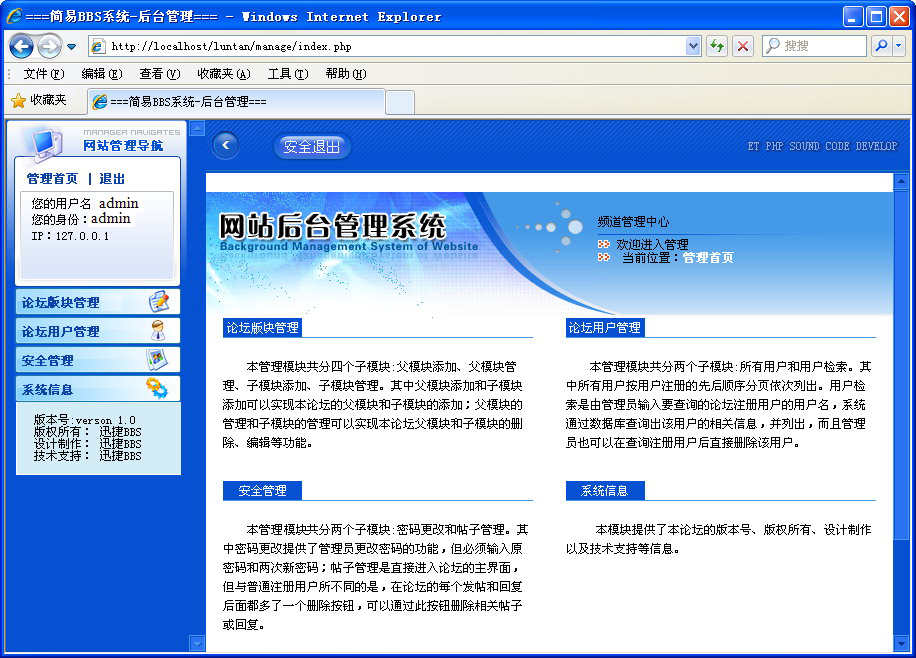
图19-9 后台管理系统主页面
选择页面左侧的【论坛版块管理】选项,即可在展开的列表中查看版块管理操作,如图19-10所示。
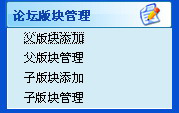
图19-10 【论坛版块管理】列表
选择【父版块添加】选项,即可在右侧的窗口中输入显示序号和父版块名称,然后单击【提交】按钮,如图19-11所示。
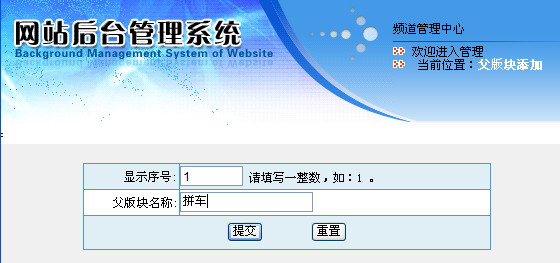
图19-11 添加父版块
添加成功后,即可显示成功提示信息,如图19-12所示。
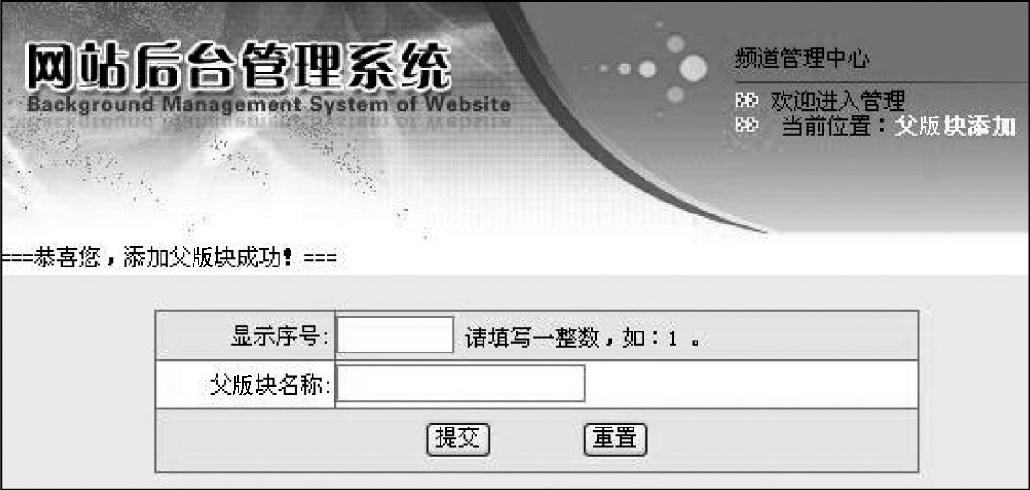
图19-12 添加父版块成功提示信息
刷新论坛的主页面,即可看到新添加的父版块,如图19-13所示。
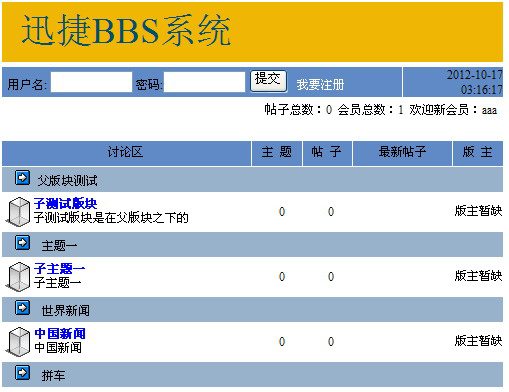
图19-13 查看父版块
在后台管理主页面的【论坛版块管理】列表中,选择【父版块管理】选项,即可进入父版块管理页面中,如图19-14所示。用户可以编辑和删除存在的父版块。
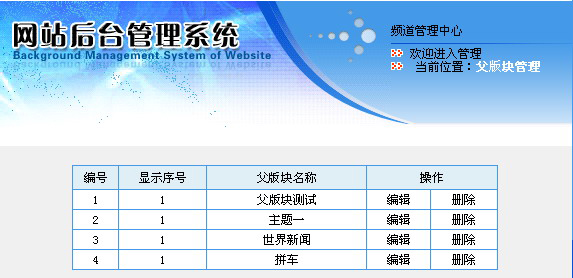
图19-14 编辑父版块
在后台管理主页面的【论坛版块管理】列表中,选择【子版块添加】选项,即可进入子版块添加页面,如图19-15所示。用户输入相关信息后,单击【提交】按钮即可。

图19-15 添加子版块
刷新论坛的主页面,即可看到新添加的子版块,如图19-16所示。
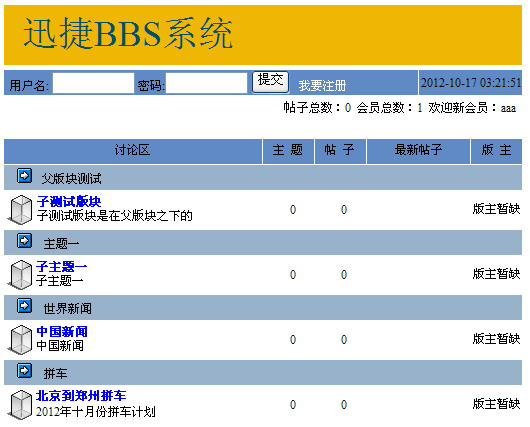
图19-16 查看添加的子版块
单击页面左侧的【论坛用户管理】选项,即可在展开的列表中查看用户管理操作,如图19-17所示。
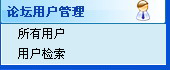
图19-17 【论坛用户管理】列表
选择【所有用户】选项,即可在右侧的窗口中查看论坛的用户,如图19-18所示。
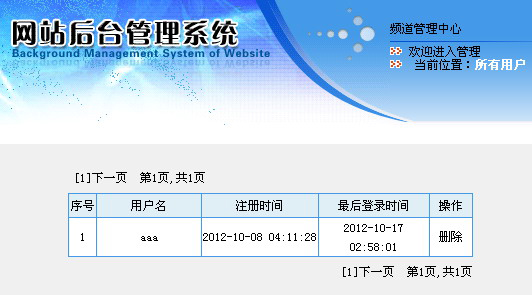
图19-18 【所有用户】页面
在后台管理主页面的【用户版块管理】列表中,选择【用户检索】选项,进入用户检索页面,输入用户名后,单击【提交】按钮,即可显示用户的具体信息,如图19-19所示。
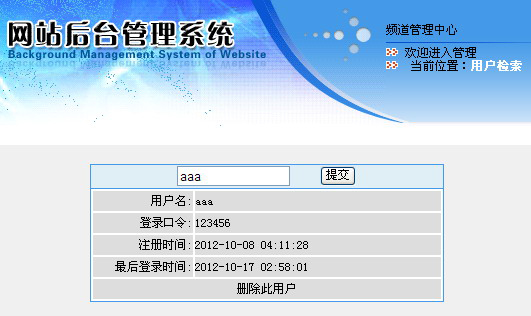
图19-19 用户检索页面
在后台管理主页面中,选择页面左侧的【安全管理】选项,即可在展开的列表中管理密码和帖子操作,如图19-20所示。
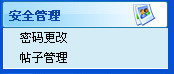
图19-20 【安全管理】列表
选择【密码更改】选项,即可在右侧的页面中修改用户的密码,如图19-21所示。
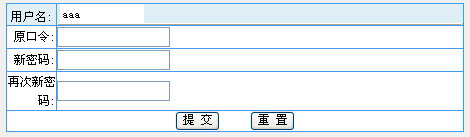
图19-21 更改用户密码页面