
12.3项目实现
时间:2020/9/17 21:49:37阅读:
12.3项目实现
12.3 项目实现
一般的微博项目主要功能包括:用户的注册和登录、日志的发表展现。下面就针对以下微博的主要部分来简述仿记事狗微博的主要模块实现过程。
12.3.1 用户注册模块的实现
该项目只有注册之后才能访问网站的各个网页,因此用户在登录之前需要进行注册。注册页面的地址是:index.php?C=weibo&a=zhuce,运行效果如图12-9所示。
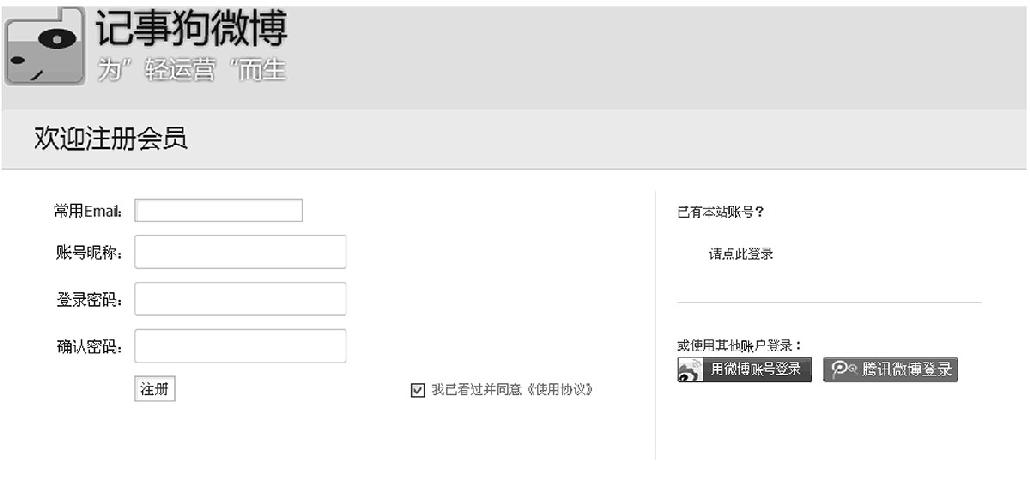
图12-9 用户注册页面
实现注册模块的关键代码如下。
Controller(控制器关键代码):
  public function zhuceAction(){
  $this->smarty->display("zhuce.tpl");
  	 }
View(视图层关键代码):
<html xmlns="http://www.w3.org/1999/xhtml"><head> <!-- base href=
"http://t.jishigou.net/" --> <meta http-equiv="Content-Type" content=
"text/html; charset=gbk"> <meta http-equiv="x-ua-compatible" content=
"ie=7"> <title>注册新用户 - 记事狗微博(t.jishigou.net)</title> <meta name=
"Keywords" content=",记事狗微博"> <meta name="Description" content=",分享发
现"> <link rel="shortcut icon" href="http://t.jishigou.net/favicon.ico">
<link href="includes/styles/main.css" rel="stylesheet" type="text/css">
<link href="includes/styles/reg.css" rel="stylesheet" type="text/css">
</head>
<body onblur="init()">
<div class="Rlogo"> <h1 class="logo"> <a title="记事狗微博" href="http://t.
jishigou.net/index.php"> <img src="includes/images/guo/logo_guest.png"
style="_filter:progid:DXImageTransform.Microsoft.AlphaImageLoader(enabl
ed=true,sizingMethod=crop)"></a> </h1> </div> <div class="appframe">
<div class="appframeTitle">
<form action="index.php?c=weibo&a=zhucechenggong" id="zhucechenggong"
method="post"
onsubmit="return validate()">
<span class="mleft">欢迎注册会员</span> </div> <div class="appframeWrap">
<div class="R_L">
<form method="post" action="index.php?mod=member&code=doregister&
invite_code=only_login" name="reg" id="member_register" onsubmit="return
check_submit(this, 3);">
<input name="FORMHASH" value="d016c7f708d36a5a" type="hidden">
<input name="referer" value="" type="hidden">
<table border="0" width="100%">
<tbody>
<tr>
<td align="right" valign="middle" width="90">常用Email:</td>
<td>
<input name="email" id="email" type="text"> <span id="email1"></span>
<div id="check_email_result" class="error"></div>
<div class="R_tt1">需要验证Email,用于登录和取回密码等。</div>
</td> </tr> <tr> <td align="right" valign="middle">账号昵称:</td>
<td>
<input msg="账户/昵称不符合要求。" max="100" min="3" datatype="LimitB" name=
"nickname_input" id="username" maxlength="50" class="reginput" tabindex=
"2" type="text"><span id="username1"></span>
<div id="check_nickname_result" class="error" style="display:none;">
</div>
<div class="R_tt4">中英文均可,用于显示、@通知和发私信等。</div></td> </tr>
<tr> <td align="right" valign="middle">登录密码:</td>
<td>
<input name="password" id="password" maxlength="32" class="reginput"
onblur="Validator.Validate(this.form,3,this.name)" tabindex="3" type=
"password"><span id="password2"></span>
<div class="R_tt2">密码至少5位。</div></td> </tr>
<tr> <td align="right" valign="middle" >确认密码:</td>
<td>
<input msg="两次输入的密码不一致。" to="password" datatype="Repeat" name=
"password1" id="password1" maxlength="32" class="reginput" onblur=
"Validator.Validate(this.form,3,this.name)" tabindex="4" type="password">
<span id="password3"></span> </td> </tr>
<tr><td align="right" valign="middle"> </td>
<td><input type="submit" id="zhucechenggong" value="注册" onclick=
"validate()"/></td>
<td><input name="copyrightInput" id="copyrightInput" onclick=
"regCopyrightSubmit();" value="1" checked="checked" type="checkbox">
<label for="copyrightInput">
<span class="font12px"><a href="http://t.jishigou.net/other/regagreement"
target="_blank">我已看过并同意《使用协议》</a></span></label> </td> </tr>
<tr><td align="right" valign="middle"> </td>
</tr>
</tbody>
</table>
</form>
</div>
<div class="R_R"> <div class="r_tit">已有本站账号?</div>
<a class="r_loginbtn" href="index.php" rel="nofollow" title="快捷登录">请
点此登录</a>
<div class="R_linedot"></div>
<div class="r_tit">或使用其他账户登录:</div>
<div class="R_logoList">
<a class="sinaweiboLogin" href="#" onclick="window.location.href="http:
//t.jishigou.net/index.php?mod=xwb&m=xwbAuth.login";return false;">
<img src="includes/images/guo/sina_login_btn.gif" style="0;">
<div class="tlb_sina">使用新浪微博账号登录</div></a>
<a class="qqweiboLogin" href="#" onclick="window.location.href="http:
//t.jishigou.net/index.php?mod=qqwb&code=login";return false;">
<img src="includes/images/guo/login.gif">
<div class="tlb_qq">使用腾讯微博账号登录</div></a></div> </div> </div> </div>
<div class="footer">
<div class="bottomLinks bottomLinks_reg">
<div class="bL_List">
<div class="bL_info bL_io1">
<h4 class="MIB_txtar">找感兴趣的人</h4>
<div id="ajax_output_area"></div> <div id="YXMPopBox" class="YXM-box"
style="position: absolute; clear: both; overflow: hidden; z-index: 10003;
zoom:1; top:2px; display:none;"><input name="YXM_input_result" id="YXM_
input_result" value="" type="hidden"><input name="YXM_level" id="YXM_
level" value="32" type="hidden"> <div class="YXM-bg"><div class="YXM-
title"><h3 id="YXM_title" class="title">请输入验证码</h3></body>
<script>
function validate(){
//alert("hhh");
var regemail=/^\w+@\w+\.\w+$/;
var stremail=document.getElementById("email").value
var resemail=regemail.test(stremail);
if(resemail){
document.getElementById("email").innerHTML = "<img src="plugins/imgs/
right.gif"><font color="green"></font>";
//return true;
}
else{
document.getElementById("email1").innerHTML = "<img src="plugins/
imgs/wrong.gif"><font color="red"><h5>请输入有效的email地址</h5>
</font>";
document.getElementById("email").value="";
document.getElementById("email").focus();
//return false;
}
var regpassword=/^\w{6,18}$/;
var strpassword=document.getElementById("password").value
var respassword=regpassword.test(strpassword);
if(respassword){
document.getElementById("password2").innerHTML = "<img src="plugins/imgs/
right.gif"><font color="green"></font>";
}
else{
document.getElementById("password2").innerHTML = "<img src="plugins/
imgs/wrong.gif"><font color="red"><h5>密码格式输入错误</h5></font>";
document.getElementById("password").value="";
//document.getElementById("password").focus();
}
var strpassword=document.getElementById("password").value;
var strpassword1=document.getElementById("password1").value;
if(strpassword==strpassword1){
document.getElementById("password3").innerHTML = "<img src="plugins/
imgs/right.gif"><font color="green"></font>";
}else
{
document.getElementById("password3").innerHTML = "<img src="plugins/imgs/
wrong.gif"><font color="red"><h5>密码输入不一致,请重新输入</h5></font>";
document.getElementById("password1").value ="";
//document.getElementById("password").value ="";
document.getElementById("password").focus();
}
var regusername=/^\S+$/;
var strusername=document.getElementById("username").value
var resusername=regusername.test(strusername);
if(resusername){
document.getElementById("username1").innerHTML = "<img src="plugins/imgs
/right.gif"><font color="green"></font>";
}
else{
document.getElementById("username1").innerHTML = "<img src="plugins/
imgs/wrong.gif"><font color="red">昵称不能为空</font>";
}
if(resusername && respassword && (strpassword==strpassword1) && resemail){
return true;
}else
{return false;}
}
</script>
</html>
用户填写好注册信息后以表单的形式提交,判断注册是否成功的Controller关键代码如下。
  public function zhucechenggongAction(){
  	 $username = $_POST["nickname_input"];
  	 $password = $_POST["password"];
  	 $email = $_POST["email"];
  	 $zhuceModel = new zhuceModel("localhost","root","","weibo");
  	 $res = $zhuceModel->insert($username,$password,$email);
  	 echo $res;
       echo "注册成功";
       header("Refresh:3; url="http://localhost/2013/weibo/index.php"");
  		 }
用户注册模块到此创建完成。
12.3.2 用户登录
用户登录模块为微博项目及其他应用程序最常见的模块。用户访问登录界面,输入正确的用户名或者邮箱、密码才能登录进入主界面,否则会弹出非法登录的提示信息。登录界面运行效果如图12-10所示。
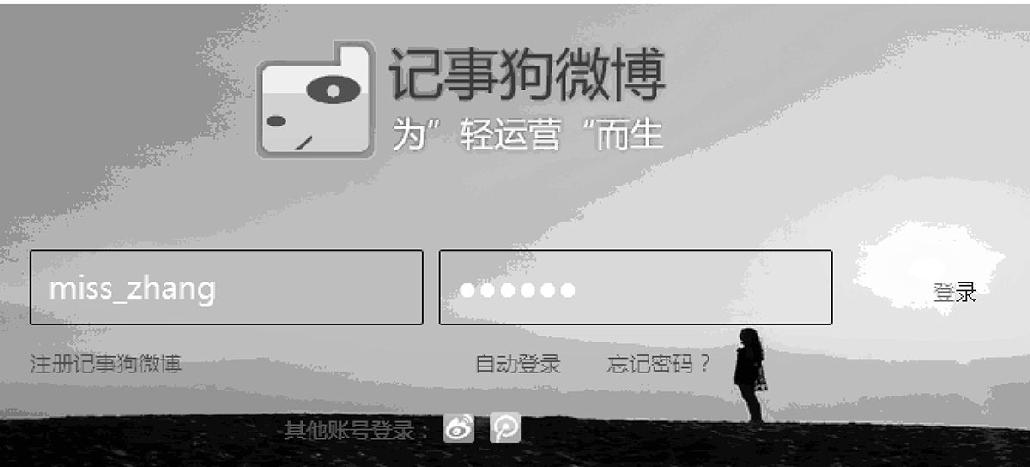
图12-10 登录界面
登录界面的模板关键代码如下。
View(视图层):login.tpl
  <div class="YXM-input YXM-input-w300">
  <span class="sub-wrap">
  <a class="YXM-logo-link" href="http://www.yinxiangma.com/" target=
  "_blank">印象码</a>
  </span>
  <span class="input-wrap"><input name="YinXiangMa_response" id=
  "seccodeverify_xyz_p" class="input-w210" type="text">
  </span>
  <span class="sub-wrap l_style"><a href="#" onclick="javascript:
  YinXiangMa.valid();return false;" class="sub-btn l_style">确定</a>
  </span><br class="YXM-clear">
  </div>
  <input name="YinXiangMa_pk" id="YinXiangMa_pk" value=
  "98583a76eb813b39381fdb1684908dc0" type="hidden">
  <input name="YinXiangMa_challenge" id="YinXiangMa_challenge" value=
  "ac1e50bca16ee61da4ff540192375b8b" type="hidden">
用户输入用户名和密码之后,将信息提交到服务器进行身份验证。验证信息的Controller关键代码如下。
  public function loginAction(){
  	 $_SESSION["username"]=$_GET["name"];
       $username = $_GET["name"];
  	$pw = $_GET["password"];
      //file_put_contents("d://a.txt",$pw);
      $db = new weiboModel("localhost","root","","weibo");
      $res = $db->login($username,$pw);
      echo $res;
  	  }
Model关键代码如下。
   public function login($username,$pw){
  	$sql = "select * from user where username="".$username."" and
  	password="".$pw.""";
  	 //file_put_contents("d://a.txt",$sql);
  	 $res = mysql_query($sql);
  	 if(mysql_affected_rows()>0){
  	   return "登录成功";
  	 }
  	}
12.3.3 微博主页面
该页面是这个网站的首页,主要显示自己以及关注的用户所发表的微博,以及对微博可进行的操作,如图12-11所示。
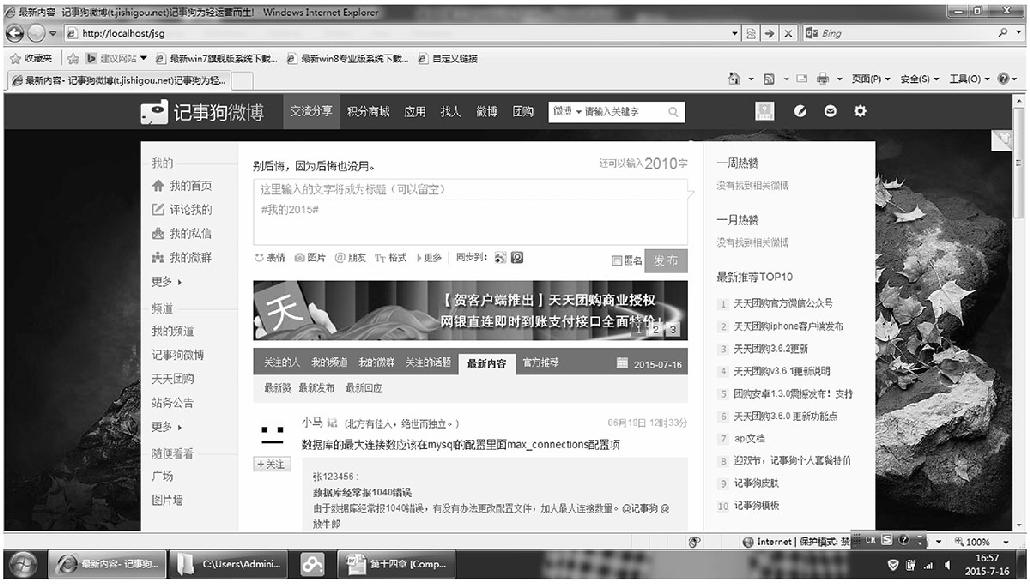
图12-11 首页
主页关键代码如下。
1.显示首页信息的Controller
     public function shouyeAction(){
  	//连接数据库
      $db = new weiboModel("localhost","root","","weibo");
  	//当前页数
  	$page = isset($_REQUEST["page"])?$_REQUEST["page"]:1;
  	//每页显示的数量
  	$pagesize = 3;
  	//每页跳过的个数
      $offest = $pagesize*($page-1);
      //获得总记录数
      $count = $db->weibo_count($_SESSION["username"]);
  	//file_put_contents("d://a.txt",$count);
      //获得具体的信息
      $weibo = $db->weibo_select($_SESSION["username"],$pagesize,$offest);
      $pagehelp = new pageHelper();
  	$pagehtml = $pagehelp->show($page,$count,$pagesize);

  	//获得个人信息
  	$info = $db->image_title($_SESSION["username"]);
  	//获得关注,粉丝个人微博总数
  	$this->smarty->assign("weibo",$weibo);
  	$this->smarty->assign("pagehtml",$pagehtml);
  	$this->smarty->assign("info",$info);
      $fans = $db->fans($_SESSION["username"]);
  	$attention = $db->attention($_SESSION["username"]);
  	$weibo_num = $db->weibo_num($_SESSION["username"]);
  	$this->smarty->assign("weibo_num",$weibo_num);
  	$this->smarty->assign("att_num",$attention);
  	$this->smarty->assign("fans_num",$fans);
  	$this->smarty->assign("name",$_SESSION["username"]);
  	$this->smarty->display("index.tpl");
  		 }
2.显示首页的Model
//统计关注人和登录人微博总数
public function weibo_count($name){
//获得个人微博总数
$db = "select count(*) from weibo where username="".$name.""";
$re = mysql_query($db);
$row = mysql_fetch_row($re);
$rr = $row;
//获得粉丝微博总数
$fans=array();
$attioner = mysql_query("select attentioner from attention where
username="miss_zhang"");
while($row = mysql_fetch_assoc($attioner)){
$fans[]=$row;
}
$result = array();
for($i=0;$i<count($fans);$i++){
$att = "select count(*) from weibo where username="".$fans[$i]
["attentioner"].""";
$res = mysql_query($att);
while($r = mysql_fetch_row($res)){
$result[]=$r[0];
}
}
$a = array_sum($result);
$b=array_sum($rr); //array(1) { [0]=> int(14) }
$array=array("0"=>$b,"1"=>$a);
return (array_sum($array));
}
//显示微博
public function weibo_select($name,$pagesize,$offest){
$db = "select weibo_content,user.username,time,image_title from weibo
join user on user.username=weibo.username where user.username="".$name.""
order by time desc limit $offest,$pagesize";
$re = mysql_query($db);
$arr = array();
while($row = mysql_fetch_assoc($re)){
$arr[]=$row;
}
// $mine = array($arr);
//查询粉丝
$attioner = mysql_query("select attentioner from attention where
username="".$name.""");
$fans = array();
while($row = mysql_fetch_assoc($attioner)){
$fans[]=$row;
//file_put_contents("d://c.txt",$row,FILE_APPEND);
}
$result = array();
$title = array();
for($i=0;$i<count($fans);$i++){
/* $att = "select * from weibo where username="".$fans[$i]
["attentioner"]."" order by time desc limit $offest,$pagesize";*/
$att = "select weibo_content,user.username,time,image_title from weibo
join user on user.username=weibo.username where user.username="".$fans[$i]
["attentioner"]."" order by time desc limit $offest,$pagesize";
//file_put_contents("d://s.txt",$att,FILE_APPEND);
$res = mysql_query($att);
while($rows = mysql_fetch_array($res)){
$result[]=$rows;
//file_put_contents("d://s.txt",$rows,FILE_APPEND);
}
}
$count=array("mine"=>$arr,"fans"=>$result);
return $count;
}
首页VIEW视图层:
<!DOCTYPE html PUBLIC "-//W3C//DTD XHTML 1.0 Transitional//EN" "http:
//www.w3.org/TR/xhtml1/DTD/xhtml1-transitional.dtd">
<html xmlns="http://www.w3.org/1999/xhtml"><head> <!-- base href="http:
//t.jishigou.net/" -->
<meta http-equiv="Content-Type" content="text/html; charset=utf-8">
<title> 我的首页- 记事狗微博(t.jishigou.net)</title>
<meta name="Keywords" content="记事狗微博">
<meta name="Description" content="分享发现">
<link rel="shortcut icon" href="http://t.jishigou.net/favicon.ico">
<link href="includes/styles/main.css" rel="stylesheet" type="text/css">
<link href="includes/styles/send.css" rel="stylesheet" type="text/css">
<link href="includes/styles/qun.css" rel="stylesheet" type="text/css">
<link href="includes/styles/hack.css" rel="stylesheet" type="text/css">
<link href="includes/styles/theme.css" rel="stylesheet" type="text/css">
<link href="includes/styles/img_slide.css" rel="stylesheet" type=
"text/css">
<script src="includes/jQuery/jquery-1.4.2.min.js"></script>
<script src="includes/jQuery/jQuery_title.js"></script>
<script src="includes/jQuery/jQuery_little.js"></script>
<script src="includes/jQuery/img_slide.js"></script>
<script src="includes/jQuery/zhuanzai.js"></script>
<script src="includes/jQuery/tongji.js"></script>
<script src="includes/jQuery/index.js"></script>
<script src="includes/jQuery/upload.js"></script>
<link href="includes/styles/zong.css" rel="stylesheet" type="text/css">
</head>
<body>
<div class="layout">
<div class="header">
<div class="headerNav">
<ul class="hleft">
<li class="logo">
<a href="http://t.jishigou.net/topic" title="记事狗微博">
<img src="includes/images/images_zhang/logo.png" style="_filter:
progid:DXImageTransform.Microsoft.AlphaImageLoader(enabled=true,
sizingMethod=crop)"></a>
</li>
<div class="btnSearch">
<a id="search_name"><span class="lbl"></span></a></div> </form> </div>
</li> </ul>
<ul class="hright">
<li style="width:150px;"><font style=" color:white; font-size:16px;">欢迎
<span id="admin_name"><{$name}></span>登录</font></li>
<li class="t_member">
<i href="/29001" title="我是管好这张嘴,点此访问个人主页"><img src=
"includes/images/images_zhang/noavatar.gif" class="member" onerror=
"javascript:faceError(this);"></i>
<ul class="t_member_box">
<li style="border:none;">
<p class="spr_weibo">
<a title="记事狗微博">我的首页</a></p> <p class="spr_info"><a>我的频道</a>
</p> <p class="spr_fav"><a href="index.php?c=shoucang&a=show_collect">
我的收藏</a></p> <p class="spr_qun"> <a href="http://t.jishigou.net/
topic/qun">
我的微群</a> </p> <p class="spr_logout"><a href="http://t.jishigou.net/
index.php?mod=login&code=logout" rel="nofollow">退出登录</a> </p> </li>
</ul> </li>
</ul> </li> <li class="pweibo" style="cursor:pointer;" title="发微博">
</li> </ul> </div> </div> <div class="topTips">
<div id="topic_index_left_ajax_list" class="fixedLeft" style="_height:
950px;"> <div class="leftNav">
<div class="blackBox"></div>
<ul class="leftNav_main">
<li class="myweibo">
<a href="" hidefocus="true" title="个人主页" target="_parent"><i></i><img
src="includes/images/images_zhang/myweibo_icon.jpg">个人主页</a> </li>
<li class="mydigout"> <a href="" hidefocus="true" title="我赞的" target=
"_parent"><i></i>
<img src="includes/images/images_zhang/mydigout_icon.jpg">我赞的</a></li>
<li class="mypm"> <a href="index.php?c=sixin&a=sixin&username=<{$name}>"
target="_blank" hidefocus="true" title="我的私信" target="_parent"><i></i>
<img src="includes/images/images_zhang/mypm_icon.jpg">我的私信</a> </li>
<li class="myfav"> <a href="index.php?c=shoucang&a=show_ collect&username=
<{$name}>" target="_blank" hidefocus="true" title="我的收藏" target=
"_parent"><i></i>
<img src="includes/images/images_zhang/myfav_icon.jpg">我的收藏</a> </li>
<li class="myhome"> <a href="index.php?c=select&a=select" hidefocus="true"
title="我的首页" target="_blank"><i></i><img src="includes/images/images_
zhang/myhome_icon.jpg">我的首页</a> </li>
</ul>
<div class="main"> <div class="mainWrap">
<style type="text/css">
ul.mycon li{ width:65px;}
#t_channel em{cursor:pointer;}
</style> <div id="send">
<!--发布微博-->
<div class="sendBox">
<div class="sendTitle">
<div id="send_follow" class="mleft"> 发布微博</div>
<ul class="mycon" id="zifu">
<li>您可以输入</li><li style="width:auto"><span id="wordCheck" style=
"font-size:20px;">1800</span></li><li style="width:14px;">字</li> </ul>
</div>
<div class="sendInput" style="display:block">
<textarea name="content" id="i_already" onkeyup="sum()">
</textarea>
</div>
<div class="sendInsert">
<div class="mleft">
<div class="menu">
<div class="menu_bq" id="editface">
<b class="menu_bqb_c"><a title="点击插入表情" style="color:#666;">表情
</a></b> </div> </div> <success></success>
<div class="menu">
<div class="menu_tq">
<b class="menu_tqb_c" title="可实现图文混排">图片</b></div> </div>
<div class="slide">
<!--图片自动切换-->
<div id="content">
<div class="content_right">
<div class="ad" >
<ul class="slider" id="ul_img">
<li><img style="border: 0px none;" src="includes/images/images_
zhang/1.jpg" alt="" height="100" width="650"></li>
<li><img style="border: 0px none;" src="includes/images/images_
zhang/2.jpg" alt="" height="100" width="650"></li>
<li><img style="border: 0px none;" src="includes/images/images_
zhang/3.jpg" alt="" height="100" width="650"></li>
</ul>
<ul class="num">
<li>1</li>
<li>2</li>
<li>3</li>
</ul>
</div>
</div>
</div>
</div>
<!--开始-->
<{foreach from=$weibo item=value}>
<{foreach from=$value item=va}>
<div class="wb_l_face">
<div class="avatar">
<a class="nude_face">
<img style="display: inline;" src="<{$va.image_title}>" class="lazyload">
</a> </div>
<span id="follow_13" class="follow_13">
<a class="follow_html2_2" title="已关注,点击取消关注"></a></span> </div>
<div class="Contant">
<div class="topicTxt">
<p class="utitle">
<!--用户名-->
<span class="un">
<a class="photo_vip_t_name" ><{$va.username}></a></span>
<!--<!--时间-->
<span style="display: block;" id="topic_lists_231560_time" class="ut">
<{$va.time}></span></p>
<!--内容-->
<div style="float:left; width:100%;"> </div>
<span id="topic_content_231560_short" class="topic_contnet"> <{$va.weibo_
content}> </span>
<div class="from">
<div class="option">
<ul>
<li style="_margin-top:-1px;">
<span><a class="topicdig_231560 digusers" id="topicdig_231560" title=
"赞"> </a></span></li>
<li class="o_line_l">|</li>
<li class="zhuanfa"><span><a style="cursor:pointer;">转发(2)</a></span>
</li>
<li class="o_line_l">|</li>
<li id="topic_list_reply_231560_aid" class="comt"><span><a style="cursor:
pointer;">评论(11)</a> </span> </li>
<li class="o_line_l">|</li>
<li id="topic_lists_231560_a" class="mobox"><a class="moreti"><span
class="txt">更多</span><span class="more"></span></a>
<div id="topic_lists_231560_b" class="molist" style="display:none">
<span id="favorite_231560" class="shoucang"> <a>收藏</a> </span>
<span><a target="_blank" title="去微博详细页面浏览">详情</a></span>
<a>删除</a> <span><a title="举报不良信息"><font color="red">举报</font>
</a></span>
</div>
</li>
</ul>
<div class="comment" style="display:none;position:relative;left:-300px;
top:10px;"><textarea cols="65" rows="2"></textarea><input type="button"
value="提交" style=" position:relative; right:-250px;"></div></div>
</div>
</div>
</div>
<{/foreach}>
<{/foreach}>
</div>
</div>
<div id="listTopicArea">
<div id="pagehtml" style=" position:relative; top:10px; left:100px;">
<!--分页-->
<{$pagehtml}>
</div>
</div>
</div> </div>
<div class="mainSide">
<div class="memberBox" style="*height:210px;">
<div class="person_info">
<div class="avatar2" id="m_avatar2">
<a href="" title="29001"><img src="<{$info.image_title}>"> </a>
<p class="name"> <a href=""><b><{$name}></b></a> </p>
<p style="display: none;" class="avatar2_tips" ><a href="index.php?c=
comment&a=pic&user=<{$info.username}>" target="_blank" id="avatar_
upload"><span>修改头像</span></a></p></div> <div class="avatar2_info"> <p
class="name"> <a href="index.php?c=update&a=admin&username="<{$info.
username}>"" target="_blank" title="@管好这张嘴"><b class="person_name">
<{$info.username}></b></a> </p> <div class="integral">积分:<a title="
点击查看我的积分" href="">12</a></div> <div class="edit_sign"> <span> <a
href="" title="编辑个人签名"> <{$info.sign}>
</a></span> </div> </div> </div> <div class="user_atten"> <div class=
"person_atten_l"> <p><span class="num"><a href="http://t.jishigou.net
/29001/follow" title="管好这张嘴关注的"><{$att_num}></a></span></p> <p><a
href="" title="管好这张嘴关注的">关注</a> </p> </div> <div class="person_
atten_l"> <p><span class="num"><a href="" title="关注管好这张嘴的"><{$fans_
num}></a></span></p> <p><a href="" title="关注管好这张嘴的">粉丝</a> </p>
</div> <div class="person_atten_l"> <p><span class="num"><a href="" title="
管好这张嘴的微博"><{$weibo_num}></a></span></p> <p><a href="" title="管好这
张嘴的微博">微博</a> </p> </div> <div cc2.gif" style="padding:0 0 2px
4px;cursor:pointer;opacity: 0.7;"></span> </div></li> <div id="alert_
follower_menu_13863"></div> <div id="Pmsend_to_user_area"></div> <div
id="global_select_13863" class="alertBox"></div> <div id="button_13863">
</div> <li class="pane" id="follow_user_19561"> <div class="fBox_l"><img
onerror="javascript:faceError(this);" </div>
<div style="clear:both;text-align:center;margin:5px auto;">Powered by <a
href="http://www.jishigou.net/" target="_blank"><strong>JishiGou 4.0.1
</strong></a><span> © 2005 - 2013 <a href="http://www.cenwor.com/"
target="_blank">Cenwor Inc.</a></span></div><div id="topicdiguser"></div>
<div id="topicrcduser"></div>
</body>
</html>
判断微博是否发布成功的Controller:
public function insert_weiboAction(){
$content = $_REQUEST["content"];
$name = $_REQUEST["name"];
$db = new weiboModel("localhost","root","","weibo");
$res = $db->insert_weibo($name,$content);
//echo $res;
if($res=="发布成功"){
// echo "hello";
$sele = $db->select_weibo($name);
$array = array("str"=>$res,"info"=>$sele);
echo json_encode($array);
//file_put_contents("d://yuyu.txt",json_encode($array));
} }
3.判断微博是否转载成功的Controller
   public function zhuanzaiAction(){
      $username = $_REQUEST["username"];
  	$name = $_REQUEST["name"];
  	$content = $_REQUEST["content"];
  	//file_put_contents("d://a.txt",$name);
  	$db = new zhuanzaiModel("localhost","root","","weibo");
  	$re = $db->zhuanzai($username,$name,$content);
  	echo $re;
     //file_put_contents("d://a.txt",$re);
    }
4.判断微博是否转载成功的Model
   class zhuanzaiModel extends baseModel{
    public function zhuanzai($username,$name,$content){
  	  $re;
      if($username!=$name){
  	$sql = "insert into reship values(null,"".$content."","".$username."",
  		"".$name."")";
  	mysql_query($sql);
  	if(mysql_affected_rows()>0){
  	$re = "转载成功!";
  	}}
  	else{
  	$re = "抱歉,您不能转载自己的";
  	}
  	return $re;
  	//file_put_contents("d://a.txt",$sql);
    }
  }
5.收藏微博的Controller
   public function shoucangAction(){
  	  $_SESSION["username"]=$_REQUEST["username"];
      $username = $_REQUEST["username"];
  	$name = $_REQUEST["name"];
  	$content = $_REQUEST["content"];
  	//file_put_contents("d://a.txt",$name);
  	$db = new collectModel("localhost","root","","weibo");
  	$re = $db->collect($username,$name,$content);
  	echo $re;
  }
6.显示收藏微博的Controller
    public function show_collectAction(){
  	  $db = new weiboModel("localhost","root","","weibo");
  	  $info = $db->image_title($_SESSION["username"]);
  	  $this->smarty->assign("info",$info);
  	  $fans = $db->fans($_SESSION["username"]);
  	  $attention = $db->attention($_SESSION["username"]);
  	  $weibo_num = $db->weibo_num($_SESSION["username"]);
  	  $this->smarty->assign("weibo_num",$weibo_num);
  	  $this->smarty->assign("att_num",$attention);
  	  $this->smarty->assign("fans_num",$fans);
  	  $this->smarty->assign("name",$_SESSION["username"]);

  	  //显示收藏信息
  	  $coll = new collectModel("localhost","root","","weibo");
  	  $res = $coll->select($_SESSION["username"]);
  	  $this->smarty->assign("array",$res);
        $this->smarty->display("shoucang.htm");
    }
收藏微博页面显示的是用户收藏的微博,对收藏的微博可以进行编辑、删除操作,如图12-12所示。
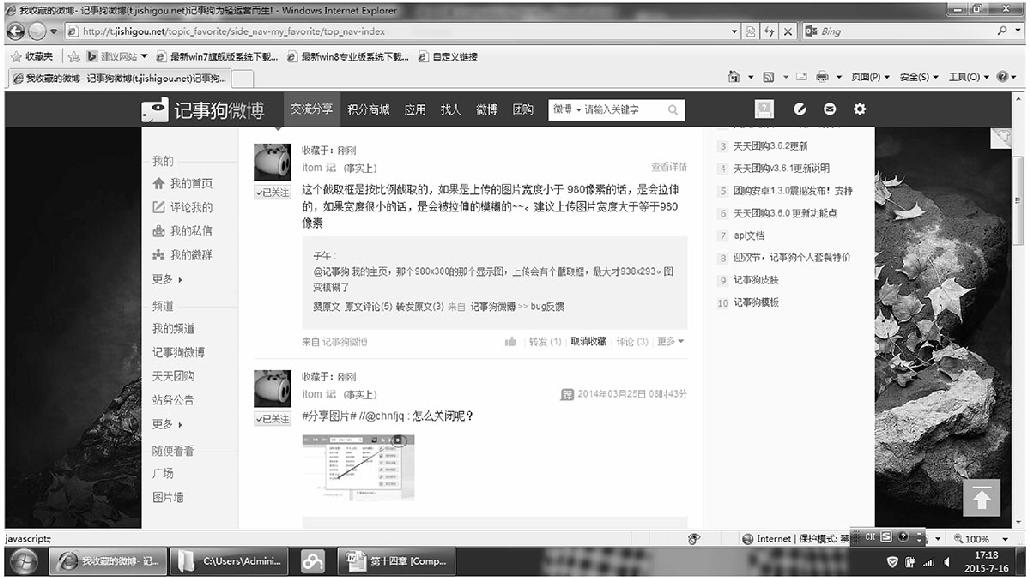
图12-12 收藏页面
7.显示收藏信息的视图(View)
   <{foreach from=$array item=value}>
    <div class="Contant">
    <div class="topicTxt">
   <!--内容-->
  <div style="float:left; width:100%;" class="cont">
  <table width="630px" class="table">
  <tr class="tr">
  <td width="760" class="col_id">
  <span style="display:none" class="va_id"><{$value.id}></span>
  <span class="topic_contnet"> <b><font style="font-size:16px;" class=
  "cont"><{$value.weibo_content}></font></b></span></td>
  <td width="340" align="right"><span style=""><{$value.time}></span> </td>
  <td width="230" align="right"><span style=""> 来自<{$value.publisher}>
  </span> </td>
  <td width="200" align="right"><span class="delete" style=" cursor:
  pointer;">删除 </span><span class="edit" style=" cursor:pointer;">编辑
  </span>  </td>
  </tr>
  </table>
  </div>
   </div>
   </div>
  <{/foreach}>
  </div>
   </div>

   <div id="listTopicArea">
     <div id="pagehtml" style=" position:relative; top:10px; left:100px;">
    <{$pagehtml}>
8.删除收藏信息的Controller
  public function delete_colAction(){
  	  $id = $_REQUEST["id"];
  	  $db = new collectModel("localhost","root","","weibo");
  	  $res = $db->delete_col($id);
  	  echo $res;
     }
9.更新收藏信息的Controller
  public function update_colAction(){
       $cont = $_REQUEST["cont"];
  	 $id = $_REQUEST["id"];
       $db = new collectModel("localhost","root","","weibo");
       $res = $db->update_col($cont,$id);
  	 //echo $res;
  	 if($res = "更新成功"){
  	  $re = $db->select_up($id);
  	  $a = array("str"=>$res,"info"=>$re);
  	  echo json_encode($a);
  	 }
    }