
10.10数据分页显示
时间:2020/8/31 20:52:25阅读:
10.10数据分页显示
10.10 数据分页显示
学习目标
学习如何实现数据分页显示。
数据分页显示向来是Web程序开发必须面对的一个问题,开发ASP.NET MVC Web应用程序也不例外。ASP.NET主要是使用System.Data.DataTable来构造输出分页,分页显示效果如图10-25所示,下面分步骤给出实现方法。
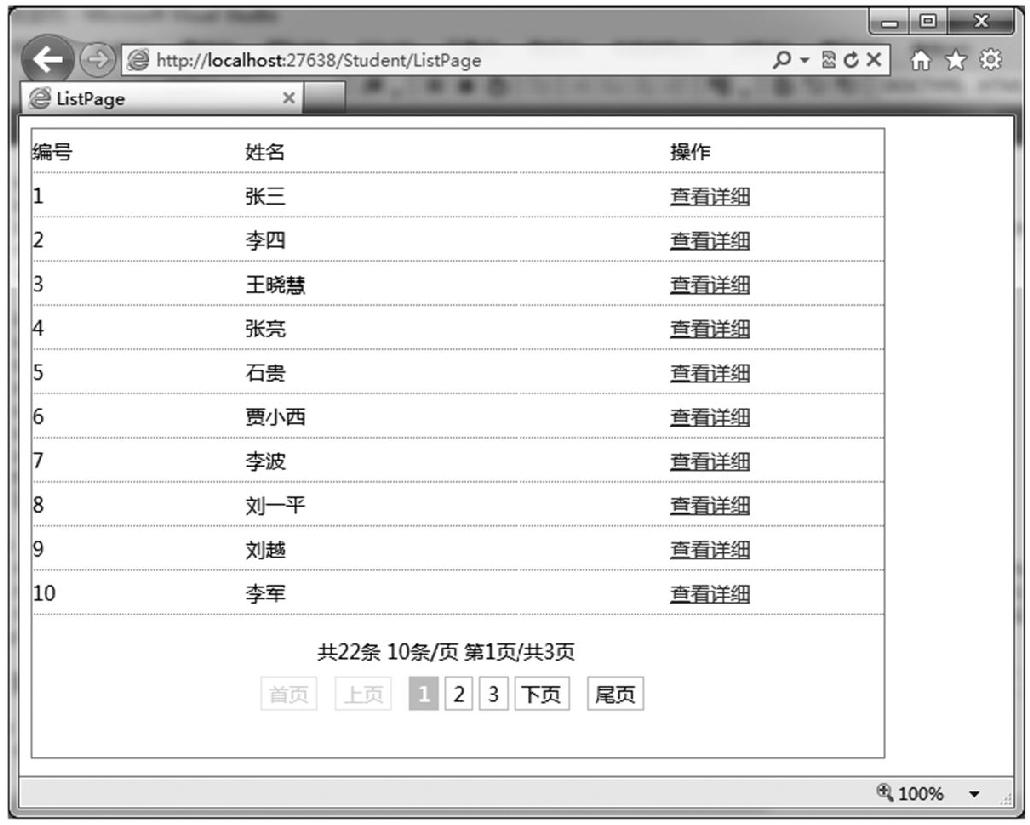
图10-25 访问/Student/ListPage显示效果
(1)在项目Student_MvcApplication中,在Models文件夹添加一个类文件Common.cs,下面给出Common.cs源代码。
public class Common
{
// 判断非数字
public static bool IsNumber(string str)
{
bool result = true;
string msg = "0123456789";
for (int i = 0; i < str.Length; i++)
{
if (msg.IndexOf(str[i]) == -1)
{
result = false;
break;
}
}
return result;
}
// 专门为分页处理定义的方法,处理page的取值
public static int GetPage(string pagestring, int
pagecount)
{
int page;
if (pagestring == null)
{
page = 1;
}
else if (!Common.IsNumber(pagestring))
{
page = 1;
}
else if (Convert.ToInt32(pagestring) < 1)
{
page = 1;
}
else if (Convert.ToInt32(pagestring) > pagecount)
{
page = pagecount;
}
else
{
page = Convert.ToInt32(pagestring);
}
return page;
}
// 获取startpageno
public static int GetStartPageno(int minpageno, int maxpageno,
int pagecount, int page, out int endpageno)
{
int startpageno;
if (minpageno > pagecount)
{
endpageno = pagecount;
}
else
{
endpageno = minpageno + (page - 1);
if (endpageno > pagecount)
{
endpageno = pagecount;
}
}
if (endpageno < maxpageno)
{
startpageno = 1;
}
else
{
startpageno = endpageno - maxpageno + 1;
}
return startpageno;
}
// 完成分页效果显示功能
public static void ShowPage(int recordcount, int pagesize,
int page, int pagecount, int startpageno, int endpageno,
string url)
{
HttpContext.Current.Response.Write("<div style="
height:80px;text-align:center;" class="page">");
HttpContext.Current.Response.Write("共" + recordcount.ToString()
+ "条"+pagesize.ToString()+"条/页 第"+ page.ToString()+"
页/共" + pagecount.ToString() + "页");
HttpContext.Current.Response.Write("  
;<br />");
if (page == 1)
{
HttpContext.Current.Response.Write("<span class="disabled">
首页</span> ");
HttpContext.Current.Response.Write("<span class="disabled">
上页</span> ");
}
else
{
HttpContext.Current.Response.Write("<a href=""
+ url + "page=1">首页</a> ");
HttpContext.Current.Response.Write("<a href="" +url+"
page="+(page-1).ToString()+"">上页</a> ");
}
for (int i = startpageno; i <= endpageno; i++)
{
if (page == i)
{
HttpContext.Current.Response.Write("<span
class="current">" + i.ToString() + "</span>");
}
else
{
HttpContext.Current.Response.Write("<a href=""+url+
"page="+i.ToString()+"">" + i.ToString()+"</a>");
}
}
if (page == pagecount)
{
HttpContext.Current.Response.Write("<span class="disabled">
下页</span> ");
HttpContext.Current.Response.Write("<span class="disabled">
尾页</span> ");
}
else
{
HttpContext.Current.Response.Write("<a href=""+url+"page="
+(page+1).ToString()+ "">下页</a> ");
HttpContext.Current.Response.Write("<a href=""+ url+"
page="+pagecount.ToString()+"">尾页</a> ");
}
HttpContext.Current.Response.Write("</div>");
}
}
(2)增加Student控制器的一个新的方法ListPage,源码如下。
public ActionResult ListPage()
  {
    string sql = "select id,name from student order by id asc";
    ViewBag.StudentList = db.GetTable(sql);
    return View();
  }
(3)给Student控制器的ListPage方法增一个视图ListPage.aspx,接下来给出视图ListPage.aspx核心代码。
…
<div>
  <table cellpadding="0" cellspacing="0" style="width: 600px; border:
  1px solid #ff6a00; padding: 0px; margin: 0px;">
    <tr>
       <td style="width: 150px; height: 30px; border-bottom: 1px
       dotted #ff6a00;">编号</td>
       <td style="width:300px;height:30px;border-bottom:1px
       dotted #ff6a00;">姓名</td>
       <td style="width:150px;height:30px;border-bottom:1px
       dotted #ff6a00;">操作</td>
    </tr>
    <%
       System.Data.DataTable table=ViewBag.StudentList;
       int recordcount = table.Rows.Count;
       int pagesize = 10;
          int pagecount=Convert.ToInt32(Math.Ceiling(Convert.ToDouble
          (recordcount) / Convert.ToDouble(pagesize)));
          string pagestring = Request.QueryString["page"];
          int page=Common.GetPage(pagestring, pagecount);
          int startindex = (page - 1) * pagesize;
          int endindex = pagesize * page - 1;
          if (endindex>=recordcount-1)endindex= recordcount-1;
          int minpageno = 5;//最少页号个数 起始页号数
          int maxpageno = 10;//最多页号个数
          int endpageno;
          int startpageno = Common.GetStartPageno(minpageno,
          maxpageno,
          pagecount, page, out endpageno);
          for (int i = startindex; i <= endindex; i++)
          {
       %>
       <tr>
          <td style="height: 30px; border-bottom: 1px dotted
          #ff6a00;"><%=table.Rows[i]["id"].ToString () %></td>
          <td style="height: 30px; border-bottom: 1px dotted
          #ff6a00;"><%=table.Rows[i]["name"].ToString () %></td>
          <td style="height: 30px; border-bottom: 1px dotted
          #ff6a00;"><a href="/Student/Detail/<%=table.Rows[i]
          ["id"].ToString () %>">查看详细</a></td>
       </tr>
       <%
          }
       %>
       <tr>
          <td colspan="3" style="line-height: 30px;">
              <% Common.ShowPage(recordcount, pagesize, page,
              pagecount, startpageno, endpageno, "?");%>
          </td>
       </tr>
    </table>
  </div>
…
(4)其中,Common.ShowPage方法中引用到样式中class=page,是专门用来定义分页显示样式的,必须要引用到分页的页面中,接下来给出class=page的完整样式定义代码。
<style type="text/css">
  * {
    font-size: 14px;
    font-family:微软雅黑,宋体;
  }
  /* -- 分页-*/
  .page {
    padding-right: 7px;
    padding-left: 7px;
    padding-bottom: 7px;
    margin: 3px;
    padding-top: 7px;
    text-align: center;
  }
    .page a {
       border-right: #ccc 1px solid;
       padding-right: 5px;
       border-top: #ccc 1px solid;
       padding-left: 5px;
       padding-bottom: 2px;
       margin: 2px;
       border-left: #ccc 1px solid;
       color: #000;
       padding-top: 2px;
       border-bottom: #ccc 1px solid;
       text-decoration: none;
    }
       .page a:hover {
          border-right: #f0f0f0 1px solid;
          border-top: #f0f0f0 1px solid;
          border-left: #f0f0f0 1px solid;
          color: #ff0000;
          border-bottom: #f0f0f0 1px solid;
       }
       .page a:active {
          border-right: #f0f0f0 1px solid;
          border-top: #f0f0f0 1px solid;
          border-left: #f0f0f0 1px solid;
          color: #000;
          border-bottom: #f0f0f0 1px solid;
       }
    .page span.current {
       border-right: #d9d300 1px solid;
       padding-right: 5px;
       border-top: #d9d300 1px solid;
       padding-left: 5px;
       font-weight: bold;
       padding-bottom: 2px;
       margin: 2px;
       border-left: #d9d300 1px solid;
       color: #fff;
       padding-top: 2px;
       border-bottom: #d9d300 1px solid;
       background-color: #d9d300;
    }
    .page span.disabled {
       border-right: #eee 1px solid;
       padding-right: 5px;
       border-top: #eee 1px solid;
       padding-left: 5px;
       padding-bottom: 2px;
       margin: 2px;
       border-left: #eee 1px solid;
       color: #ddd;
       padding-top: 2px;
       border-bottom: #eee 1px solid;
    }
  </style>
通常都是把这些定义代码写到具体的css样式文件中,然后通过主题theme或者link标签引用到网页中。运行访问ListPage.aspx这个视图,就能看到如图10-25所示的效果了。
完整代码参见:/Code/ch10/Student_MvcApplication/ListPage。
下一篇:10.11本章小结