
11.5网站前台主页index.html设计
11.5 网站前台主页index.html设计
学习目标
学习网站前台的设计。
通常企业宣传网站的功能模块不是很多,主要是页面设计要大气、国际化;而且,能让浏览用户看完后眼前一亮,当然同时,也能让浏览用户能够快速找到自己想要浏览的内容。
本节对前台主页index.html的设计效果做代码分析,完整网站前台HTML设计页面可参见:/Code/ch11/html。
11.5.1 前台主页index.html预览效果
设计好的前台主页index.html预览效果如图11-39所示。
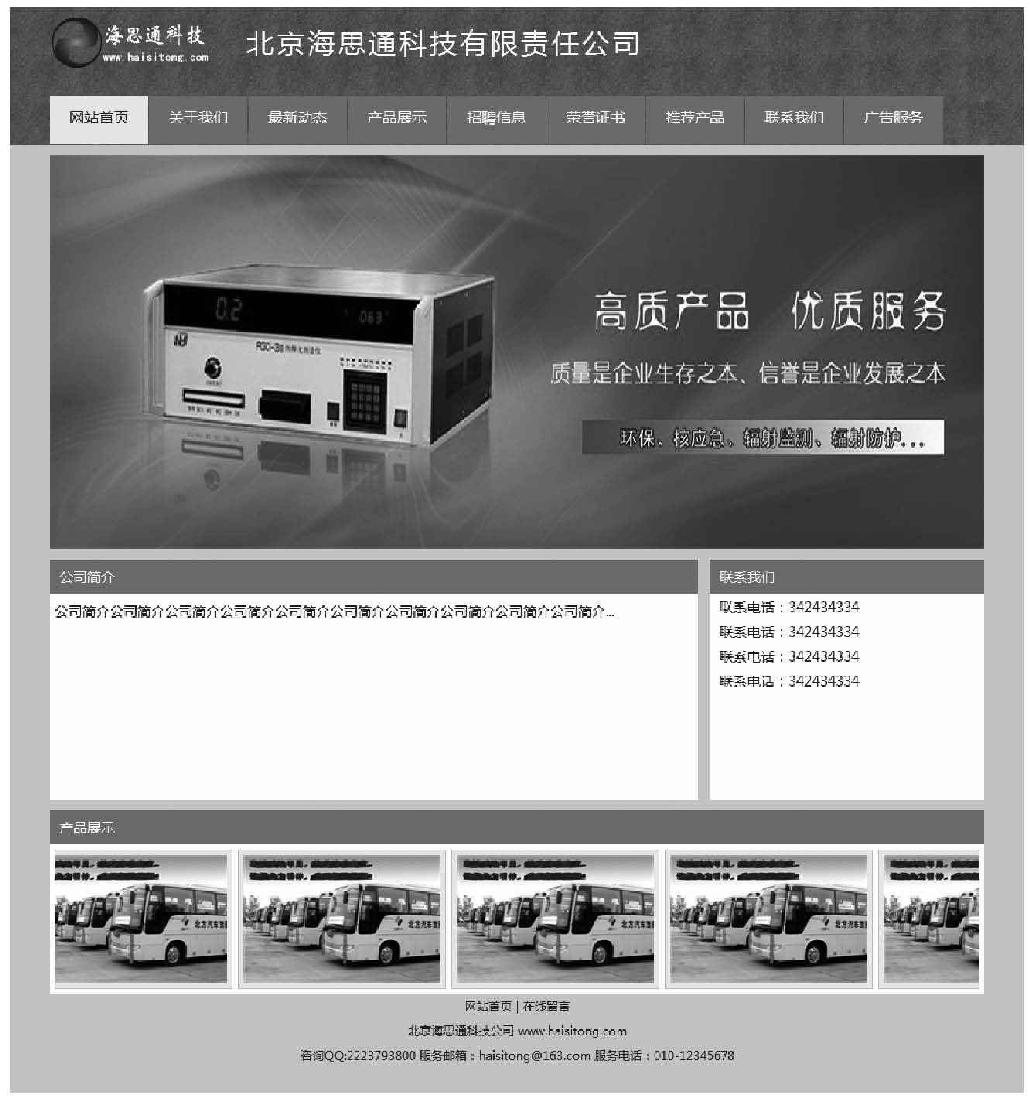
图11-39 前台主页index.html预览效果
11.5.2 前台主页index.html样式css文件
首先,要设计页面的css文件,当然也可以在设计过程中不断完善css样式文件的编写。这里给出css样式文件的完整源代码。
  @charset "utf-8";
  /* CSS Document */
  * {
    margin: 0;
    padding: 0;
    font-family:微软雅黑,宋体;
    font-size: 14px;
    color: #333333;
    line-height: 25px;
  }
  body {
    background-image: url(../images/top_bg.jpg);
    background-repeat: repeat-x;
    background-color: #d5d5d7;
  }
  div {margin: 0 auto; }

  a {color: #333333; text-decoration: none;}
  a:hover { color: #ff0000; text-decoration: underline;}
  a img { border: 0px; }
  .btn {
    text-align: center;
    width: 120px;
    height: 40px;
    margin: 5px;
    letter-spacing: 3px;
    padding-left: 10px;
    padding-right: 10px;
    font-size: 14px;
    color: #333;
    font-family:微软雅黑,宋体;
  }
  .txt {
    border: 1px solid #ccc;
    width: 360px;
    padding-top: 7px;
    height: 28px;
    padding-left: 5px;
    color: #116685;
    font-size: 12px;
    font-family:微软雅黑,宋体;
  }
  textarea {
    border: 1px solid #ccc;
    padding-left: 5px;
    color: #116685;
    font-size: 12px;
    font-family:微软雅黑,宋体;
  }
  /*top*/
  .top {width: 950px;border: 0px solid #fff; margin-top: 10px; height: 65px;}
  .top .logo { float: left; width: 200px;}
  .top .company {
       float: left;
       font-size: 28px;
       color: #fff;
       letter-spacing: 3px;
       line-height: 50px;
  }
  .nav {
    width: 950px;
    border: 0px solid #fff;
    margin-top: 15px;
    height: 50px;
    color: #fff;
  }
  .nav ul {list-style: none; }
  .nav ul li {
          list-style: none;
          float: left;
          height: 40px;
          margin-right: 1px;
          width: 100px;
          text-align: center;
          padding-top: 9px;
          cursor: pointer;
          font-size: 15px;
  }
  .nav ul li:hover { color: #333; background-color: #eee; }
  .nav .common { color: #fff; background-color: #2aa226; }
  .nav .current { color: #333;background-color: #eee;}
  .foot {width: 950px;text-align: center;font-size: 12px;}
  .foot a {font-size: 12px;}
  /*about*/
  .news {
    min-height: 160px;
    background-color: #fff;
    font-size: 12px;
    padding: 10px;
  }
  .news ul li {
       list-style: none;
       font-size: 12px;
       background-image: url(../images/arrow.jpg);
       background-repeat: no-repeat;
       background-position: left;
       padding-left: 15px;
       border-bottom: 1px dotted #ccc;
       height: 30px;
    }
  .news ul li a {font-size: 12px;}
  .news ul li .title {float: left;width: 500px;}
  .news ul li .date {float: right;font-size: 12px;color: #999;}
从首页预览效果可以看出,主页index.html的结构是上、中、下结构模式,首先是顶部导航设计,然后是中间内容显示设计,最后是网页底部信息设计。
11.5.3 主页index.html顶部导航设计
主页index.html顶部导航显示效果如图11-40所示。

图11-40 主页index.html顶部导航显示效果
设计HTML脚本代码如下:
  <!--top-->
  <div class="top">
    <div class="logo"><img src="images/logo.png" /></div>
    <div class="company">北京海思通科技有限责任公司</div>
  </div>
  <!--top-->

  <!--nav-->
  <div class="nav">
       <ul>
          <li class="current">网站首页</li>
          <li class="common">关于我们</li>
          <li class="common">最新动态</li>
          <li class="common">产品展示</li>
          <li class="common">招聘信息</li>
          <li class="common">荣誉证书</li>
          <li class="common">推荐产品</li>
          <li class="common">联系我们</li>
          <li class="common">广告服务</li>
       </ul>
  </div>
  <!--nav-->
这里主要采用的是div+css来排版实现的显示效果,所以关键是要理解css文件中的样式定义中的每个关键词的含义和显示效果。
11.5.4 主页index.html焦点图部分
网页焦点图效果,通常可以在网络上直接下载,然后在主页index.html中使用iframe嵌入焦点图显示页面,这样,修改维护非常方便,主页index.html焦点图部分代码如下。
  <!--focus-->
  <div style=" width:950px; margin-top:10px;">
  <iframe src="focus/index.html" width="950" height="401"
  frameborder="0" scrolling="no"></iframe>
  </div>
  <!--focus-->
11.5.5 主页index.html中间内容显示设计
中间内容显示,主要是一个左右结构,依次显示公司简介、联系方式,这里给出中间部分HTML脚本源代码。
<div style=" width:950px; margin-top:10px;">
<table cellpadding="0" cellspacing="0" style=" width:950px;">
<tr>
<td height="35" align="left" style=" background-color:#2aa226;
color:#fff; padding-left:10px;">公司简介</td>
<td height="35" align="right"> </td>
<td height="35" align="left" style=" background-color:#2aa226;
color:#fff; padding-left:10px;">联系我们</td>
</tr>
<tr>
<td width="666" align="left" valign="top">
<table cellpadding="0" cellspacing="0" style=" width:100%;
background-color:#fff;">
<tr>
<td align="left" valign="top" style=" padding:
5px; height:200px;">
公司简介公司简介公司简介公司简介公司简介公司简介公司简
介公司简介公司简介公司简介...
</td>
</tr>
</table>
</td>
<td width="12"> </td>
<td width="270" align="left" valign="top" style=" backgroundcolor:#fff; padding-left:10px;">
联系电话:342434334<Br />
联系电话:342434334<Br />
联系电话:342434334<Br />
联系电话:342434334<Br />
</td>
</tr>
</table>
</div>
11.5.6 底部滚动图显示效果设计
底部滚动图显示效果代码依然可以从网络上直接下载,稍微修改一下即可使用。接下来给出底部滚动图显示效果完整脚本代码。
  <div style=" width:950px; background-color:#fff; margin-top:10px;">
  <table cellpadding="0" cellspacing="0" style=" width:950px;">
  <tr>
    <td height="35" align="left" style=" background-color:#2aa226;
    color:#fff; padding-left:10px;">产品展示</td>
    </tr>
    <tr>
    <td>
  <!--下面是向左滚动代码-->
    <div id="colee_left" style="overflow:hidden;width:940px;">
    <table cellpadding="0" cellspacing="0" border="0">
    <tr>
       <td id="colee_left1" valign="top" align="center">
          <table cellpadding="5" cellspacing="5" border="0"
          id="mytable">
              <tr align="center">
                 <td style=" border:1px solid #ccc; backgroundcolor:#eee"><p style=" margin:5px;"><a href
                 ="#"><imgsrc="images/p1.png" width="200"
                 height="130" border="0" /><a></p>

                </td>
                <td style=" border:1px solid #ccc; backgroundcolor:#eee"><p style=" margin:5px;"><a href=
                "#"><img src="images/p1.png" width="200"
                height="130" border="0" /><a></p>

                </td>
                <td style=" border:1px solid #ccc; backgroundcolor:#eee"><p style=" margin:5px;"><a href=
                "#"><img src="images/p1.png" width="200" height
                ="130" border="0" /><a></p>

                </td>
                <td style=" border:1px solid #ccc; backgroundcolor:#eee"><p style=" margin:5px;"><a href=
                "#"><img src="images/p1.png" width="200" height=
                "130" border="0" /><a></p>

                </td>
                <td style=" border:1px solid #ccc; backgroundcolor:#eee"><p style=" margin:5px;"><a href=
                "#"><img src="images/p1.png" width="200" height
                ="130" border="0" /><a></p>

                </td>
                <td style=" border:1px solid #ccc; backgroundcolor:#eee"><p style=" margin:5px;"><a href=
                "#"><img src="images/p1.png" width="200" height
                ="130" border="0" /><a></p></br><br/>
                </td>
                <td style=" border:1px solid #ccc; backgroundcolor:#eee"><p style=" margin:5px;"><a href=
                "#"><img src="images/p1.png" width="200" height
                ="130" border="0" /><a></p>

                </td>
                <td style=" border:1px solid #ccc; backgroundcolor:#eee"><p style=" margin:5px;"><a href=
                "#"><imgsrc="images/p1.png" border="0"/><a></p>

                </td>
            </tr>
       </table>
    </td>
    <td id="colee_left2" valign="top"></td>
    </tr>
    </table>

    </div>
    <script>
    //使用div时,请保证colee_left2与colee_left1是在同一行上.
    var speed=30//速度数值越大速度越慢
    var colee_left2=document.getElementById("colee_left2");
    var colee_left1=document.getElementById("colee_left1");
    var colee_left=document.getElementById("colee_left");
    colee_left2.innerHTML=colee_left1.innerHTML
    function Marquee3(){
    if(colee_left2.offsetWidth-colee_left.scrollLeft<=0)//offsetWidth
    是对象的可见宽度
    colee_left.scrollLeft-=colee_left1.offsetWidth//scrollWidth是对
    象的实际内容的“宽度”,不包括边线宽度
    else{
    colee_left.scrollLeft++
    }
    }
    var MyMar3=setInterval(Marquee3,speed)
    colee_left.onmouseover=function() {clearInterval(MyMar3)}
    colee_left.onmouseout=function() {MyMar3=setInterval(Marquee3,s
    peed)}
    </script>
  <!--向左滚动代码结束-->
    </td>
    </tr>
    </table>
  </div>
11.5.7 主页index.html底部信息设计
最下面底部显示的通常是一些版权信息,一般都是居中显示,设计比较简单,接下来直接给出这一部分完整HTML脚本代码。
<!--foot-->
<div class="foot">
<a href="index.php">网站首页</a> | <a href="message.php">在线留言</
a><br />
<a href="http://www.haisitong.com/" target="_blank">北京海思通科
技公司</a> <a href="http://www.haisitong.com/" target="_blank"
>www.haisitong.com</a><br />
咨询QQ:2223793800服务邮箱:haisitong@163.com服务电话:010-12345678<br
/><br />
</div>
<!--foot-->
上一篇:11.4网站后台管理系统
下一篇:11.6网站前台功能实现