
11.6网站前台功能实现
11.6 网站前台功能实现
学习目标
学习网站后台的实现。
企业宣传网站前台涉及的页面并不是很多,功能主要涉及主页index、最新动态NewsList、产品展示ProdList、关于我们About、最新动态详细NewsDetail、产品展示详细ProdDetail,可以创建一个HomeController控制器,在其中创建功能方法及其对应的视图页面即可。
11.6.1 前台顶部top、底部foot用户控件页面
通常多数Web网站每个页面的顶部top信息和底部foot信息都是一样的,在ASP.NET中可以制作顶部top的用户控件和底部foot的用户控件来实现页面重用。而在MVC 4项目中,通常创建的用户控件都放在Views文件夹中。接下来以顶部top用户控件为例来说明创建用户控件的方法。
(1)项目Company_MvcApplication的“Views”文件夹,如图11-41所示。
(2)然后依次选择“添加”|"Web用户控件”命令,弹出如图11-42所示的对话框。
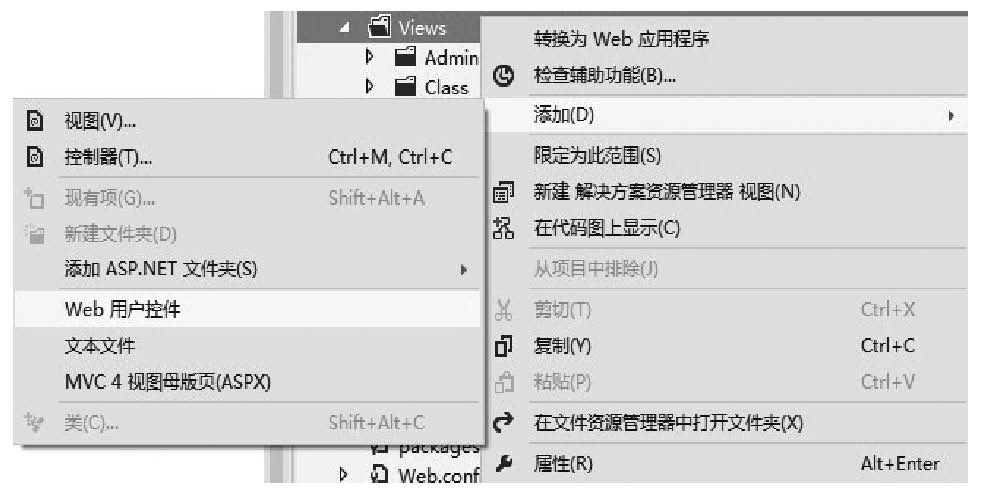
图11-41 选择添加Web用户控件项目
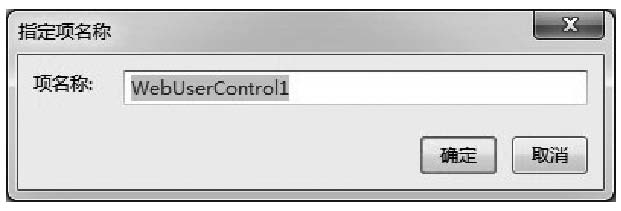
图11-42 设置Web用户控件文件名称
(3)这里设置文件名为“TopUserControl",然后单击“确定”按钮,系统就会在Views文件夹中生成一个名称为TopUserControl.ascx的文件,即为创建好的Web用户控件页面,默认情况下页面代码如下。
<%@ Control Language="C#" AutoEventWireup="true"
CodeBehind="WebUserControl1.ascx.cs" Inherits="Company_
MvcApplication.Views.TopUserControl" %>
(4)接下来,就直接在下面编排显示效果就可以了,用户自定义的TopUserControl.ascx这个Web用户控件的完整源代码如下。
<%@ Control Language="C#" AutoEventWireup="true" CodeBehind="
TopUserControl.ascx.cs" Inherits="Company_MvcApplication.Views
.TopUserControl" %>
<%@ Import Namespace="Company_MvcApplication.Models" %>
<!--top-->
<div class="top">
    <div class="logo">
        <img src="<%:Common.GetConfig("logo") %>" />
    </div>
    <div class="company"><%: Common.GetConfig("company") %></div>
</div>
<!--top-->
<!--nav-->
<div class="nav">
    <ul>
       <li class="current" onclick="location.href="/Home/
       Index"">网站首页</li>
       <li class="common" onclick="location.href="/Home/
       NewsList"">最新动态</li>
       <li class="common" onclick="location.href="/Home/
       ProdList"">产品展示</li>
       <%
          for (int i = 4; i < 10; i++)
          {
       %>
          <li class="common"
          onclick="location.href="/Home/About/<%:i.ToString() %>"">
          <%:Common.GetFixRow(i)["title"] %></li>
       <%
          }
       %>
    </ul>
</div>
<!--nav-->
通过上述代码,容易看出,其实就是把前面讲的网站前台主页index.html设计中的顶部HTML代码复制到其中,然后把程序代码添加其中,使得其中显示的数据从数据库读取出来。用类似的方法可以创建FootUserControl.ascx,接下来也给出FootUserControl.ascx这个Web用户控件完整代码。
<%@ Control Language="C#" AutoEventWireup="true" CodeBehind="
FootUserControl.ascx.cs" Inherits="Company_MvcApplication.Views.
FootUserControl" %>
<%@ Import Namespace="Company_MvcApplication.Models" %>

<div style="width: 950px; background-color: #fff; margin-top: 10px;">
    <table cellpadding="0" cellspacing="0" style="width: 950px;">
       <tr>
          <td height="35" align="left" style="background-color:
          #2aa226; color: #fff; padding-left: 10px;">产品展示</td>
       </tr>
       <tr>
          <td>
              <!--下面是向左滚动代码-->
              <div id="colee_left" style="overflow: hidden;
              width: 940px;">
                   <table cellpadding="0" cellspacing="0"
              border="0">
                       <tr>
                           <td id="colee_left1" valign="top"
              align="center">
                              <table cellpadding="5" cellspacing
              ="5" border="0" id="mytable">
                                  <tr align="center">
       <%

       System.Data.DataTable table = Common.GetProdTable();
       for (int i = 0; i < table.Rows.Count; i++)
       {
       %>
       <td style="border: 1px solid #ccc; background-color: #eee">
       <p style="margin: 5px;">
<a href="/Home/ProdDetail/<%:table.Rows[i]["id"] %>" target="_blank">
<img src="<%:table.Rows[i]["pic"] %>" width="200" height="130"
border="0" /><a>
       </p>
       </td>
       <%
       }
       %>
                                  </tr>
                              </table>
                           </td>
                           <td id="colee_left2" valign="top"></td>
                       </tr>
                   </table>
              </div>
              <script>
                   //使用div时,请保证colee_left2与colee_left1是在
                       同一行上
                       var speed = 30//速度数值越大速度越慢
                       var colee_left2 = document.getElementById
                   ("colee_left2");
                   var colee_left1 = document.getElementById
                   ("colee_left1");
                   var colee_left = document.getElementById
                   ("colee_left");
                   colee_left2.innerHTML = colee_left1.innerHTML
                   function Marquee3() {
                       if (colee_left2.offsetWidth - colee_left.
                       scrollLeft <= 0)//offsetWidth是对象的可见
                             宽度
                                 colee_left.scrollLeft -= colee_left1.
                          offsetWidth//scrollWidth是对象的实际
                                内容的宽度,不包括边线宽度
                         else {
                           colee_left.scrollLeft++
                       }
                   }
                   var MyMar3 = setInterval(Marquee3, speed)
                   colee_left.onmouseover = function () { clear
                   Interval(MyMar3) }
                   colee_left.onmouseout = function () { MyMar3
                   = setInterval(Marquee3, speed) }
              </script>
              <!--向左滚动代码结束-->
          </td>
       </tr>
    </table>
  </div>
  <!--foot-->
  <div class="foot">
    <a href="/">网站首页</a> | <a href="/Home/About">关于我们</a> |友情链接:
    <select id="friend" name="friend" style="font-size:12px;"
    onchange="window.open($(this).val());">
       <option value="#">==选择友情链接==</option>
       <%
          System.Data.DataTable friendTable = Common.
          GetFriendTable();
          for (int i = 0; i < friendTable.Rows.Count; i++)
          {
              Response.Write("<option value="" + friendTable.Rows
              [i]["url"] + "">" + friendTable.Rows[i]["title"] +
              "</option>");
          }
          %>
    </select>
    <br />
    <%=Common.GetFixRow(3)["content"].ToString () %>
    <br />
    版权所有:<%:Common.GetConfig("company") %><br />
    技术支持:<a href="http://www.haisitong.com/" target="_blank">
    北京海思通科技公司</a>
</div>
<!--foot-->
当然,也是由于每个页面下面都需要显示图片展示滚动效果,那就把这部分代码也放置到底部FootUserControl.ascx文件来完成,这样一来,其他页面直接调用TopUserControl和FootUserControl这两个用户控件就可以了,如果需要修改,就只需要修改对应的用户控件即可快速完成维护。
11.6.2 前台主页
前台主页的设计,首先要增加一个HomeController控制器,在其中添加Index方法,接下来给出Index方法完整源代码如下。
  public ActionResult Index()
       {
          ViewBag.PageTitle = Common.GetConfig("company");
          return View();
       }
然后就可以添加对应的视图Index.aspx,默认添加后显示的源带代码如下。
  <%@ Page Language="C#" Inherits="System.Web.Mvc.ViewPage<dynamic>" %>

  <!DOCTYPE html>

  <html>
  <head runat="server">
    <meta name="viewport" content="width=device-width" />
    <title>Index</title>
  </head>
  <body>
    <div>

    </div>
  </body>
  </html>
然后,在项目文件列表中,直接拖动TopUserControl.ascx和FootUserControl.ascx文件到视图Index.aspx页面中,拖动完毕后的代码如下。
<%@ Page Language="C#" Inherits="System.Web.Mvc.ViewPage<dynamic>" %><br/><br/>

<%@ Register Src="~/Views/FootUserControl.ascx" TagPrefix="uc1"
TagName="FootUser Control" %>
<%@ Register Src="~/Views/TopUserControl.ascx" TagPrefix="uc1"
TagName="TopUser Control" %>

<!DOCTYPE html>
<html>
<head runat="server">
    <meta name="viewport" content="width=device-width" />
    <title>Index</title>
</head>
<body>
    <uc1:TopUserControl runat="server" ID="TopUserControl" />

    <uc1:FootUserControl runat="server" ID="FootUserControl" />
</body>
</html>
然后再把其他功能代码静态代码从html中的index.html中复制到视图Index.aspx中,同时增加程序代码,让页面显示的数据源自数据库及ViewBag参数即可。视图Index.aspx完整脚本代码如下。
<%@ Page Language="C#" Inherits="System.Web.Mvc.ViewPage<dynamic>" %>
<%@ Import Namespace="Company_MvcApplication.Models" %>
<%@ Register Src="~/Views/FootUserControl.ascx" TagPrefix="uc1"
TagName="FootUser Control" %>
<%@ Register Src="~/Views/TopUserControl.ascx" TagPrefix="uc1"
TagName="TopUser Control" %>
<!DOCTYPE html>
<html>
<head runat="server">
<meta name="viewport" content="width=device-width" />
<title><%:ViewBag.PageTitle %></title>
<link href="/Content/Style.css" rel="stylesheet" />
<script src="/Scripts/jquery-1.7.2.min.js"></script>
</head>
<body>
<uc1:TopUserControl runat="server" ID="TopUserControl" />
<!--focus-->
<div style="width: 950px; margin-top: 10px;">
<iframe src="/Focus/Index" width="950" height="401"
frameborder="0" scrolling="no"></iframe>
</div>
<!--focus-->
<div style="width: 950px; margin-top: 10px;">
<table cellpadding="0" cellspacing="0" style="width: 950px;">
<tr>
<td height="35" align="left" style="backgroundcolor: #2aa226; color: #fff; padding-left: 10px;">
<%=Common.GetFixRow(1)["title"].ToString() %></td>
<td height="35" align="right"> </td>
<td height="35" align="left" style="backgroundcolor: #2aa226; color: #fff; padding-left: 10px;">
<%=Common.GetFixRow(2)["title"].ToString() %></td>
</tr>
<tr>
<td width="666" align="left" valign="top">
<table cellpadding="0" cellspacing="0<sup>"</sup>
style="width: 100%; background-color: #fff;">
<tr>
<td align="left" valign="top" style="
padding: 5px; min-height: 200px;">
<%=Common.GetFixRow(1)
["content"].ToString() %>
</td>
</tr>
</table>
</td>
<td width="12"> </td>
<td width="270" align="left" valign="top" style=
"background-color: #fff; padding-left: 10px;">
<%=Common.GetFixRow(2)["content"].ToString() %>
</td>
</tr>
</table>
</div>
<uc1:FootUserControl runat="server" ID="FootUserControl" />
</body>
</html>
其中的iframe引用的/Focus/Index地址,是专门为焦点图效果展示设计了一个FocusController,并增加了一个默认的Index方法,实际iframe中src访问的就是FocusController控制器中的Index方法,FocusController控制器的Index方法代码如下。
public class FocusController : Controller
    {
       //
       // GET: /Focus/

       public ActionResult Index()
       {
          return View();
       }
    }
然后增加对应的视图文件Index.aspx,接下来给出FocusController控制器中Index方法对应的视图文件Index.aspx的完整源代码。
<%@ Page Language="C#" Inherits="System.Web.Mvc.ViewPage<dynamic>" %>
<!DOCTYPE html>
<html>
<head runat="server">
    <meta name="viewport" content="width=device-width" />
    <title>Index</title>
    <link href="/Content/FocusImages/css.css" rel="stylesheet" />
<script src="/Content/FocusImages/jquery-1.9.1.min.js"
type="text/javascript"></script>
<script src="/Content/FocusImages/simplefoucs.js" type="text/
javascript"></script>
</head>
<body style="margin: 0px; padding: 0px;">
    <!--代码开始-->
    <div class="bannerbox">
       <div id="focus">
<ul>
          <li><a href="#"><img src="/Content/FocusImages/bn1.
          jpg" alt="" /></a></li>
<li><a href="#"><img src="/Content/FocusImages/bn2.jpg"
alt="" /></a></li>
<li><a href="#"><img src="/Content/FocusImages/bn3.jpg"
alt="" /></a></li>
<li><a href="#"><img src="/Content/FocusImages/bn4.jpg"
alt="" /></a></li>
</ul>
       </div>
    </div>
    <!--代码结束--></h6>
</body>
</html>
访问/Home/Index,就可以看到网站首页显示效果如图11-43所示。

图11-43 网站首页显示效果
11.6.3 最新动态
最新动态实际上就是新闻条展示,并且有分页功能,需要在HomeController控制器中增加新的方法NewsList,接下来给出方法NewsList的完整代码。
public ActionResult NewsList(int? id)
       {
          if (id == null)
          {
              id = Convert.ToInt32(db.GetValue("select top 1
              classid from tb_class where parentid=1 order by
              sortid asc"));
          }
          ViewBag.ClassID = id;
          //把新闻的类别信息传递过去ClassTable
          Hashtable ht = new Hashtable();
          ht.Add("@id",id);
          ViewBag.ClassTable = db.GetTable("select classid,class
          name from tb_class where parentid=1 order by sortid asc");
          ViewBag.ClassName = db.GetValue("select classname
          from tb_class where classid=@id", ht);
          ViewBag.InfoTable = db.GetTable("select id,title,dt
          from tb_info where classid=@id",ht);
          return View();
       }
当然也需要给NewsList方法增加一个对应的视图NewsList.aspx,接下来给出视图NewsList.aspx完整代码。
<%@ Page Language="C#" Inherits="System.Web.Mvc.ViewPage<dynamic>" %>
<%@ Import Namespace="Company_MvcApplication.Models" %>
<%@ Register Src="~/Views/TopUserControl.ascx" TagPrefix="uc1"
TagName="TopUser Control" %>
<%@ Register Src="~/Views/FootUserControl.ascx" TagPrefix="uc1"
TagName="FootUser Control" %>
<!DOCTYPE html>
<html>
<head runat="server">
<meta name="viewport" content="width=device-width" />
<title><%:ViewBag.ClassName %>-最新动态</title>
<link href="/Content/Style.css" rel="stylesheet" />
<script src="/Scripts/jquery-1.7.2.min.js"></script>
<script>
$(document).ready(function () {
$(".classlist").hover(function () {
$(this).css("background-color", "#ffffff");
}, function () {
$(this).css("background-color", "#eeeeee");
});
});
</script>
</head>
<body>
<%
System.Data.DataTable table;
%>
<uc1:TopUserControl runat="server" ID="TopUserControl" />
<!--banner-->
<div style="width: 950px; margin-top: 10px;">
<img src="/Content/Images/banner.jpg" width="950"
height="133" />
</div>
<!--banner-->
<div style="width: 950px; margin-top: 5px;">
<table cellpadding="0" cellspacing="0" style="width: 950px;">
<tr>
<td width="666" align="left" valign="top">
<!--left-->
<table cellpadding="0" cellspacing="0"
style="width: 666px;">
<tr>
<td height="35" style="background-
color: #2aa226; color: #fff; padding-
left: 10px;">最新动态-<%:ViewBag.
ClassName %></td>
</tr>
<tr>
<td align="left" valign="top">
<div style="min-height: 365px;
width: 646px;" class="news">
<ul>
<%
table = ViewBag.InfoTable;
int recordcount = table.Rows.Count;
int pagesize = 10;
int pagecount = Convert.ToInt32(Math.Ceiling(Convert.
ToDouble(recordcount) / Convert.ToDouble(pagesize)));
string pagestring = Request.QueryString["page"];
int page = Common.GetPage(pagestring, pagecount);
int startindex = (page - 1) * pagesize;
int endindex = pagesize * page - 1;
if (endindex >= recordcount - 1) endindex = recordcount - 1;
int minpageno = 5;//最少页号个数起始页号数
int maxpageno = 10;//最多页号个数
int endpageno;
int startpageno = Common.GetStartPageno(minpageno, maxpageno,
pagecount, page, out endpageno);
for (int i = startindex; i <= endindex; i++)
{
%>
<li>
<div class="title">
<a href="/Home/NewsDetail/<%:table.Rows[i]["id"].ToString () %>">
<%:table.Rows[i]["title"].ToString () %></a>
</div>
<div class="date"><%:table.Rows[i]["dt"].ToString () %></div>
</li>
<%
}
%>
</ul>
<div style="margin-top: 10px; text-align: center">
<% Common.ShowPage(recordcount,pagesize, page, pagecount,
startpageno, endpageno, "?");%>
</div>
</div>
</td>
</tr>
</table>
<!--left-->
</td>
<td width="12"> </td>
<td width="270" align="left" valign="top">
<!--right-->
<table cellpadding="0" cellspacing="0"
style="width: 270px;">
<tr>
<td height="35" style="background-color:
#2aa226; color: #fff; padding-left: 10px;"
>最新动态</td>
</tr>
<tr>
<td align="left" valign="top" style="
height: 150px; background-color:#fff;
font-size:12px; font-weight: bold;">
<%
table = ViewBag.ClassTable;
for (int i = 0; i < table.Rows.
Count; i++)
{
%>
<div class="classlist"
onclick="location.href="/Home/NewsList/<%:table.Rows[i]
["classid"].ToString() %>"">
<%:table.Rows[i]["classname"].ToString() %></div>
<%
}
%>
</td>
</tr>
</table>
<table cellpadding="0" cellspacing="0" style=
"width: 270px;">
<tr>
<td height="35" style="background-color: #2aa226; color: #fff;
padding-left: 10px;">
<%=Common.GetFixRow(2)["title"].ToString() %></td>
</tr>
<tr>
<td align="left" valign="top">
<div style="min-height: 150px; background-color: #fff; font-size:
12px; padding: 10px;">
<%=Common.GetFixRow(2)["content"].ToString() %>
</div>
</td>
</tr>
</table>
<!--right-->
</td>
</tr>
</table>
</div>
<uc1:FootUserControl runat="server" ID="FootUserControl" />
</body>
</html>
访问/Home/NewsList/即可查看相关类别的最新动态信息,如图11-44所示。
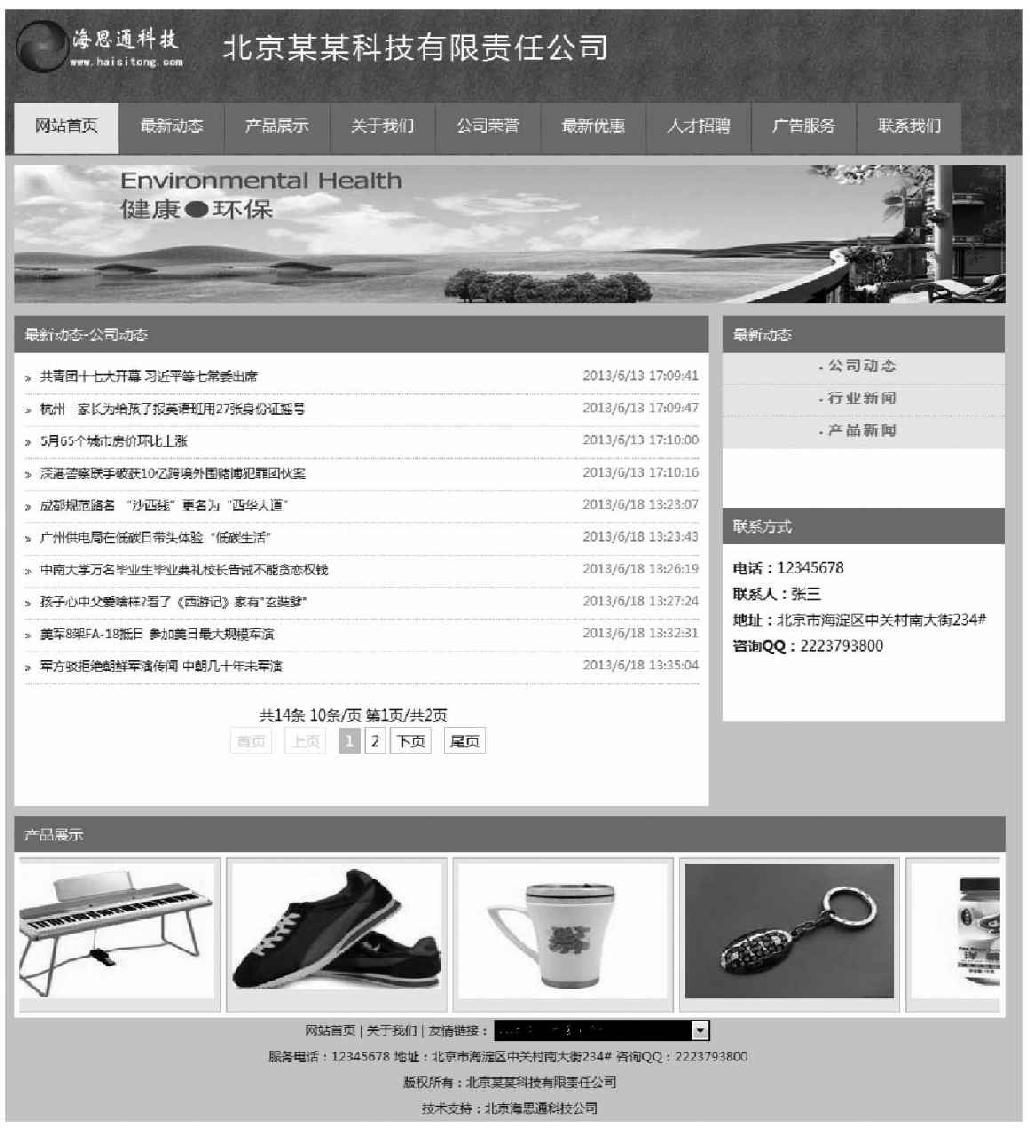
图11-44 访问最新动态预览效果
11.6.4 最新动态详细
最新动态详细信息,就在HomeController控制器中增加一个NewsDetail方法,接下来给出该方法的完整代码。
public ActionResult NewsDetail(int? id)
{
if (id==null)
{
       Response.Redirect("/");
}
//这里传递的id默认是指info表的id号
Hashtable ht = new Hashtable();
ht.Add("@id", id);
int classid = Convert.ToInt32(db.GetValue("select classid from tb_info where id=@id", ht));
ViewBag.InfoRow = db.GetRow("select id,title,content,pic,dt,author
from tb_info where id=@id", ht);
ViewBag.ClassTable = db.GetTable("select classid,classname from
tb_class where parentid=1 order by sortid asc");
ht = new Hashtable();
ht.Add("@classid",classid);
ViewBag.ClassName = db.GetValue("select classname from tb_class
where classid=@classid", ht);
return View();
}
当然,也需要给NewsDetail方法添加对应的视图文件NewsDetail.aspx,接下来给出该视图的完整代码。
<%@ Page Language="C#" Inherits="System.Web.Mvc.ViewPage<dynamic>" %>
<%@ Import Namespace="Company_MvcApplication.Models" %>
<%@ Register Src="~/Views/TopUserControl.ascx" TagPrefix="uc1"
TagName="TopUserControl" %>
<%@ Register Src="~/Views/FootUserControl.ascx" TagPrefix="uc1"
TagName="FootUserControl" %>
<!DOCTYPE html>
<html>
<head runat="server">
<meta name="viewport" content="width=device-width" />
<title><%:ViewBag.InfoRow["title"] %>-<%:ViewBag.ClassName %>-
最新动态</title>
<link href="/Content/Style.css" rel="stylesheet" />
<script src="/Scripts/jquery-1.7.2.min.js"></script>
<script>
$(document).ready(function () {
$(".classlist").hover(function () {
$(this).css("background-color", "#ffffff");
}, function () {
$(this).css("background-color", "#eeeeee");
});
});
</script>
</head>
<body>
<%
System.Data.DataTable table;
%>
<uc1:TopUserControl runat="server" ID="TopUserControl" />
<!--banner-->
<div style="width: 950px; margin-top: 10px;">
<img src="/Content/Images/banner.jpg" width="950" height=
"133" />
</div>
<!--banner-->
<div style="width: 950px; margin-top: 5px;">
<table cellpadding="0" cellspacing="0" style="width: 950px;">
<tr>
<td width="666" align="left" valign="top">
<!--left-->
<table cellpadding="0" cellspacing="0"
style="width: 666px;">
<tr>
<td height="35" style="background-
color: #2aa226; color: #fff; padding
-left: 10px;">最新动态-<%:ViewBag.
ClassName %></td>
</tr>
<tr>
<td align="left" valign="top">
<div style="min-height: 365px;
width: 646px; line-height:
25px;" class="news">
<div style="font-size: 24px;
color: #2aa226; font-weight:
normal; height: 35px; text-align:
center; line-height: 35px;">
<%:ViewBag.InfoRow
["title"] %>
</div>
<div style="border-bottom: 1px dotted #cccccc; color: #aaaaaa;
text-align: center;">
时间:<%:ViewBag.InfoRow["dt"] %>来源:<%:ViewBag.InfoRow
["author"] %>
</div>
<%
if (ViewBag.InfoRow["pic"] != "/Content/Images/nopic.jpg")
{
%>
<div style="text-align:center;margin:10px;">
<img src=" <%:ViewBag.InfoRow["pic"] %>" onload="if (this.
width>500) this.width=500;" />
</div>
<%
}
%>
<%=ViewBag.InfoRow["content"] %>
</div>
</td>
</tr>
</table>
<!--left-->
</td>
<td width="12"> </td>
<td width="270" align="left" valign="top">
<!--right-->
<table cellpadding="0" cellspacing="0" style
="width: 270px;">
<tr>
<td height="35" style="background-
color: #2aa226; color: #fff;padding
-left: 10px;">最新动态</td>
</tr>
<tr>
<td align="left" valign="top" style
="height: 150px; background-color:#
fff; font-size: 12px; font-weight: bold;">
<%
table = ViewBag.ClassTable;
for (int i = 0; i < table.Rows.Count; i++)
{
%>
<div class="classlist"
onclick="location.href="/Home/NewsList/<%:table.Rows[i]
["classid"].ToString() %>"">
<%:table.Rows[i]["classname"].ToString() %>
</div>
<%
}
%>
</td>
</tr>
</table>
<table cellpadding="0" cellspacing="0" style<br/>
="width: 270px;">
<tr>
<td height="35" style="background-
color: #2aa226; color: #fff; padding
-left: 10px;"><%=Common.GetFixRow(2)
["title"].ToString() %></td>
</tr>
<tr>
<td align="left" valign="top">
<div style="min-height: 150px;
background-color: #fff; font-size:
12px; padding: 10px;">
<%=Common.GetFixRow(2)
["content"].ToString() %>
</div>
</td>
</tr>
</table>
<!--right-->
</td>
</tr>
</table>
</div>
<uc1:FootUserControl runat="server" ID="FootUserControl" />
</body>
</html>
然后在/Home/ProdList/中单击任意标题即可查看标题的详细信息,如图11-45所示。

图11-45 最新动态详细页面预览效果
11.6.5 产品展示
产品展示功能ProdList和最新动态NewsList的实现基本一致,只是视图展示以图片风格展示,而不是以新闻条的模式展示,读者可以参照最新动态功能模仿实现。
11.6.6 产品展示详细
产品展示详细ProdDetail和最新动态详细NewsDetail实现基本一致,读者可以参照最新动态详细功能模仿实现。
11.6.7 关于我们
其实,关于我们、公司荣誉、最新优惠、人才招聘、广告服务、联系我们都是属于单个页面展示信息,获取的是tb_fix表中的标题title和详细内容content中的数据信息。
于是,可以在HomeController控制器中增加一个带参数的About方法,完整代码如下。
public ActionResult About(int? id)
{
  if (id == null)
  {
     Response.Redirect("/");
  }
  ViewBag.FixID = id;
  ViewBag.ClassTable = db.GetTable("select classid,classname from
  tb_class where parentid=1 order by sortid asc");
  return View();
}
然后,再添加对应的视图About.aspx文件,接下来给出该视图文件的完整代码。
<%@ Page Language="C#" Inherits="System.Web.Mvc.ViewPage<dynamic>" %>
<%@ Import Namespace="Company_MvcApplication.Models" %>
<%@ Register Src="~/Views/TopUserControl.ascx" TagPrefix="uc1"
TagName="TopUserControl" %>
<%@ Register Src="~/Views/FootUserControl.ascx" TagPrefix="uc1"
TagName="FootUserControl" %>
<!DOCTYPE html>
<html>
<head runat="server">
<meta name="viewport" content="width=device-width" />
<title><%:Common.GetFixRow(ViewBag.FixID)["title"] %></title>
<link href="/Content/Style.css" rel="stylesheet" />
<script src="/Scripts/jquery-1.7.2.min.js"></script>
<script>
$(document).ready(function () {
$(".classlist").hover(function () {
$(this).css("background-color", "#ffffff");
}, function () {
$(this).css("background-color", "#eeeeee");
});
});
</script>
</head>
<body>
<%
System.Data.DataTable table;
%>
<uc1:TopUserControl runat="server" ID="TopUserControl" />
<!--banner-->
<div style="width: 950px; margin-top: 10px;">
<img src="/Content/Images/banner.jpg" width="950" height
="133" />
</div>
<!--banner-->
<div style="width: 950px; margin-top: 5px;">
<table cellpadding="0" cellspacing="0" style="width: 950px;">
<tr>
<td width="666" align="left" valign="top">
<!--left-->
<table cellpadding="0" cellspacing="0" style
="width: 666px;">
<tr>
<td height="35" style="background-
color:#2aa226; color: #fff; padding
-left: 10px;"><%:Common.GetFixRow
(ViewBag.FixID)
["title"] %></td>
</tr>
<tr>
<td align="left" valign="top">
<div style="min-height: 365px; width: 646px; line-height: 25px;"class
="news">
<div style="font-size: 24px; color: #2aa226; font-weight: normal;
height: 35px; text-align: center; line-height: 35px;"><%:Common.
GetFixRow(ViewBag.FixID)["title"] %></div>
<%=Common.GetFixRow(ViewBag.FixID)["content"] %>
</div>
</td>
</tr>
</table>
<!--left-->
</td>
<td width="12"> </td>
<td width="270" align="left" valign="top">
<!--right-->
<table cellpadding="0" cellspacing="0" style
="width: 270px;">
<tr>
<td height="35" style="background-
color: #2aa226; color: #fff; padding
-left: 10px;">最新动态</td>
</tr>
<tr>
<td align="left" valign="top"
style="height: 150px; background-
color:#fff; font-size: 12px; font-
weight: bold;">
<%
table = ViewBag.ClassTable;
for (int i = 0; i < table.Rows.Count; i++)
{
%>
<div class="classlist"
onclick="location.href="/Home/NewsList/<%:table.Rows[i]["classid"].
ToString() %>"">
<%:table.Rows[i]["classname"].ToString() %></div>
<%
}
%>
</td>
</tr>
</table>
<table cellpadding="0" cellspacing="0" style
="width: 270px;">
<tr>
<td height="35" style="background-
color: #2aa226; color: #fff; padding-
left: 10px;"><%=Common.GetFixRow(2)
["title"].
ToString() %></td>
</tr>
<tr>
<td align="left" valign="top">
<div style="min-height: 150px;
background-color: #fff; font-
size: 12px; padding: 10px;">
<%=Common.GetFixRow(2)
["content"].ToString() %>
</div>
</td>
</tr>
</table>
<!--right-->
</td>
</tr>
</table>
</div>
<uc1:FootUserControl runat="server" ID="FootUserControl" />
</body>
</html>
访问企业网站导航中的关于我们,显示效果如图11-46所示。

图11-46 访问关于我们预览效果
下一篇:11.7本章小结