
13.3后台功能的实现
时间:2020/9/17 21:49:37阅读:
13.3后台功能的实现
13.3 后台功能的实现
该项目主要的功能实现集中在了后台管理中,主要包括管理员登录模块,景点展示、添加、编辑与删除模块。下面就针对这几项基本功能,对项目后台功能进行详细阐述。
13.3.1 管理用户登录
后台登录界面,主要是对登录者的信息进行验证,在这个界面中还可以进行身份的选择,若以管理员的身份登录,登录进去的页面是后台主界面;若以普通会员的身份登录,则进入的是前台首页面。
其中HTML代码如下。
<!DOCTYPE html PUBLIC "-//W3C//DTD XHTML 1.0 Transitional//EN" "http:
//www.w3.org/TR/xhtml1/DTD/xhtml1-transitional.dtd">
<html xmlns="http://www.w3.org/1999/xhtml">
<head>
<meta http-equiv="Content-Type" content="text/html; charset=utf-8">
<title>杭州旅游网</title>
<link href="../includes/base.css" rel="stylesheet" type="text/css" />
<link href="../includes/login.css" rel="stylesheet" type="text/css" />
<script language="javascript" type="text/javascript">
function refreshcode1(obj,url){
obj.src = url+"?nowtime="+Math.random();
}
</script>
</head>
<body>
<div id="login-box">
<div class="login-top"><a href="../hww/index.html" target="_blank"
title="返回网站主页">返回网站主页</a></div>
<div class="login-main">
<form name="form1" method="post" action="login1.php">
<dl>
<dt>用户名:</dt>
<dd><input type="text" name="username"/></dd>
<dt>密 码:</dt>
<dd><input type="password" class="alltxt" name="password"/></dd>
<dt>验证码:</dt>
<dd><input id="vdcode" type="text" name="validate" style="text-
transform:uppercase;"/><img id="vdimgck" align="absmiddle" alt="
看不清?点击更换" style=" cursor:pointer;" onClick="refreshcode1
(this,this. src);" src="ckcode.php?ckcode=1&a1" /> </dd>
<dt> </dt>
<dd><input type="radio" value="管理员" name="sf" checked="checked"/>
管理员 <input type="radio" value="普通会员" name="sf" />普通会员</dd>
<dt> </dt>
<dd style=" position:relative; top:5px;"><button type="submit"
name="sm1" class="login-btn" onclick="this.form.submit();">登录
</button></dd>
</dl>
</form>
</div>
<div class="login-power">Powered by<strong>hangzhou<?php echo $cfg_
version; ?></strong></a>© 2004-2011 <a href="http://www.desdev.cn"
target="_blank">trips</a> Inc.</div>
</div>
</body>
</html>
利用PHP进行身份验证的关键代码如下。
  <?php
  session_start();
  $_SESSION["user"] = $_POST["username"];
  $_SESSION["sf"]=$_POST["sf"];
  $username=$_POST["username"];
  $password=$_POST["password"];
  $logon_ip = $_SERVER["REMOTE_ADDR"];
  $sf = $_POST["sf"];
  include "includes/connect.php";

  $sql = mysql_query("select * from user where username="$username" and
  	password="$password"");
  $array=array();
  while($row = mysql_fetch_assoc($sql)){
  	$array[]=$row;
  	}
  if(mysql_affected_rows()>0){
  	//echo "登录成功";
  	if(trim(strtolower($_POST["validate"])) == strtolower($_SESSION
  		["ckcode"])){
  		if($sf=="管理员"){
            $id = $array[0]["id"];
  		$sql = mysql_query("insert into logon values(null,$id,"$username",
  			now(),"$logon_ip","$sf"); ");
  		if(mysql_affected_rows()>0){
  		//echo "成功";
  				header("Location:index.php");
  		}
  }
  else{
  header("location:../hww/index.html");
       }
  }
  	else{
  		echo "验证码输入错误";
  		header("Refresh:3; url="logon.html"");
  		}
  }
  else{
  echo "用户名或密码错误";
  header("Refresh:3; url="logon.html"");
  }
登录界面运行效果如图13-8所示。
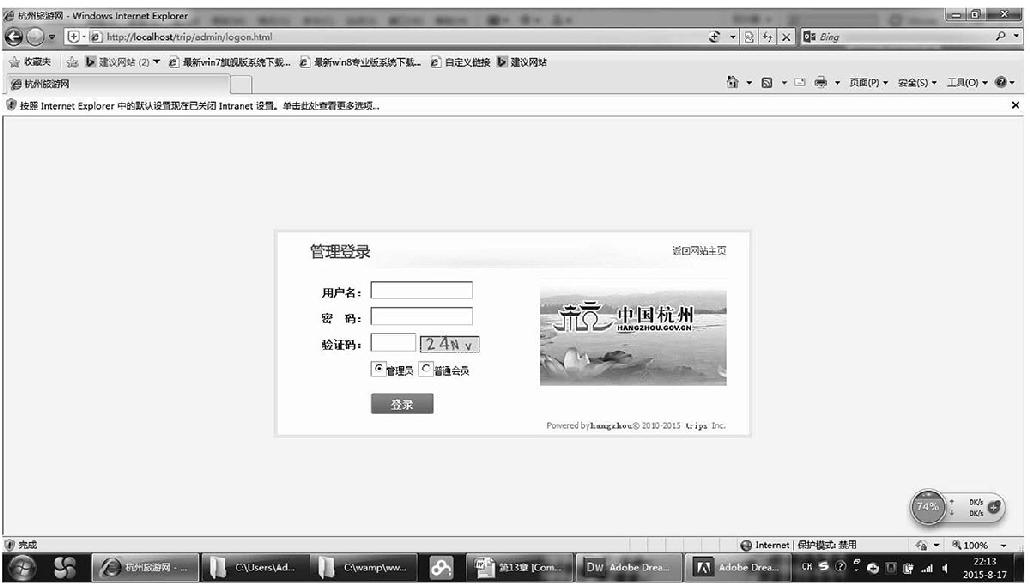
图13-8 后台登录界面
13.3.2 后台主界面
经过身份验证后进入后台主页面,后台管理系统是用frameset框架搭建的,可以显示当前的时间,表格的内容是所有管理用户的登录记录,如图13-9所示。
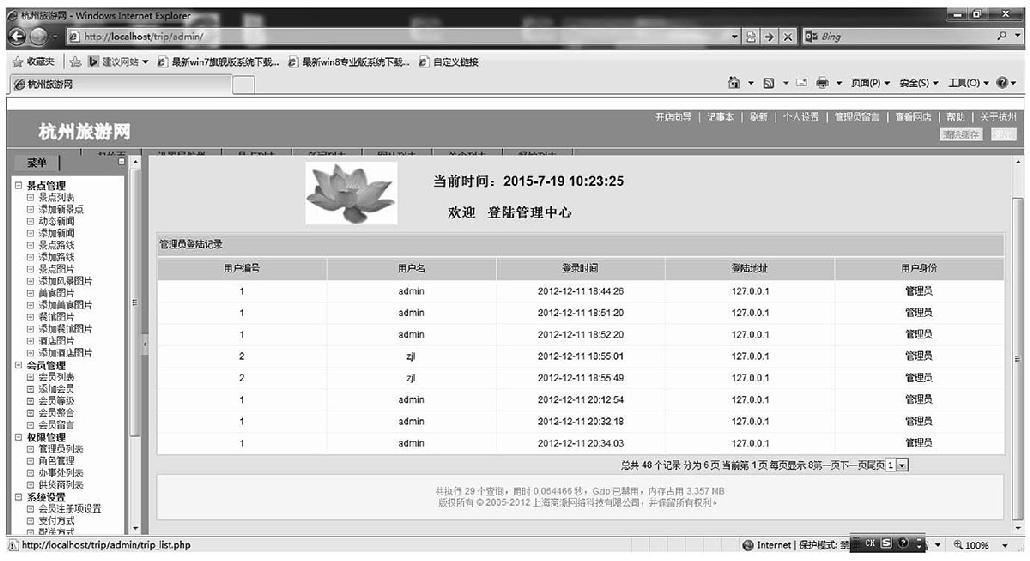
图13-9 后台首页面
13.3.3 景点列表页面
景点列表页面显示的是Scenic表所有的记录,在该页面可以对景点信息进行编辑、删除操作,如图13-10所示。
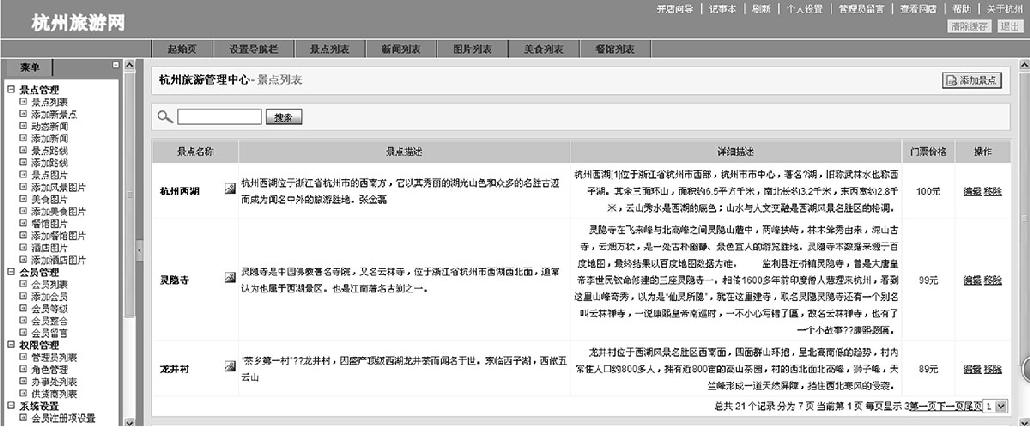
图13-10 景点列表页面
其中PHP代码如下。
  <?php
  include "includes/connect.php";

  $sql = "select * from scenic";
  $res = mysql_query($sql);
  $return = array();
  while($row = mysql_fetch_assoc($res)){
  $return[] = $row;
  }
  $page = isset($_GET["page"])?$_GET["page"]:1;
  				$pagesize=3;					//这是已知的条件
  				$offset=$pagesize*($page-1);
  				$sql1 = "select * from scenic limit $offset,$pagesize";
  				$result = mysql_query($sql1);
  				$return = array();
  				while($row = mysql_fetch_assoc($result)){
  					  $return[] = $row;

  					 }
  				 //获取符合条件的所有记录
  				 $sql2 = "select count(*) as total from scenic";
  				 $res = mysql_query($sql2);
  				 $rows = mysql_fetch_assoc($res);
  				 $total_rows=$rows["total"];
  				 $url = "trip_list.php";
  	                       //var_dump($rows);
  				 include "includes/page.class.php";
  				 $html=page::show($total_rows,$page,$pagesize,$url);
   include "trip_list_html.php";
显示界面代码如下。
   <!DOCTYPE html PUBLIC "-//W3C//DTD XHTML 1.0 Transitional//EN" "http:
   //www.w3.org/TR/xhtml1/DTD/xhtml1-transitional.dtd">
  <html xmlns="http://www.w3.org/1999/xhtml">
  <head>
  <title>杭州旅游管理中心 - 景点列表 </title>
  <meta name="robots" content="noindex, nofollow">
  <meta http-equiv="Content-Type" content="text/html; charset=utf-8" />
  <link href="../includes/general.css" rel="stylesheet" type="text/css" />
  <link href="../includes/main.css" rel="stylesheet" type="text/css" />
  </head>
  <body>

  <h1>
  <span class="action-span"><a href="trip_add.html">添加景点</a></span>
  <span class="action-span1"><a href="index.php?act=main">杭州旅游管理中心
  	</a> </span><span id="search_id" class="action-span1"> - 景点列表 </span>
  <div style="clear:both"></div>
  </h1>
  <div class="form-div">
    <form action="trip_search.php" name="searchForm" method="post">

      <img src="../includes/images/icon_search.gif" width="26" height="22"
  	 border="0" alt="SEARCH" />
       <input type="text" id="brand_name" name="scenic_name" size="15"
  	 value="<?php echo isset($scenic)?$scenic:""; ?>" />
      <input type="submit" value=" 搜索 " class="button"/>
    </form>
  </div>

  <script language="JavaScript">
      function search_brand()
      {
          listTable.filter["brand_name"] = Utils.trim(document.forms
  	    ["searchForm"].elements["brand_name"].value);
          listTable.filter["page"] = 1;

          listTable.loadList();
      }

  </script>
  <form method="post" action="" name="listForm">
  <!-- start brand list -->
  <div class="list-div" id="listDiv">

    <table cellpadding="3" cellspacing="1">

      <tr>
        <th>景点名称</th>
        <th>景点描述</th>
        <th>详细描述</th>
        <th>门票价格</th>
        <th>操作</th>
      </tr>

  	<?php if(@$return):?>
  	<?php foreach($return as $value):?>
          <tr>
        <td class="first-cell" width="100">

          <span style="float:right"><a href="<?php echo $value["image"]; ?>"
  	    target="_brank"><img src="../includes/images/picnoflag.gif" width=
  	    "16" height="16" border="0" alt="景点LOGO" /></a></span>
           <span onclick="javascript:listTable.edit(this, "edit_brand_name",
 	    1)"><?php echo $value["scenic_name"]; ?></span>
        </td>

        <td align="left" width="430"><?php echo $value["simple"]; ?></td>
        <td align="right" width="430"><span onclick="javascript:listTable.
  	  edit(this, "edit_sort_order", 1)"><?php echo $value
  	  ["description"]; ?></span></td>
        <td align="center"><?php echo $value["charge"];?></td>
        <td align="center">
          <a href="edit.php?id=<?php echo $value["id"]; ?>" title="编辑">编辑
  	    </a>
          <a onclick="return confirm("你确认要删除选定的商品品牌吗?");" title=
  	   "移除" href="trip_delete.php?id=<?php echo $value["id"]; ?>">移除</a>

        </td>

      </tr>
         <?php endforeach;?>
  	   <?php else: ?>
  	   <tr><td align="center" nowrap="true" colspan="6"><?php echo "您查找
  	   的商品不存在" ?></td></tr>
  	   <?php endif; ?>
  	   <tr>

        <td align="right" nowrap="true" colspan="6">
              <!-- $Id: page.htm 14216 2008-03-10 02:27:21Z testyang $ -->
              <div id="turn-page">
  			<?php if(isset($html)):?>
  			<?php echo $html; ?>
  			<?php else:?>
  			<?php echo "";?>
  			<?php endif;?>
  			</div>
        </td>
      </tr>

    </table>

  <!-- end brand list -->
  </div>
  </form>
  </script>
  <div id="popMsg">
    <table cellspacing="0" cellpadding="0" width="100%" bgcolor="#cfdef4"
    border="0">
    <tr>
      <td style="color: #0f2c8c" width="30" height="24"></td>
      <td style="font-weight: normal; color: #1f336b; padding-top: 4px;
  	padding-left: 4px" valign="center" width="100%"> 新订单通知</td>
      <td style="padding-top: 2px;padding-right:2px" valign="center" align=
  	"right" width="19"><span title="关闭" style="cursor: hand;cursor:
  	pointer;color:red;font-size:12px;font-weight:bold;margin-right:4px;"
  	onclick="Message.close()" >×</span><!-- <img title=关闭 style="cursor:
  	hand" onclick=closediv() hspace=3 src="msgclose.jpg"> --></td>
    </tr>
    </table>
  </div>

  </body>
  </html>
13.3.4 景点列表的编辑
该页面可以对景点列表内容进行编辑和移除,如图13-11所示。
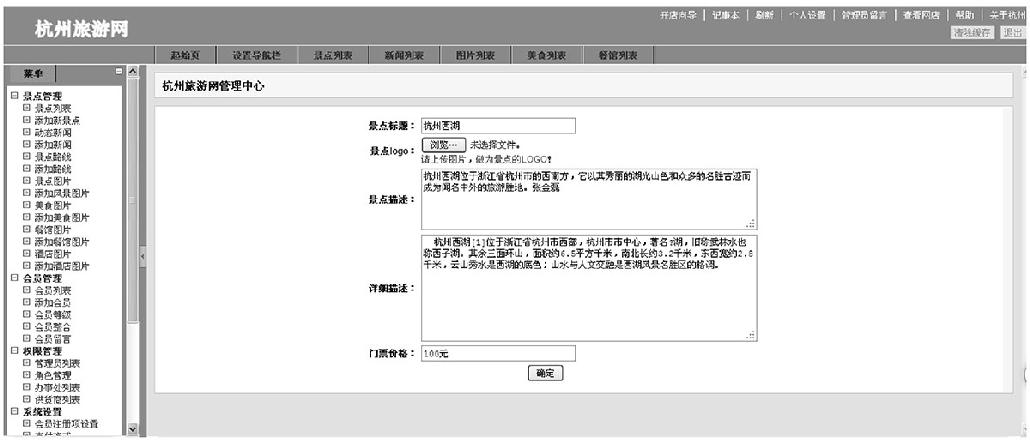
图13-11 景点编辑页面
PHP代码如下。
   <?php
  include "includes/connect.php";
  $id=$_GET["id"];
  $sql=mysql_query("select * from scenic where id = $id");
  $array = array();
  while($row = mysql_fetch_assoc($sql)){
  	$array[]=$row;

  	}
  //var_dump($array);
  include "edit_html.php";
显示代码如下。
   <!DOCTYPE html PUBLIC "-//W3C//DTD XHTML 1.0 Transitional//EN" "http:
  //www.w3.org/TR/xhtml1/DTD/xhtml1-transitional.dtd">
  <html xmlns="http://www.w3.org/1999/xhtml">
  <head>
  <meta http-equiv="Content-Type" content="text/html; charset=utf-8" />
  <title>无标题文档</title>
  <link href="../includes/general.css" rel="stylesheet" type="text/css" />
  <link href="../includes/main.css" rel="stylesheet" type="text/css" />
  </head>

  <body>
  <h1>
  <span class="action-span1"><a href="index.php?act=main">杭州旅游网管理中心
  </a> </span><span id="search_id" class="action-span1"></span>
  <div style="clear:both"></div>
  </h1>

  <div class="main-div">

  <table>
  <form method="POST" action="edit_edit.php?id=<?php echo $array[0]
  ["id"] ?>" enctype="multipart/form-data" onsubmit="return validate()">
  <tr>
  <td width="31%" align="right"><strong>景点标题:</strong></td>
  <td width="69%"><input type="text" style=" width:200px;" name="scenic_
  name" value="<?php echo $array[0]["scenic_name"];?>" /></td>
  </tr>
  <tr>
  <td align="right"><strong>景点logo:</strong></td>
  <td><input type="file" name="brand_logo" size="45" value="<?php echo
  $array[0]["image"];?>" /><br /><span class="notice-span" style="display:
  block"  id="warn_brandlogo">
          请上传图片,作为景点的LOGO!        </span></td>
  </tr>
  <tr><td align="right"><strong>景点描述:</strong></td>
  <td><textarea cols="60" rows="4" name="desc"><?php echo $array[0]
  ["simple"];?></textarea></td></tr>
  <tr><td align="right"><strong>详细描述:</strong></td>
  <td><textarea cols="60" rows="8" name="description"><?php echo $array[0]
  ["description"];?></textarea></td></tr>
  <tr><td width="31%" align="right"><strong>门票价格:</strong></td>
  <td><input type="text" style=" width:200px;" name="charge" value="<?php
  echo $array[0]["charge"];?>"/></td></tr>
  <tr><td></td><td><input type="submit" value="确定" style=" position:
  relative; left:140px;" /></td></tr>
  </form>
  </table>
  </div>
  </body>
  </html>
移除信息效果如图13-12所示。
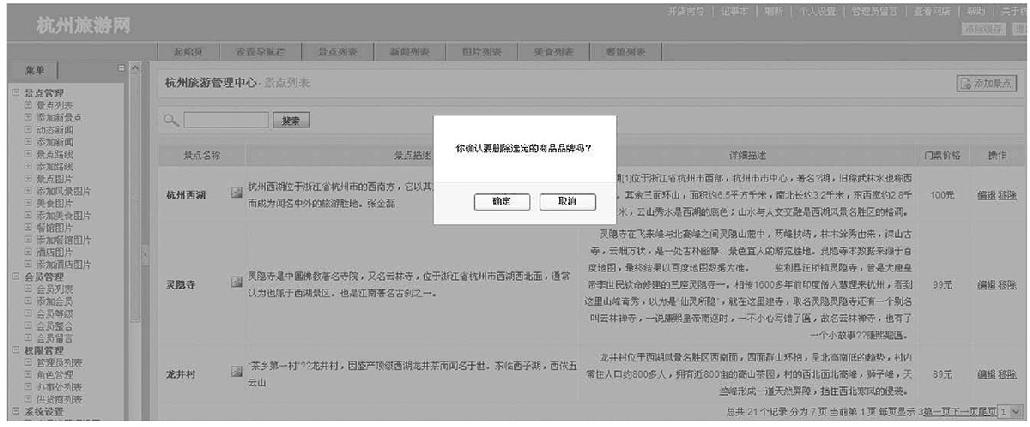
图13-12 景点信息删除
PHP代码如下。
  <?php
  include "includes/connect.php";
  $id = $_GET["id"];
  $sql = mysql_query("delete from scenic where id = $id");
  if(mysql_affected_rows()>0){
  	echo "删除成功";
  	}
13.3.5 景点信息添加模块
添加景点信息内容,如图13-13所示。
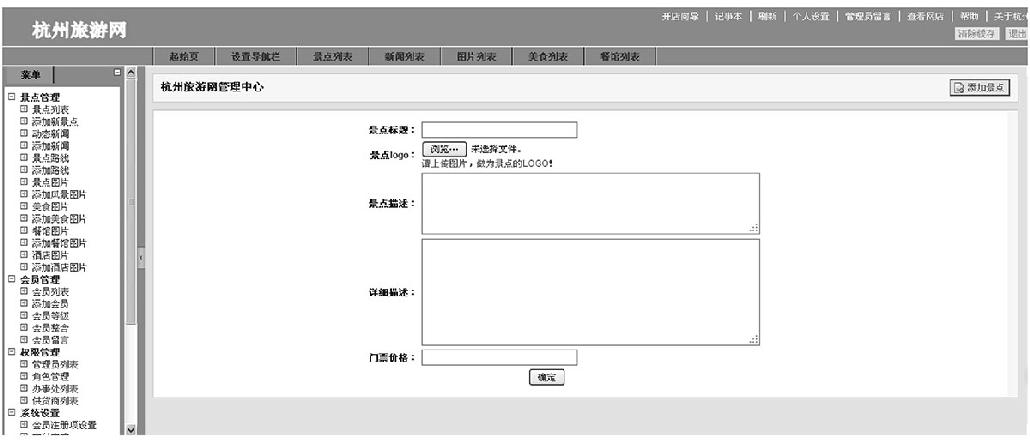
图13-13 添加景点
HTML代码如下。
  <!DOCTYPE html PUBLIC "-//W3C//DTD XHTML 1.0 Transitional//EN" "http:
  //www.w3.org/TR/xhtml1/DTD/xhtml1-transitional.dtd">
  <html xmlns="http://www.w3.org/1999/xhtml">
  <head>
  <meta http-equiv="Content-Type" content="text/html; charset=utf-8" />
  <title>无标题文档</title>
  <link href="../includes/general.css" rel="stylesheet" type="text/css" />
  <link href="../includes/main.css" rel="stylesheet" type="text/css" />
  </head>

  <body>
  <h1>
  <span class="action-span"><a href="trip_add.html">添加景点</a></span>
  <span class="action-span1"><a href="index.php?act=main">杭州旅游网管理中心
  </a> </span><span id="search_id" class="action-span1"></span>
  <div style="clear:both"></div>
  </h1>

  <div class="main-div">
  <table>
  <form method="POST" action="trip_add.php" enctype="multipart/form-data"
  onsubmit="return validate()">
  <tr>
  <td width="31%" align="right"><strong>景点标题:</strong></td>
  <td width="69%"><input type="text" style=" width:200px;" name="title"
  /></td>
  </tr>
  <tr>
  <td align="right"><strong>景点logo:</strong></td>
  <td><input type="file" name="brand_logo" size="45"/><br /><span class=
  "notice-span" style="display:block"  id="warn_brandlogo">
          请上传图片,作为景点的LOGO!        </span></td>
  </tr>
  <tr><td align="right"><strong>景点描述:</strong></td>
  <td><textarea cols="60" rows="4" name="desc"></textarea></td></tr>
  <tr><td align="right"><strong>详细描述:</strong></td>
  <td><textarea cols="60" rows="8" name="description"></textarea></td></tr>
  <tr><td width="31%" align="right"><strong>门票价格:</strong></td>
  <td><input type="text" style=" width:200px;" name="charge" /></td></tr>
  <tr><td></td><td><input type="submit" value="确定" style=" position:
  	relative; left:140px;" /></td></tr>
  </form>
  </table>

  </div>

  </body>
  </html>
PHP代码如下。
   <?php
  $brand = $_FILES["brand_logo"];
  //var_dump($brand);
  				 if($brand["error"] == 0){
  				 //判断用户提交的图片格式是否是要求的格式
  				 $allow_type = array("image/jpeg","image/png","image/gif",
  				 "image/jpg","image/pjpeg");

  				 if(in_array($brand["type"],$allow_type)){
  				 //in_array()函数判断图片格式是否正确
  				//说明用户提交的图片格式正确
  				//再判断提交的图片大小
  			      $max_size = 2000000;
  				if($brand["size"] <= $max_size){
  				//如果文件重名了会覆盖之前提交的图片,怎么解决?
  				//文件名使用用户上传的时间戳+5个随机数+文件名后缀
  				//现在可以允许用户上传到服务器了,移动到指定的目录中
  					$new_file_name = time().mt_rand(100000,99999).strrchr
  					($brand["name"],".");
  					move_uploaded_file($brand["tmp_name"],"../includes/
  					images/".$new_file_name);
  					$title = $_POST["title"];
                   $simple = $_POST["description"];
                   $desc = $_POST["desc"];
                   $charge = $_POST["charge"];
  					$brand_logo = "../includes/images/".$new_file_name;
  					include "includes/connect.php";
  					$sql = mysql_query("insert into scenic values(null,
  					"$title","$brand_logo","$simple","$desc",
  					"$charge");");
                     if(mysql_affected_rows()>0){
  	              echo "添加成功";
  					header("Refresh:3; url="http://localhost/trip/admin/
  					trip_add.html"");
  	                 }
  					}
  			  }
  		 }