
13.4前台界面
时间:2020/9/17 21:49:37阅读:
13.4前台界面
13.4 前台界面
后台管理员在完成对景点信息的增、删、改之后,将在前台页面中进行体现。下面针对前台页面进行设计。前台页面是使用MVC模板技术进行设计的。
13.4.1 前台首页
前台首页起到一个门的作用,展示杭州西湖的美景,单击ENTER进入的是杭州旅游网的主页,如图13-14所示。

图13-14 前台首页
代码如下。
   <!DOCTYPE html PUBLIC "-//W3C//DTD XHTML 1.0 Transitional//EN" "http:
  //www.w3.org/TR/xhtml1/DTD/xhtml1-transitional.dtd">
  <html xmlns="http://www.w3.org/1999/xhtml">
  <head>
  <meta http-equiv="Content-Type" content="text/html; charset=utf-8" />
  <title>上有天堂 下有苏杭</title>

  <style type="text/css">
  <!--
  html,body{
  	overflow:hidden;
  	height:100%;
  }
  .enterBodyBg{
  	background:url(images/enter_body_bg_01.jpg) repeat;

  }
  .homeCenterBg{
  	background:url(images/enter_center_bg_03.jpg) no-repeat;
  	width:999px;
  	height:643px;
  	margin:0 auto;
  	overflow:hidden;
  }
  .homeTopicBottomImg{
  	background:url(images/enter_flash_bottom_06.jpg) no-repeat;
  	width:999px;
  	height:31px;
  	clear:both;
  }
  .homeCenterLeft{
  	float:left;
  	width:247px;
  	height:630px;
  	background:url(images/enter_flash_left_03.jpg) no-repeat;
  }
  .homeTopicRight{
  	float:left;
  	background:url(images/enter_flash_right_04.jpg) no-repeat;
  	width:752px;
  	height:630px;
  	overflow:hidden;
  }
  .homeLogo{
  	margin:37px 0;
  	background:url(images/home_logo_03.png) no-repeat !important;
  	background:none;
  	_FILTER:progid:DXImageTransform.Microsoft.AlphaImageLoader(src="imag
  	es/home_logo_03.png");
  	width:214px;
  	height:73px;
  }
  .homeMenuBg{
  	background:url(images/gou_info_bg_1_0.jpg) no-repeat;
  	width:150px;
  	height:145px;
  	margin:360px 120px;
  }
  .homeMenuBg ul{
  	margin:0;
  	padding:0;
  	list-style-type:none;
  }
  .homeMenuBg ul li{
  	height:50px;
  	line-height:50px;
  	text-align:center;
  	color:#cebe95;
  	cursor:pointer;
  	font-family:Verdana, Arial, Helvetica, sans-serif;
  }
  .homeMenuBg ul li a,.homeMenuBg ul li a:visited{
  	color:#cebe95;
  	text-decoration:none;
  }
  .homeMenuBg ul li a:hover{
  	background:url(images/home_menu_over_06.jpg) repeat-y;
  	_background:url(images/home_menu_over_06.jpg) repeat-y -3px 0px;
  	+background:url(images/home_menu_over_06.jpg) repeat-y -3px 0px;
  	width:114px;
  	display:block;
  	height:50px;
  	line-height:50px;
  	text-decoration:none;
  	font-weight:bold;
  	color:white;
  }
  -->
  </style>
  </head>
  <body class="enterBodyBg" scroll="no" onLoad="maxMainHeight()">
      <style>
  A.applink:hover {border: 2px dotted #DCE6F4;padding:2px;background-color:
  #ffff00;color:green;text-decoration:none}
  A.applink       {border: 2px dotted #DCE6F4;padding:2px;color:#2F5BFF;
  background:transparent;text-decoration:none}
  A.info          {color:#2F5BFF;background:transparent;text-decoration:
  none}
  A.info:hover    {color:green;background:transparent;text-decoration:
  underline}
  </style>

  <script language="javascript" type="text/javascript">
  var xPos = 0;
  var yPos = 0;
  var step = 1;
  var delay = 17;
  var height = 0;
  var Hoffset = 0;
  var Woffset = 0;
  var yon = 0;
  var xon = 0;
  var pause = true;
  var interval;
  img1.style.top = yPos;
  function changePos(){
  width = document.body.clientWidth;
  height = document.body.clientHeight;
  Hoffset = img1.offsetHeight;
  Woffset = img1.offsetWidth;
  img1.style.left = xPos + document.body.scrollLeft;
  img1.style.top = yPos + document.body.scrollTop;
  if (yon)
  {yPos = yPos + step;}
  else
  {yPos = yPos - step;}
  if (yPos < 0)
  {yon = 1;yPos = 0;}
  if (yPos >= (height - Hoffset))
  {yon = 0;yPos = (height - Hoffset);}
  if (xon)
  {xPos = xPos + step;}
  else
  {xPos = xPos - step;}
  if (xPos < 0)
  {xon = 1;xPos = 0;}
  if (xPos >= (width - Woffset))
  {xon = 0;xPos = (width - Woffset);   }
  }
  function start(){
  img1.visibility = "visible";
  interval = setInterval("changePos()", delay);
  }
  function pause_resume(){
  if(pause)
  {
  clearInterval(interval);
  pause = false;}
  else{
  interval = setInterval("changePos()",delay);
  pause = true;
  }
  }
  start();
  img1.onmouseover = function() {
  clearInterval(interval);
  interval = null;
  }
  img1.onmouseout = function() {
  interval = setInterval("changePos()", delay);
  }
  </SCRIPT>
  <div class="homeCenterBg" id="homeContent">
  	<div style="width:999px;clear:both;">
      <div class="homeCenterLeft">
      	<div class="homeLogo"></div>
      	<div class="homeMenuBg">
         <ul>
          <li><a href="index.php"><h2>ENTER</h2></a></li>
         </ul>
          </div>
      </div>
    <div class="homeTopicRight">
    <object classid="clsid:D27CDB6E-AE6D-11cf-96B8-444553540000"  width=
     "753" height="630">
  <embed src="images/main.swf" quality="high"  type="application/x-
  shockwave-flash" width="753" height="630" wmode="transparent"></embed>
        </object>
      </div>
    </div>
  </div>
  </body>
  </html>
13.4.2 杭州旅游的主页
使用JavaScript技术,实现图片的自动切换,使用Smarty循环数组的知识分页显示有关杭州的新闻,如图13-15所示。
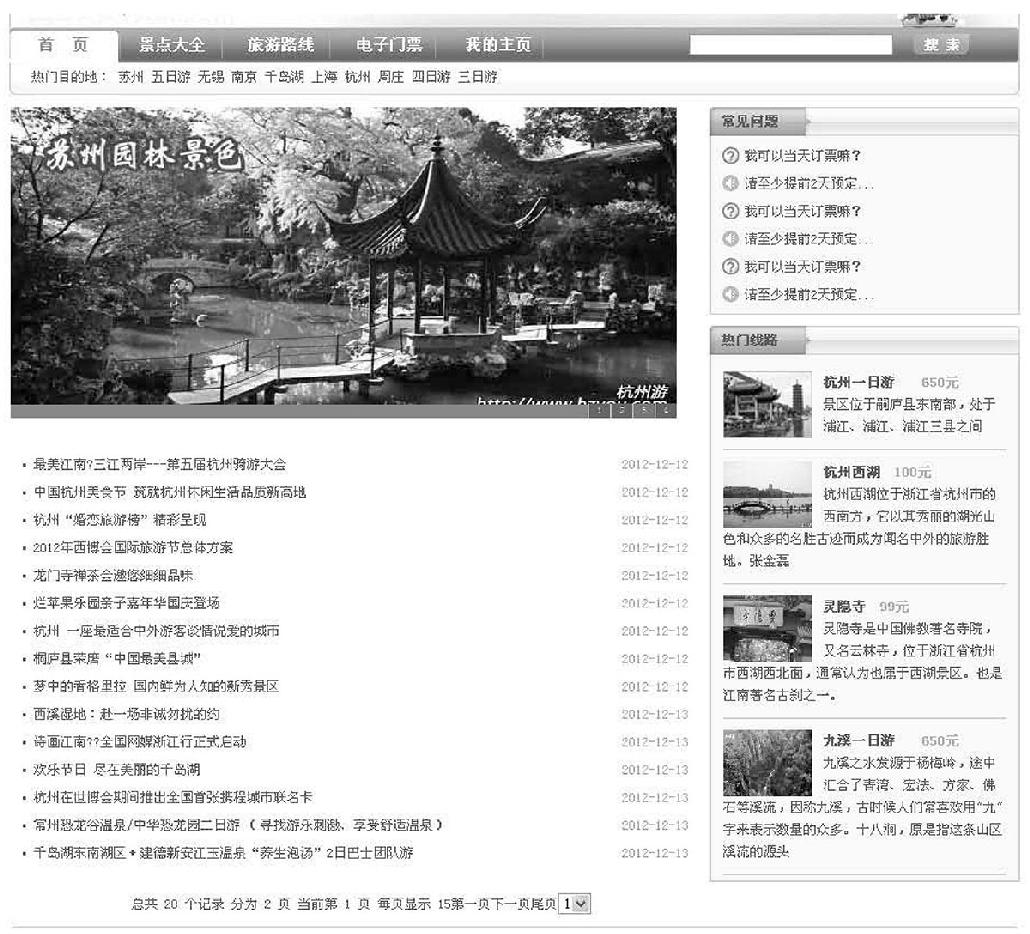
图13-15 前台主页
逻辑代码部分如下。
   <?php
  include("connect.php");
  include("libs/Smarty.class.php");
  $smarty=new Smarty;
  $smarty->reInitSmarty("demo/templates","demo/templates_c","demo/configs
  ","demo/cache");
  $page=isset($_GET["page"])?$_GET["page"]:1;
  $pagesize=15;
  $offset=$pagesize*($page-1);
  $q="select * from news limit $offset,$pagesize";
  $res=mysql_query($q);
  $rows=array();
  while($row=mysql_fetch_assoc($res)){
  	$rows[]=$row;

  	}
  $sql = "select count(*) as total from news";
  $res = mysql_query($sql);
  $a = mysql_fetch_assoc($res);
  $total_rows=$a["total"];
  $url = "index.php";
  include "page.class.php";
  $html=page::show($total_rows,$page,$pagesize,$url);
  $smarty->assign("page",$html);
  $smarty->assign("rows",$rows);
  $q="select * from scenic limit 2";
  $res=mysql_query($q);
  $route=array();
  while($row=mysql_fetch_assoc($res)){
  	$route[]=$row;
  }
  $smarty->assign("route",$route);
  $smarty->display("index.tpl");

  ?>
前台首页模板Index.tpl代码如下。
<!DOCTYPE html PUBLIC "-//W3C//DTD XHTML 1.0 Transitional//EN" "http:
//www.w3.org/TR/xhtml1/DTD/xhtml1-transitional.dtd">
<html xmlns="http://www.w3.org/1999/xhtml">
<head>
<meta http-equiv="Content-Type" content="text/html; charset=utf-8" />
<link href="demo/templates/css/style.css" rel="stylesheet" type="text/
css" />
<script language="javascript"type="text/javascript" src="images/jquery.
js"></script>
<script language="javascript" type="text/javascript" src="images/myjs.
js"></script>
<title>杭州旅游网欢迎您</title>
</head>
<body>
<div id="header">
<div class="header_1">
<div id="logo"><a href="#"><img src="images/third_6_news-3_02.jpg" alt=""
/></a></div>
<div id="header_1_right">
<a class="dcol1" href="#">设为首页</a> <a class="dcol1"
href="#">收藏本站</a> | <a class="dcol2" href="#">登
录</a> <a class="dcol2" href="#">注册</a></div>
</div>
<div id="nav">
<div class="nav1">
<ul>
<li><a class="bg2" href="#">首 页</a></li>
<li><a class="bg1" href="jingdian.php">景点大全</a></li>
<li><a class="bg1" href="route.php">旅游路线</a></li>
<li><a class="bg1" href="#">电子门票</a></li>
<li><a class="bg1" href="#">我的主页</a></li>
</ul>
</div>
<div class="nav2">
<form name="soso_form" method="post" action="">
<input name="soso" type="text" value="" />
<img class="ss" src="images/third_6_news-3_07.gif" alt="" />
</form></div>
</div>
<div class="header_2">
热门目的地: 苏州 五日游 无锡 南京 千岛湖 上海 杭州 周庄 四日游 三日游
</div>
</div>
<div id="pagebody">
<div id="left">
<div class="list_new2">
<script>
var widths=600;
var heights=280;
var counts=4;
img1=new Image ();img1.src="images/fj.jpg";
img2=new Image ();img2.src="images/fj2.jpg";
img3=new Image ();img3.src="images/fj3.jpg";
img4=new Image ();img4.src="images/fj4.jpg";
url1=new Image ();url1.src="http://www.baidu.com";
url2=new Image ();url2.src="http://www.baidu.com";
url3=new Image ();url3.src="http://www.baidu.com";
url4=new Image ();url4.src="qdh.php";
//网页地址
var nn=1;
var key=0;
function change_img()
{if(key==0){key=1;}
else if(document.all)
{document.getElementById("pic").filters[0].Apply();document.getEleme
ntById("pic").filters[0].Play(duration=2);}
eval("document.getElementById("pic").src=img"+nn+".src");
eval("document.getElementById("url").href=url"+nn+".src");
for (var i=1;i<=counts;i++){document.getElementById("xxjdjj"+i).
className="axx";}
document.getElementById("xxjdjj"+nn).className="bxx";
nn++;if(nn>counts){nn=1;}
tt=setTimeout("change_img()",2000);}
function changeimg(n){nn=n;window.clearInterval(tt);change_img();}
document.write("<style>");
document.write(".axx{padding:1px 7px;border-left:#cccccc 1px
solid;}");
document.write("a.axx:link,a.axx:visited{text-decoration:none;
color:#fff;line-height:12px;font:9px sans-serif;background-color:
#666;}");
document.write("a.axx:active,a.axx:hover{text-decoration:none;
color:#fff;line-height:12px;font:9px sans-serif;background-color:
#999;}");
document.write(".bxx{padding:1px 7px;border-left:#cccccc 1px
solid;}");
document.write("a.bxx:link,a.bxx:visited{text-decoration:none;
color:#fff;line-height:12px;font:9px sans-serif;background-color:
#D34600;}");
document.write("a.bxx:active,a.bxx:hover{text-decoration:none;
color:#fff;line-height:12px;font:9px sans-serif;background-color:
#D34600;}");
document.write("</style>");
document.write("<div style="width:"+widths+"px;height:"+
heights+"px;overflow:hidden;text-overflow:clip;">");
document.write("<div><a id="url"><img id="pic" style="border:0px;
filter:progid:dximagetransform.microsoft.wipe(gradientsize=
1.0,wipestyle=4, motion=forward)" width="+widths+" height="+
heights+" /></a></div>");
document.write("<div style="filter:alpha(style=1,opacity=10,
finishOpacity=80);background: #888888;width:100%-2px;text-align:
right;top:-12px;position:relative;margin:1px;height:12px;padding:
0px;margin:0px;border:0px;">");
for(var i=1;i<counts+1;i++){document.write("<a href="javascript:
changeimg("+i+");" id="xxjdjj"+i+"" class="axx" target="_self">"
+i+"</a>");}
document.write("</div></div>");
change_img();
</script>
</div>
</div>
<div id="right">
<div class="right1">
<div class="right1_1"><a href="#">常见问题</a></div>
<div class="right1_2">
<ul class="wenti">
<li class="r12_1"><a href="#">我可以当天订票嘛?</a></li>
<li class="r12_2"><a href="#">请至少提前2天预订...</a></li>
<li class="r12_1"><a href="#">我可以当天订票嘛?</a></li>
<li class="r12_2"><a href="#">请至少提前2天预订...</a></li>
<li class="r12_1"><a href="#">我可以当天订票嘛?</a></li>
<li class="r12_2"><a href="#">请至少提前2天预订...</a></li>
</ul>
</div>
</div>
<div class="right1">
<div class="right1_1"><a href="#">热门线路</a></div>
<div class="right1_2">
<div class="xianlu">
<img src="images/third_6_news-3_22.jpg" alt="" />
<span class="xl_s1"><a href="#">杭州一日游</a></span> <span
class="xl_s2">650元</span><br />
<a href="#">景区位于嗣庐县东南部,处于浦江、浦江、浦江三县之间</a>
</div>
<{section name=a loop=$route}>
<div class="xianlu">
<img src="<{$route[a].image}>" alt="" />
<span class="xl_s1"><a href="#"><{$route[a].scenic_name}></a></span>
<span class="xl_s2"><{$route[a].charge}></span><br />
<a href="#"><{$route[a].simple}></a>
</div>
<{/section}>
<div class="xianlu">
<img src="images/r4.gif" alt="" />
<span class="xl_s1"><a href="#">九溪一日游</a></span> <span
class="xl_s2">650元</span><br />
<a href="#">九溪之水发源于杨梅岭,途中汇合了青湾、宏法、方家、佛石等溪流,
因称九溪,古时候人们常喜欢用"九"字来表示数量的众多。十八涧,原是指这条山区溪
流的源头</a>
</div>
</div>
</div>
</div>
<div style="width:600px; margin-top:310px; margin-left:2px;">
<div class="list_new">
<ul>
<{section name=a loop=$rows}>
<li><span class="s1"><a href="<{$rows[a].url}>"><{$rows[a].title}></a>
</span><span class="s2"><{$rows[a].news_time}></span></li>
<{/section}>
</ul>
</div>
<div class="fenye">
<{$page}>
</div>
</div>
</div>
<{include file="footer.tpl"}>
分页是利用Smarty进行网站设计最常用的知识点之一,通过定义分页类实现信息的分页显示。实现分页功能的PHP分页类代码如下。
     <?php
  class page{
  		public static function show($total_rows,$page,$pagesize,$url){
              $return = "";
  			//求出总的页数
  			$total_page = ceil($total_rows/$pagesize);
  			$request_url = $url."?page=";
  			$return .= "总共  $total_rows 个记录 分为 $total_page 页 当前第
  			$page 页 每页显示 $pagesize";
  			//格式化字符串
  			$first = sprintf("<a href="%s">%s</a>",$request_url."1","第一
  			页");
              //一次求出上一页,下一页,尾页的字符串
  			if($page>1){
  	        $prev=sprintf("<a href="%s">%s</a>",$request_url.($page-1),
  			"上一页");
  				}else{
  					$prev = "";
  				}

  			if($total_page == $page){
  					$next = "";
  			}else{
                        //href="brand.php?page=2"
  			$next = sprintf("<a href="%s">%s</a>",$request_url.($page+1),"
  			下一页");
  			}
  			$last = sprintf("<a href="%s">%s</a>",$request_url.$total_page,
  			"尾页");
  			$select_page = "<select onchange="goPage(this)">";

  			for($i=1;$i<=$total_page;$i++){
  			if($i == $page){
  			$select_page .= sprintf("<option value="%s" selected>%s
  			</option>",$i,$i);
  				}else{
  				$select_page .= sprintf("<option value="%s">%s</option>",
  				$i,$i);
  				}
  			}
  			$select_page.="</select>";
      //一定要注意,定界符结束时一定要顶格写,分号结束
  			$select_script=<<<SCR
     <script type="text/javascript">
  				function goPage(obj){
  					window.location.href="$request_url"+obj.value;
  			}
  </script>
  SCR;


  			$return .= $first.$prev.$next.$last.$select_page.$select_
  			script;
  			return $return;
   	}
  }
13.4.3 景点模块设计
该模块主要显示杭州旅游的各个景点,其运行效果如图13-16所示。
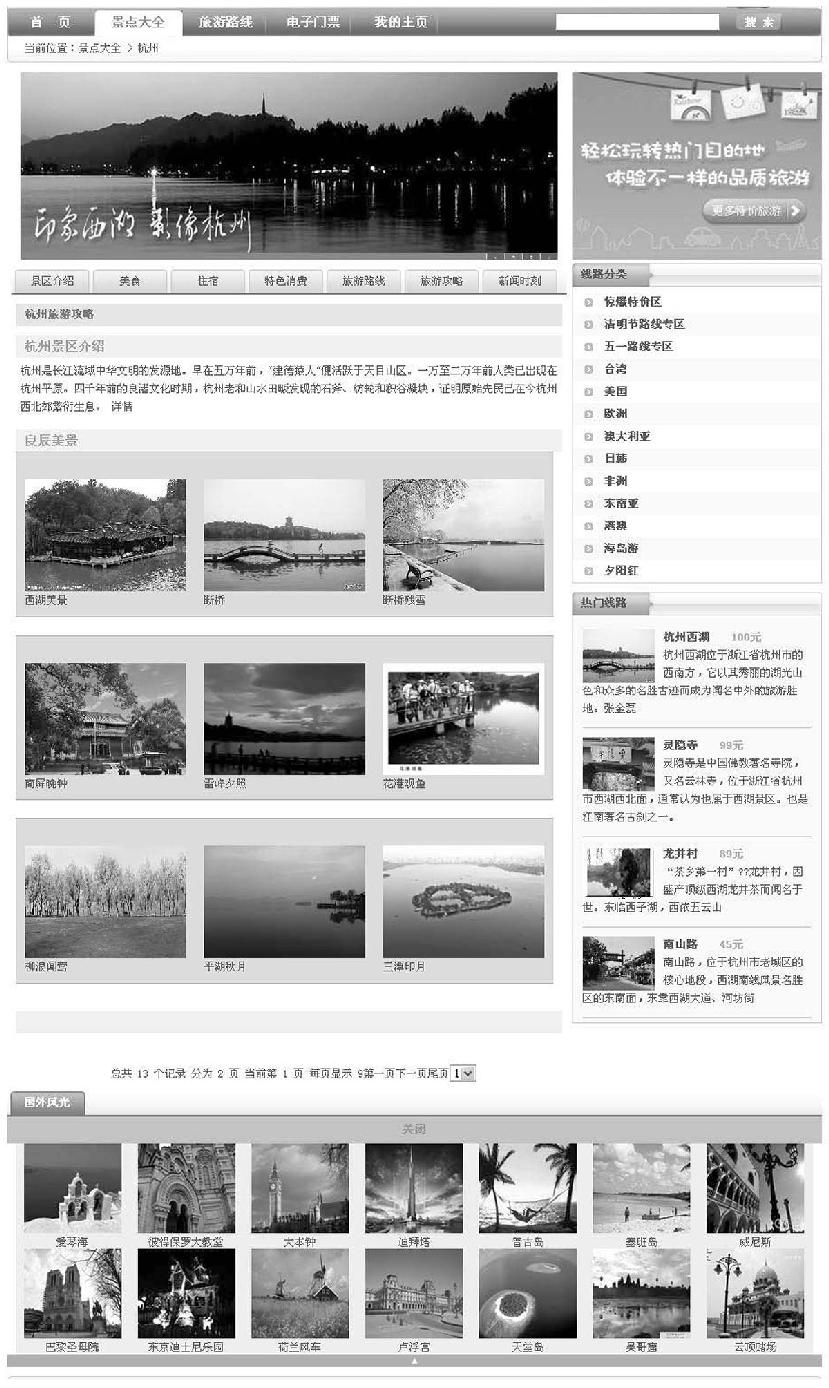
图13-16 前台景点列表
其逻辑代码PHP代码如下。
  <?php
  include ("connect.php");
  include ("libs/Smarty.class.php");
  $smarty = new Smarty();
  $smarty->template_dir="demo/templates";		//更新模板存放路径及编译路径
  $smarty->compile_dir="demo/templates_c";		//更新编译路径
  $smarty->left_delimiter="<{";			//修改界定符
  $smarty->right_delimiter="}>";
  $smarty->config_dir = "demo/configs";		//更改配置文件的路径
  $smarty->cache_dir = "demo/cache";			//更改缓存文件的路径
  $page=isset($_GET["page"])?$_GET["page"]:1;
  $pagesize=9;
  $offset=$pagesize*($page-1);
  $q="select * from view limit $offset,$pagesize";
  $res=mysql_query($q);
  $array=array();
  while($row=mysql_fetch_assoc($res)){
  	$array[]=$row;

  	}

  $sql = "select count(*) as total from view";
  				 $res = mysql_query($sql);
  				 $a = mysql_fetch_assoc($res);
  				 $total_rows=$a["total"];
  				 $url = "jingdian.php";
  	include "page.class.php";
  	 $html=page::show($total_rows,$page,$pagesize,$url);
  $smarty->assign("page",$html);

  $q="select * from scenic limit 4";
  $result=mysql_query($q);
  $array1=array();
  $i=0;
  while($row=mysql_fetch_assoc($result)){
  	$array1[$i]=$row;
  	$i++;
  	}

  $smarty->assign("array",$array);
  $smarty->assign("array1",$array1);
  $smarty->display("jingdian.tpl");
  ?>
其显示模板Jingdian.tpl代码如下。
<!DOCTYPE html PUBLIC "-//W3C//DTD XHTML 1.0 Strict//EN" "http://www.
w3.org/TR/xhtml1/DTD/xhtml1-strict.dtd">
<html xmlns="http://www.w3.org/1999/xhtml" lang="zh-CN">
<head>
<title> 杭州旅游网 </title>
<meta http-equiv="content-Type" content="text/html; charset=utf-8" />
<meta http-equiv="content-Language" content="zh-CN" />
link href="demo/templates/images/style.css" rel="stylesheet" type="text/
css" />
<script language="javascript" type="text/javascript" src="demo/
templates/images/jquery.js"></script>
<script language="javascript" type="text/javascript" src="demo/
templates/images/myjs.js"></script>
</head>
<body>
<div id="container">
<div id="header">
<div class="header_1">
<div id="logo"><a href="#"><img src="demo/templates/
images/third_6_news-3_02.jpg" alt="" /></a></div>
<div id="header_1_right">
<a class="dcol1" href="#">设为首页</a> <a
class="dcol1" href="#">收藏本站</a> |
<a class="dcol2" href="#">登录</a> <a
class="dcol2" href="#">注册</a>
</div>
</div>
<div id="nav">
<div class="nav1">
<ul>
<li><a class="bg1" href="index.php">首
页</a></li>
<li><a class="bg2" href="jingdian.php">景点大全
</a></li>
<li><a class="bg1" href="route.php">旅游路线
</a></li>
<li><a class="bg1" href="#">电子门票</a></li>
<li><a class="bg1" href="#">我的主页</a></li>
</ul>
</div>
<div class="nav2">
<form name="soso_form" method="post" action="">
<input name="soso" type="text" value="" />
<img class="ss" src="demo/templates/images/third_
6_news-3_07.gif" alt="" />
</form>
</div>
</div>
<div class="header_2">
当前位置:景点大全 > 杭州
</div>
</div>
<div id="pagebody">
<div id="left">
<div class="showly">
<div class="showly_2">
<div class="showly2_1" style="margin-top:10px;">
<ul>
<li><a class="sbg1" href="jingdian.php">景区介绍</a>
</li>
<li><a class="sbg1" href="jingdian_food.php">美食</a>
</li>
<li><a class="sbg1" href="jingdian_sleep.php">住宿</a>
</li>
<li><a class="sbg1" href="#">特色消费</a></li>
<li><a class="sbg1" href="#">旅游路线</a></li>
<li><a class="sbg1" href="#">旅游攻略</a></li>
<li><a class="sbg1" href="#">新闻时刻</a></li>
</ul>
</div>
<div class="jd_3">
<div class="jd3_1">
<div class="jd31_1">杭州旅游攻略</div>
</div>
<div class="jd3_2">
<div class="jd32_1">
<span class="jd32_1_s1">杭州景区介绍</span> </div>
<div class="jd32_2">
杭州是长江流域中华文明的发源地。早在五万年前,"建德猿人"便活跃于天目山区。一万至二万
年前人类已出现在杭州平原。四千年前的良渚文化时期,杭州老和山水田畈发现的石斧、纺轮和积
谷凝块,证明原始先民已在今杭州西北郊繁衍生息。
<a href="jingdian_jieshao.php">详情</a>
</div>
</div>
<div class="jd3_2">
<div class="jd32_1">
<span class="jd32_1_s1">良辰美景</span>
</div>
<div class="works">
<ul>
<{section name=q loop=$array}>
<li>
<img src="<{$array[q].image}>" width="180"
height="125"/><br /><{$array[q].title}></li>
<{/section}><ul>
</div>
</div>
<div class="jd3_2">
<div class="jd32_1">
<span class="jd32_1_s1"></span>
</div>
</div>
</div>
<div class="fenye">
<{$page}>
</div>
</div>
</div>
</div>
<div id="right">
<img src="demo/templates/images/tp.jpg" alt="" />
<div class="right1">
<div class="right1_1"><a href="#">热门线路</a></div>
<div class="right1_2">
<{section name=a loop=$array1}>
<div class="xianlu">
<img src="<{$array1[a].image}>" alt="" />
<span class="xl_s1"><a href="#"><{$array1[a].scenic_name}>
</a></span> <span class="xl_s2"><{$array1[a].charge}>
</span><br />
<a href="#"><{$array1[a].simple}></a>
</div>
<{/section}>
</div>
</div>
</div>
</div>
<div class="jd_4">
<ul>
<li><a class="sbg2">国外风光</a></li>
</ul>
</div>
</body>
</html>
上一篇:13.3后台功能的实现
下一篇:习题